BenQ Board Alternatives: 5 Options Compared by Feature & Price
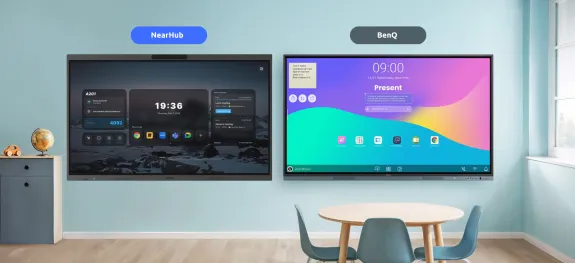
This guide compares five BenQ Board alternatives on platform, camera, cost, and room size, so you can pick the right board for how your team actually works.
BenQ board price
Android board vs Windows board
Updated: Sep 22, 2026 · 9 minutes read
Global Business, Brought Near.
No Installer, No Hassle, Just Works.
Key Takeaways
The BenQ Board Pro RP05 runs Android 15; to run Windows, it requires an OPS module with no public US pricing, while the NearHub Board S Pro and Board Max ship with Windows 11 Pro built in.
At the Windows tier, BenQ plus OPS lands at around $4,600, versus $4,299 to $4,499 for NearHub's 65-inch Windows models, so price is roughly a wash, and complexity becomes the deciding factor.
For immersive hybrid meetings, NearHub's AI Gallery View frames faces rather than a wide shot of the room; BenQ's strength is education: AI Lesson, AI Quiz, NFC sign-in, and ClassLink/Clever integration.
BenQ offers no 55-inch Pro model; rooms smaller than 65 inches push you toward NearHub, Vibe, or Newline.
The BenQ quote looked solid until separate charges for a camera and an OPS module stalled your budget approval. If those hidden costs paused your purchase, this guide is for you. Below: what actually separates a BenQ Board Pro RP05 from its five strongest alternatives — model by model, with the math shown.
Quick Take: BenQ Board Pro RP05 and Five Alternatives
Board
Platform
Built-in camera
Starting price (as of September 2026, subject to change)
Sizes
BenQ Board Pro RP05
Android 15
No (DVY32, $499)
$2,829 (65", CDW)
65-86 in
NearHub Board S
Android
Yes
from $2,599
55-86 in
NearHub Board S Pro
Windows 11 Pro built-in
Yes, 4K
from $3,299
55-86 in
NearHub Board Max
Windows 11 Pro built-in(i5)
Yes, 4K AI
from $3,499
55/65/75 in
Vibe Board S1
Android-based, app ecosystem
No ($399 add-on)
from $3,699
55/75 in
Newline Q Ultra
Android 16 EDLAQ Ultra Elite only (4K camera)
Q Ultra Elite only (4K camera)
Dealer only, not public
55-86 in
Samsung WAFX-P
Android 15(EDLA)
Yes
Not public
65-86 in
Microsoft Surface Hub 3
Windows(Teams Rooms; Zoom and Webex joinable, no Win32 apps)
Yes
from $9,499
50 / 85 in
Key takeaways:
Platform is the real divide. The RP05 is an Android appliance; a NearHub Board S Pro or Board Max is a Windows 11 Pro computer that happens to be a touchscreen. Everything else follows from that.
Price is not the deciding factor. Once sizes are aligned, the two land close at both the video-call and the Windows tier — close enough that platform and device count matter more. Full numbers in the pricing section below.
BenQ's moat is education and channel. AI Lesson, AI Quiz, NFC sign-in, ClassLink/Clever integration, and dealers who can fold camera, install, and warranty into one quote.
Small rooms have no BenQ Pro option. The RP05 starts at 65 inches, so a room seating four to six needs one of the 55-inch boards covered below.
The Platform Divide: An Android Appliance vs. a Windows PC
The missing camera on the BenQ RP05 is a minor fix — add a $499 DVY32, and you're set. The platform gap is harder to bridge: turning the RP05 into a functional Windows machine requires a separate OPS module (a UK reference lists one around £1,037 ex VAT, often without the Windows license included).
Instead of raw specs, the choice comes down to three operational differences:
1. Software depth: full desktop ecosystem vs. scaled-down mobile apps
A Windows board is a standard PC that runs your team's existing software— Excel macros, Power BI, Adobe Creative Cloud, full ERP/CRM desktop clients. Android boards run mobile apps that often lack those heavy-duty features.
2. Productivity and expansion: universal peripherals vs. limited drivers
Peripheral Freedom: Windows natively supports virtually any USB device—document cameras, PTZ cameras, professional microphones, and docks. Android board driver support is far more restrictive.
True Multitasking: Windows allows simultaneous, side-by-side execution of a whiteboard, spreadsheet, and video conference. Android boards typically cap out at basic two-app split screens.
3. Security & IT Management: Native Domain Control vs. Third-Party Overhead
A Windows board integrates directly into your existing IT infrastructure. It joins your domain and is managed via Active Directory, group policies, or Microsoft Intune just like any employee laptop. Android boards often require separate Mobile Device Management (MDM) protocols, adding deployment and maintenance overhead for IT.
we used to struggle with frequent app crashes on Android boards. Since switching to the NearHub Board Max, all our teaching software runs smoothly — classroom disruptions have dropped by over 90%." — Katie Allen, Executive Director, Algalita.
5 things a NearHub board does that a BenQ Board Pro can't
Not "better" — simply not available on the BenQ Pro path at any price.
Run your team's actual desktop software, natively. Full Windows 11 Pro, not mobile ports. If it runs on your laptops, it runs on a NearHub Board S Pro or Board Max. The RP05 runs Windows only via an OPS module.
Show remote participants' faces, not a room. AI Gallery View with Face Close-Up Stitching frames each participant individually, side by side — 4K, 130° camera, 8-mic array rated at 8-meter pickup with AI noise reduction.
Enroll in Microsoft Intune like any other endpoint: domain join, group policy, Intune — managed exactly like an employee laptop, with no separate console to learn.
Fit a room smaller than 65 inches. The NearHub Board S55, NearHub S Pro 55, and NearHub Board Max 55 exist. No BenQ Pro model does.
Stay useful after it leaves the meeting room. A retired Windows board becomes a PC, training terminal, or signage player — the Board Max has a one-tap signage mode. It's an asset, not a screen.
BenQ Board Pricing: What You'll Actually Spend
Neutral math, three tiers, current promotional prices as of September 2026, subject to change. Draw your own conclusion.
Tier
BenQ RP05 65"
NearHub 65" Board
Difference
Board only (BenQ ships no camera; NearHub's is included)
$2,829
NearHub Board S65: $3,399 (Android, 4K camera and 24-mic array included)
One size note: the NearHub Board S55 at $2,599 is a 55-inch board. It is the right answer for rooms under 65 inches — a size BenQ's Pro line does not offer — but it is not a like-for-like price comparison, so it stays out of the table.
Two honest caveats. The OPS figure is a non-US reference; get a written US quote. And BenQ dealers can bundle camera, installation, and extended warranty into one negotiated price, which can widen the video-call tier further in BenQ's favor. For a broader budgeting framework, see our smart board cost guide.
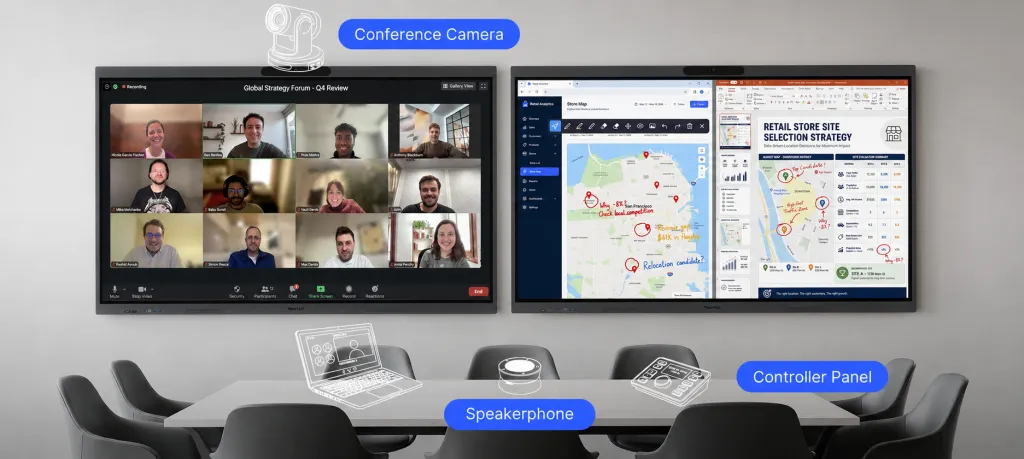
Where the tiers genuinely differ is not money but device count. "Windows video-call ready" on the BenQ path is three devices: board, OPS module, camera. That means a separately mounted and cabled camera, three firmware update streams, a fault-isolation step whenever something misbehaves, and three lines in your asset register and warranty tracker. The NearHub path is one device that ships in that state. Same outcome on paper; different operational footprint for life.
Camera and Meeting Equity: A Picture of the Room, or a Picture of the People
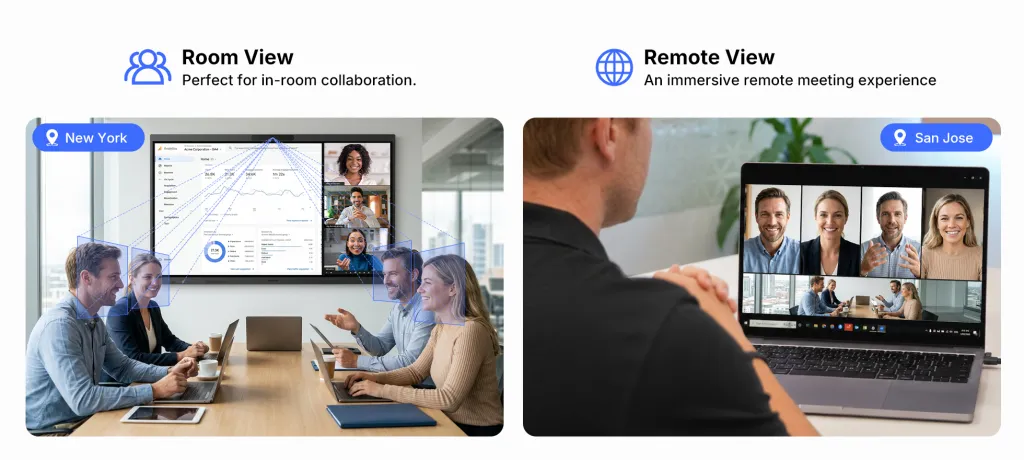
A conventional conference camera gives remote attendees a picture of the room: a wide shot of people along a table, each face a few pixels tall. They cannot see who is about to speak, who is frowning, who disagrees. They are observers, not participants.
The NearHub Board Max pairs a 4K, 130-degree ultra-wide camera with four framing modes: Panoramic, Auto-framing, Speaker Tracking, and Gallery View. Gallery View uses what NearHub calls "Face Close-Up Stitching Technology": face detection plus stitching that frames each participant individually, side by side. Remote attendees see faces, not a room. The Board Max's 8-mic array is rated for 8-meter pickup with AI noise reduction, AGC, and full duplex.
A customer running hybrid client workshops: "Our remote partners used to feel like 'observers' due to poor visibility. Since switching to the NearHub Board Max, the AI Gallery View ensures everyone is seen with equal presence — meeting fatigue has vanished, and our decision-making efficiency has been boosted by 40%." — Marcus Thorne, Managing Director, Stratos Consulting.
Fairness to BenQ: the DVY32 is a serious camera, officially described as 120-degree wide-angle with AI auto-framing and 5x digital zoom, at $499. We have not verified whether it offers a gallery-style per-person mode, so do not assume it lacks one; demo both and judge the remote-side view yourself. If meeting equity matters, see our hybrid workplace design guide.
BenQ Strengths: What the RP05 Gets Right
BenQ did not become a default shortlist brand by accident, and pretending otherwise would make this article useless to you.
Education depth. The RP05 runs Android 15 (EDLA) with a 10 TOPS NPU and a teaching AI suite: Ask AI, Lasso Search, EZMath, Circle to Artify, AI Lesson, AI Quiz. Add NFC card sign-in, AMS accounts, DMS device management, and native ClassLink and Clever integration, and you have a board purpose-built for K-12 and higher-ed fleets. ClassroomCare is something no business-focused rival ships.
Hardware credentials. 50-point Ultra Precision IR touch under 2.5 ms, an 8-mic array rated at 12-meter pickup (both manufacturer ratings; test conditions vary), a 70 W audio system with a 20 W subwoofer, 16 GB RAM, 256 GB storage. Not a cut-corner panel.
Brand and channel. Twenty-five-plus years in displays, a mature dealer and service network, large-scale education deployments, and the ability to negotiate a bundle folding camera, installation, and extended warranty into one quote — erasing the $499 camera gap outright. If procurement favors established vendors with local service, that is a legitimate, decision-grade advantage.
Decision Guide: When to Choose BenQ
You run K-12 or higher-ed classrooms and want AI Lesson, AI Quiz, Google Classroom workflows, and NFC tap-to-sign-in.
You need ClassLink or Clever identity integration natively, with SAML IdP support.
You already own BenQ projectors or displays and want one DMS console.
Procurement requires an established vendor with a deep dealer and local service network.
Your dealer offers a bundle with camera, installation, and warranty priced in, closing the camera-cost gap completely.
You want ClassroomCare air-quality and eye-care sensing in the classroom.
Decision Guide: When to Choose NearHub Board Max
The board must run your team's everyday desktop software. Full Windows 11 Pro, not mobile ports. If it runs on your laptops, it runs here.
You cannot afford a training line item. BenQ's ecosystem (EZWrite 6, AMS, DMS, NFC sign-in) is backed by BenQ Academy, onboarding guides, and teacher manuals; a product that needs an academy has a learning curve, and that is a real budget item. Your team already knows Windows, and IT already manages it with Intune, group policy, and domain accounts. The training cost here is zero. Not "easier" — nothing to learn.
Remote participants need to see faces. AI Gallery View, plus the Stratos Consulting result above.
You want one device, not three. No OPS module, no bolt-on camera, one firmware stream, one warranty line.
You manage devices with Microsoft Intune and want the board enrolled like any other endpoint.
You care about residual value. A retired Windows board becomes a PC, a training-room terminal, or a signage player (the Board Max has a one-tap signage mode). An Android board's value roughly zeroes out when app support ends. This is an asset, not a screen.
Your room is smaller than 65 inches. The NearHub Board S55, NearHub Board S Pro 55, and NearHub Board Max 55 exist; no BenQ Pro model does. See the NearHub Board S55.
Five BenQ Board Alternatives, by Use Case
If you need Windows software and meeting equity in one box: NearHub Board. The S65 ($3,399) is the like-for-like 65-inch video-call counterpart to a camera-equipped RP05; the S55 ($2,599) covers rooms under 65 inches; and the NearHub Board S Pro 65" ($4,299) and NearHub Board Max 65" ($4,499) step up to full Windows 11 Pro, Intune management, and AI Gallery View. Prices promotional as of September 2026, subject to change. Sizes run 55 to 86 inches.
If your priority is app ecosystem and a familiar canvas: Vibe Board S1. Vibe leans into its app store and cloud canvas, from $3,699 (S1 Pro $5,699), with a $399 camera add-on. Strong fit for teams standardized on its software; we compared it in Vibe Board vs. NearHub.
If you are a Google-ecosystem school district: Newline Q Ultra. Android 16 EDLA, 55 to 86 inches, built-in 4K camera on Elite models. Pricing floats by dealer and is not public, so we will not pretend to compare numbers. Capability-wise it is the closest Android rival to BenQ's education play; see our Newline board alternative.
If you want a built-in camera on a big Android panel: Samsung WAFX-P. Launched February 2026 with a built-in 48 MP camera and rated 10-meter mic pickup, in 65, 75, and 86 inches. Pricing is not public; expect dealer quotes.
If your world is Microsoft Teams end to end: Surface Hub 3. The premium, Teams-only option: from $9,499 (50"), about $22,999 (85"). Superb Teams integration, far less app freedom, a very different budget. Details in Surface Hub vs. NearHub.
Sizing, Rooms, and the 55-Inch Question
The BenQ RP05 is only available in 65, 75, and 86 inches, whereas NearHub spans a broader range from 55 to 86 inches. That missing 55-inch option matters: for spaces that call for a display under 65 inches, BenQ Pro offers no choice at all.
Panel size should be matched to the distance of the farthest viewer, not the size of the wall. For huddle spaces or rooms seating four to six people, a 55-inch display is typically ideal—oversizing adds cost without improving usability. If you are calculating dimensions for your layout, see our guide on how to choose the best interactive whiteboard size.
Buyer's Checklist: Eight Questions to Ask Before You Sign
Does it run the exact desktop applications my team uses daily, natively, or mobile versions? Verify in a live demo.
What is the written price to reach "video-call ready," camera included?
What is the written price to reach "runs Windows," OPS and license included?
How many separate devices will IT patch, warranty-track, and troubleshoot?
What do remote participants actually see? Demo from the far end of the call.
How is the board enrolled and managed: Intune and group policy, or a proprietary console we must learn?
What is this device worth in year four, and what can it be repurposed into?
Does the vendor's training ecosystem (academies, manuals, onboarding) imply a learning curve to budget for?
FAQs
Does the BenQ Board Pro RP05 have a built-in camera? No. Neither the Pro RP05 nor the Master RM05 includes one; the DVY32 is a $499 add-on. The entry Essential RE05AC does include a 50 MP camera.
Can the RP05 run Windows? Only via an OPS module. BenQ publishes no US OPS pricing; a UK reference is about £1,037 ex VAT, and an Australian listing is marked "(No Operating System)," so confirm whether the Windows license is included.
Which alternative is best for video conferencing? Boards with the camera built in: the NearHub S65 ($3,399 at 65 inches; the 55-inch S55 is $2,599, as of September 2026, subject to change) or the Samsung WAFX-P. NearHub adds AI Gallery View for per-person framing.
Which alternatives come in 55 inches? NearHub Board S55, NearHub Board S Pro 55, and NearHub Board Max 55; Newline's Q Ultra also spans 55 to 86 inches. The RP05 starts at 65.
Should I still consider BenQ? Yes, if you are an education buyer who values AI Lesson and AI Quiz, ClassLink/Clever integration, NFC sign-in, and dealer bundles folding camera, install, and warranty into one price.
The Bottom Line
The RP05 is a strong Android appliance with the best education stack here. Its two weaknesses, no built-in camera and no native Windows, are individually fixable, but the fixes differ in kind: $499 and ten minutes for the camera, an opaquely priced OPS module and a third device to manage for Windows. NearHub's case is not a lower sticker — size-aligned at 65 inches, the two sit within about $71 of each other, and at the Windows tier they are roughly level. It is that the board is already a managed Windows PC with a 4K AI camera inside, needs no training, frames people instead of rooms, and stays useful after it leaves the meeting room.
If your situation is…
Choose
K-12 or higher-ed classroom needing teaching AI, Google Classroom, NFC sign-in
BenQ
Board must run the desktop software your team already uses
NearHub
Formal video meetings where remote attendees should see faces
NearHub
Existing BenQ projectors or displays under DMS management
BenQ
Room smaller than 65 inches
NearHub
Procurement requires a mature vendor with a local service network
BenQ
Dealer can bundle camera and installation into the price