Zoom Room Solutions Compared: Video Bar vs Room Kit vs PC-Based vs All-in-One
A decision-focused comparison of the four main Zoom Room solution architectures — video bar, room kit/appliance, PC-based modular, and all-in-one interactive board — with guidance on room fit, deployment complexity, AV flexibility, and long-term maintenance.
zoom room solution
zoom meeting room solution
zoom rooms architecture
Updated: Sep 8, 2026 · 9 minutes read
Global Business, Brought Near.
No Installer, No Hassle, Just Works.
Choosing a Zoom Room solution is an architecture decision, not a hardware shopping list. Video bars minimize deployment effort, room kits maximize standardization, PC-based modular builds maximize AV flexibility, and all-in-one interactive boards minimize device count and cabling. The right choice depends on room size, platform strategy, fleet scale, and who will maintain the system.
Key Takeaways
Video bar architectures trade AV flexibility for speed: typically one or two devices and minimal cabling per room, but expansion options depend heavily on the specific product.
Room kit and appliance architectures deliver the most standardized Zoom-first experience, at the cost of tighter dependence on the certified hardware ecosystem.
PC-based modular designs are the only architecture that comfortably supports multi-camera layouts, ceiling microphones, and DSP-integrated audio in large or acoustically difficult rooms.
A Windows-based meeting board that runs Zoom is not automatically a Zoom Rooms Certified appliance — certification status varies by product and must be verified per model.
When standardizing dozens of rooms, repeatable deployment and centralized management usually matter more than maximum per-room customization.
If you are evaluating a zoom room solution for your office, the most important thing to understand is this: you are not shopping for a list of devices. You are choosing a room architecture — the underlying pattern of compute, audio, video, control, and cabling that determines how the room is deployed, used, and maintained three years from now.
That distinction matters because the market labels are slippery: a "room kit," a "video bar bundle," and an "all-in-one meeting board" can all host Zoom meetings, yet they imply completely different deployment models, IT workloads, and upgrade paths.
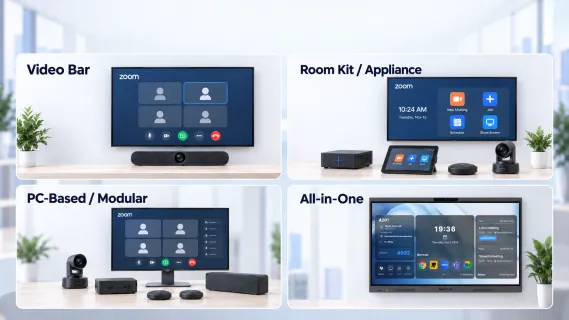
This guide compares the four dominant Zoom Room solution architectures used in US workplaces in 2026:
Video bar solutions — a display plus an integrated camera/mic/speaker bar
PC-based / modular solutions — a room computer driving separate, professional AV components
All-in-one interactive meeting boards — display, camera, microphones, speakers, touch, and compute in a single device
For each, we cover what the architecture looks like, where it fits, why organizations choose it, and the limitations that surface after deployment. If you need the installation workflow rather than the selection logic, our Zoom Room setup guide covers the deployment sequence.
What "Zoom Room Solution" Actually Means: Architecture Before Hardware
Most bad purchasing decisions in this category start with a terminology mix-up, so it is worth tightening the vocabulary first.
Zoom Rooms is Zoom's software-based room system: a licensed, centrally managed room endpoint that pairs dedicated AV hardware with a controller so anyone can walk in and join a meeting with one touch. It is different from the Zoom desktop app (part of Zoom Workplace), which is a personal client — a laptop running the Zoom app is not a Zoom Room, no matter how good its webcam is.
Zoom Rooms Certified hardware is equipment that has passed Zoom's third-party lab testing program. Certification is granted to specific models and configurations, and Zoom's certified hardware list — not marketing pages — is the authoritative source. The practical value is predictability: validated behavior, firmware tested against Zoom Rooms releases, and a clear support path.
Devices capable of running Zoom are a much broader category. Any Windows PC, Mac, or Windows-based interactive board can install Zoom software and join meetings. That does not make it a certified Zoom Room system. This gap matters most when we get to all-in-one boards.
The Zoom Room Controller is the touch interface (usually a tablet or touch console) that users actually interact with. In a standard Zoom Rooms deployment, a supported controller is effectively mandatory: one-touch calendar join, the feature that makes rooms feel effortless, depends on it.
BYOD (Bring Your Own Device) is a different usage pattern entirely: the room's camera, microphones, and speakers act as peripherals for whatever laptop walks in, and the meeting runs on the user's own device. BYOD is a useful complement to a room system — especially for guests and mixed-platform environments — but it is not a substitute for a native, always-on room endpoint. Our wireless meeting room solutions guide covers BYOD-style sharing workflows in more depth.
A zoom meeting room solution, then, is the combination of the Zoom Rooms software layer, a compute platform to run it, certified or supported AV hardware, a control surface, and a licensing and management model. The four architectures below differ mainly in how much of that stack is integrated into how few devices — and who carries the complexity that integration removes. For a deeper look at how certification and platform layers interact across vendors, see our overview of video conferencing hardware for Zoom, Teams, Meet, and Webex.
The Four Zoom Room Solution Architectures at a Glance
Before the details, here is the high-level map. Use it to orient yourself; the sections that follow explain the trade-offs behind each cell.
Video Bar
Room Kit / Appliance
PC-Based / Modular
All-in-One Interactive Board
Typical components
Display + integrated bar (camera, mics, speakers) + controller
Windows/Mac compute + separate display, camera, mics, speakers, DSP as needed
One device integrating display, camera, mics, speakers, touch, compute
Device count
Very low (2–3)
Low to medium (pre-matched)
High (5–10+)
Lowest (1, plus controller workflow as required)
Deployment complexity
Low
Low to medium
High
Low
AV flexibility
Low
Low to medium
Very high
Medium
Zoom experience
Native when run as a certified appliance
Native, most standardized
Native, highly configurable
Runs Zoom on Windows; certification varies by product
Platform flexibility
Medium (ecosystem-dependent)
Lower (Zoom-first)
High
High (full desktop OS)
Maintenance burden
Low
Low
High
Low to medium
Best-fit rooms
Small to medium
Small to large, standardized fleets
Large, complex, or acoustically difficult rooms
Small to medium collaboration rooms
None of these rows is universally "best" — each is a deliberate bet on deployment speed, standardization, AV capability, or device consolidation.
Video Bar Solution: The Simplest Hardware Footprint
First, a precision point that matters for everything below: "video bar" describes a form factor, not a single compute architecture. A video bar integrates camera, microphones, and speakers into one elongated device that sits above or below a display. Some bars connect to an external PC as USB peripherals; others contain their own compute and run Zoom Rooms directly as dedicated appliances. So a video bar is not automatically the opposite of an appliance — many appliances are bars.
In this comparison, we single out the video bar solution because, from a buyer's perspective, it represents a specific approach: the lowest device count and the fastest deployment — typically a display, one bar, a controller, and a handful of cables. That is why it is the default starting point for small and medium rooms.
Why organizations choose it:
Deployment speed. Mount the display, mount the bar, connect a few cables, enroll the controller — often well under a day per room, depending on the product and room conditions.
Standardized experience. An integrated, fixed AV chain means every room behaves the same — exactly what you want when users rotate between spaces.
Low maintenance surface. Fewer devices means fewer firmware tracks, fewer failure points, and fewer things for IT to inventory.
The limitations:
Lower AV customization. You take the camera framing, microphone pickup pattern, and speaker output the bar gives you. In rooms wider or deeper than the bar was designed for, remote participants notice.
Expansion limits. Adding a second camera, ceiling microphones, or external speakers ranges from "supported accessory" to "not possible," depending on the product. Check expansion options per model before assuming you can grow into a room.
Room-size ceiling. Most bars target huddle and mid-size rooms. Past that, coverage becomes the binding constraint, and the architecture stops being the right answer.
A zoom video bar is often the right answer for satellite offices and SMBs standardizing a handful of rooms quickly. It becomes the wrong answer when the room outgrows the bar's audio and camera envelope.
Room Kit / Appliance Solution: The Standardized Zoom-First Fleet
A room kit or appliance solution centers on purpose-built compute that exists to run Zoom Rooms — nothing else. The vendor ships a matched set — the appliance, a supported camera and audio chain (which may be a bar), a controller, and validated accessories — all tested together.
This is where the distinction from the previous section matters: appliance architecture is broader than any physical form factor. Some video bars can operate as appliances, but the category also includes dedicated compute boxes paired with separate cameras and table microphones. What defines the architecture is not the shape — it is the single-purpose, centrally managed room endpoint.
Why organizations choose it:
The most standardized Zoom experience. One-touch join, calendar integration, and consistent behavior across every room, because every room runs the same validated stack.
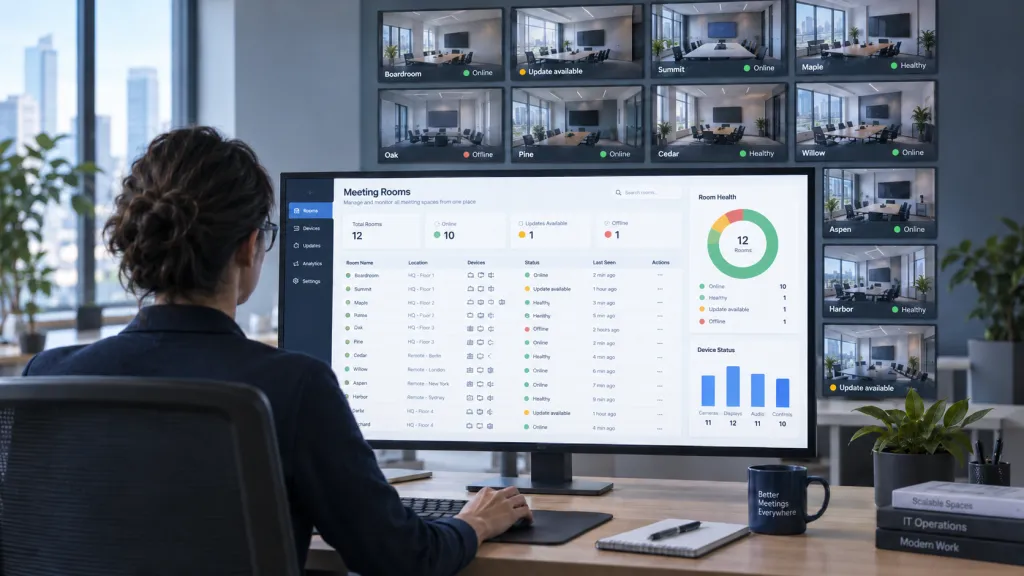
Centralized management. Appliances enroll in Zoom's admin portal for remote monitoring, updates, and alerts. For a Zoom-first IT team, this is the cleanest management model of the four.
Predictable support. When something breaks, the troubleshooting matrix is short — a significant quality-of-life difference at fleet scale.
The limitations:
Ecosystem dependence. The room is excellent at being a Zoom Room and deliberately narrower at everything else. If your platform strategy shifts, the hardware's value shifts with it — though many certified devices support joining third-party meetings, the depth of that experience varies by device.
Lower flexibility for unusual AV designs. Non-standard acoustics, divisible rooms, or multi-camera production layouts push against what appliance kits are validated to do.
Upgrade granularity. You typically replace or add validated components rather than swap arbitrary third-party parts.
For Zoom-first enterprises rolling out ten, fifty, or two hundred rooms, this is usually the lowest-risk zoom conference room solution: not the most flexible, but the most governable.
PC-Based / Modular Solution: Maximum AV Flexibility
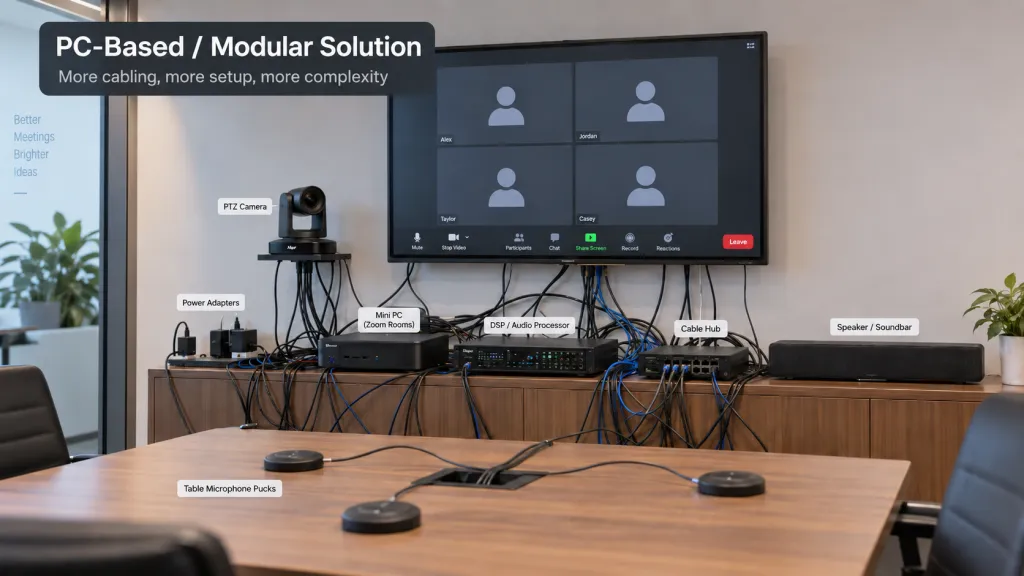
At the other end of the spectrum sits the PC-based, modular architecture: a Windows PC or dedicated room computer running Zoom Rooms software, connected to separate, individually chosen AV components — displays, cameras, table or ceiling microphones, loudspeakers, and often a DSP (digital signal processor) tying the audio together. Professional AV platforms such as Q-SYS are common in these builds, but the architecture is vendor-agnostic by nature.
Why organizations choose it:
It is the only architecture that scales to genuinely difficult rooms. Boardrooms with 20-foot tables, divisible training rooms, town-hall spaces with multiple cameras — these need zoned microphone pickup, camera switching, and tuned audio that no integrated device provides.
Component-level upgrades. Replace the camera without touching the audio chain; the system evolves piece by piece.
Integration with the rest of the room. Lighting, shades, room booking panels, and existing professional AV infrastructure can be pulled into one design.
The limitations — and they are real:
More cabling, more commissioning. These rooms are designed and tuned, not unboxed. Expect integrator involvement, acoustic tuning, and a punch list.
Higher maintenance complexity. Windows updates, driver versions, firmware across a half-dozen components, and a Zoom Rooms app in the middle — someone has to own that stack.
Higher total cost. Both upfront and ongoing. The flexibility is worth paying for in the rooms that need it and wasted in the ones that don't.
The mental model: video bars and appliances are products; a modular PC-based room is a project. Budget and staff it accordingly.
All-in-One Interactive Board: Consolidation With Touch Collaboration
The fourth architecture consolidates everything — display, camera, microphones, speakers, touch input, and computing — into a single interactive board on a wall or stand. Where the video bar minimizes device count around a display, the all-in-one board eliminates the separation entirely: the display is the room system.
Why organizations choose it:
The fewest separate room devices. One unit, one power run, one network connection. Installation is closer to hanging a large display than commissioning an AV system, and ongoing maintenance follows the same logic — one device to update, one vendor to call.
Built-in touch and collaboration. Digital whiteboarding, annotation, and on-screen interaction are native to the hardware rather than bolted on, which matters for workshops, design reviews, and hybrid brainstorms.
Cleaner room design. No table hardware, no visible cable runs, no separate camera bar — a real consideration in client-facing and design-conscious spaces.
Multi-platform flexibility. Boards running a full desktop OS can typically use Zoom alongside Microsoft Teams, Google Meet, Webex, and ordinary Windows applications, subject to the manufacturer's supported configuration.
The trade-offs:
Less modular than professional AV. You cannot re-engineer the audio chain or swap in a ceiling microphone array the way you can in a PC-based build; pickup range and camera coverage are fixed at purchase.
Less granular upgrades. Components improve when the board does, not on your schedule.
Certification varies by product — read this twice. Some boards on the market are Zoom Rooms Certified devices; others are general-purpose Windows boards that run Zoom well without certification. A Windows meeting board that can run Zoom is not automatically a Zoom Rooms Certified appliance, and the difference matters if your organization mandates certified hardware or relies on Zoom's native room-management features. Verify the specific model against Zoom's certified hardware list rather than the product page.
This is why the category contains two sub-types: if certification is a hard requirement, shop within Zoom's certified hardware list; if your priority is a multi-platform collaboration room where Zoom is one of several tools, the field opens up.
For organizations prioritizing multi-platform flexibility rather than Zoom Rooms certification, a Windows-based board such as the NearHub Board Max represents another approach. It is a Windows 11 Pro all-in-one interactive meeting board integrating display, camera, microphones, speakers, touch, and computing in one device — so a room gains video meetings, digital whiteboarding, and full access to Windows applications with a single piece of hardware. Because it runs a standard desktop OS, teams can use Zoom alongside Microsoft Teams, Google Meet, Webex, and their everyday Windows tools without re-cabling the room. It fits organizations that value platform flexibility and touch collaboration over a certification mandate.
How to Choose the Right Zoom Room Solution
Strip away the product names, and the decision reduces to six questions. Work through them in order — each one eliminates at least one architecture.
1. What is the largest room you need to cover? Huddle and small rooms point to a video bar or an all-in-one board; large, divisible, or acoustically difficult rooms point to PC-based modular.
2. How much AV customization do your rooms actually need? If the honest answer is "none, our rooms are standard boxes," paying for modular flexibility is waste. If the answer involves ceiling microphones, multiple cameras, or DSP-tuned audio, modular is the only serious option.
3. Is Zoom your primary platform — or one of several? Zoom-first organizations get the most from appliance architecture. Multi-platform organizations should weight platform flexibility higher and evaluate whether certified devices' third-party join capabilities are sufficient for their workflows, subject to the certified hardware ecosystem.
4. Who maintains the rooms? No dedicated AV staff favors low-touch architectures: bars, appliances, boards. An AV team or integrator relationship makes modular builds sustainable.
5. How will you scale? If you are standardizing dozens of rooms, prioritize repeatable deployment, centralized management, and support consistency over maximum per-room customization. A fleet of forty identical appliance rooms is operationally cheaper than forty individually optimized rooms — even if a few of those rooms would be marginally better with custom AV. Scalability is an architecture property, not a procurement afterthought.
6. What is the room for? Pure meeting space favors bars and appliances. Collaboration-heavy rooms — whiteboarding, workshops, teaching — justify the touch layer of an all-in-one board.
Multi-platform collaboration rooms, no certification mandate
All-in-one interactive board
One device, touch collaboration, any platform
Common Mistakes When Comparing Zoom Room Solutions
Treating "runs Zoom" as "is a certified Zoom Room." Any Windows device can join a Zoom meeting; certification is a specific, per-model status with management and support implications. Verify against Zoom's certified hardware list.
Equating "video bar" with "appliance." The bar is a form factor; the appliance is an architecture. Some bars are appliances, some are USB peripherals, and the difference changes your compute, management, and cabling plan.
Using BYOD as a substitute for a room system. BYOD complements a native room endpoint — it does not replace one-touch join, calendar integration, or the walk-in-and-meet experience users expect from a dedicated room.
Comparing purchase price instead of lifecycle cost. A cheaper room that needs weekly hands-on attention is not cheaper. Include commissioning, firmware management, spares, and support hours in the comparison.
FAQ
Is a Zoom Room the same as a Zoom Meetings license? No. Zoom Meetings licenses are assigned to individual users, while a Zoom Room runs on a separate per-room license that turns a physical space into a managed meeting endpoint. A standard Meetings user license should not be treated as a replacement for a Zoom Rooms license in a shared room.
Can a Zoom Room join Microsoft Teams, Google Meet, or Webex meetings? In many cases, yes. Zoom Rooms supports joining third-party meetings such as Microsoft Teams, Google Meet, and Webex, and administrators can configure interoperability settings per service, including SIP or web-client-based join. The exact experience varies by device, room configuration, and the interop services enabled, so verify the workflow on your chosen hardware before standardizing.
Do all Zoom Room solutions require a separate controller? Most traditional Zoom Rooms deployments use a supported tablet or touch console as the room controller, and one-touch calendar join depends on that controller workflow. Some integrated systems change how room control works, so confirm how each candidate device handles meeting control before removing a dedicated controller from your plan.
Can I mix different Zoom Room architectures across my offices? Yes, and many organizations do. A common pattern is video bars or all-in-one boards in small rooms, appliance kits in standardized mid-size rooms, and PC-based modular builds in large boardrooms. The trade-off is a wider support matrix, so document each room type and keep spare parts and recovery steps per architecture.
Choosing the Architecture, Not the Gadget
The four zoom room solutions in this comparison are not ranked — they are matched to different constraints. Video bars win on deployment speed, appliance kits on fleet governance, PC-based modular builds on AV capability, and all-in-one boards on consolidation and touch collaboration. Start with your largest room, your platform strategy, and your maintenance reality; the architecture that survives those three filters is almost always the right one. From there, the specific hardware shortlist practically writes itself.