Best Headsets for Zoom Meetings: Why Your 'Quiet' Room Isn't Quiet Enough
Sound professional on every Zoom call.
Zoom Meetings
Hybrid Work
Noise Cancelling Headsets
Updated: Aug 19, 2026 · 8 minutes read
Global Business, Brought Near.
No Installer, No Hassle, Just Works.
Your home office may sound quiet—but Zoom hears everything. From lawn mowers and barking dogs to keyboard clicks and household conversations, video meetings reveal background noise that traditional phone calls often hide. This guide explains why Zoom places higher demands on your headset, the features that actually improve call quality, and how to choose a headset that keeps you sounding professional in every meeting.
Key Takeaways
Zoom meetings demand more from a headset than traditional phone calls because they transmit higher-quality audio and expose background noise more easily.
AI-powered Environmental Noise Cancellation (ENC) is the most important feature for maintaining professional voice quality in unpredictable home and hybrid work environments.
Comfort matters just as much as audio quality when you're wearing a headset through hours of back-to-back meetings.
Hardware-based noise cancellation and a boom microphone provide cleaner voice pickup than relying solely on Zoom's built-in noise suppression.
Choosing a headset designed for Zoom and hybrid work can significantly improve communication, productivity, and meeting confidence.
Best Headsets for Zoom Meetings: Why Your 'Quiet' Room Isn't Quiet Enough
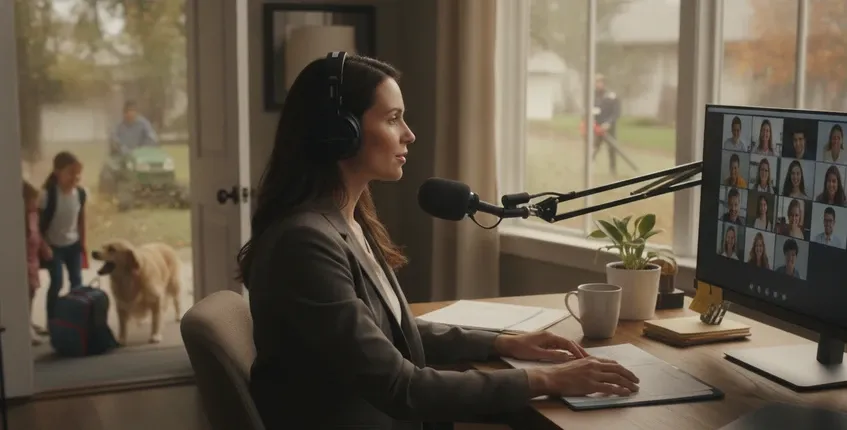
Last Tuesday, Elena closed her laptop after a four-hour marathon of back-to-back Zoom calls and realized something unsettling: she had spent the entire day subconsciously anxious about her audio. Every time her neighbor started remodeling in the apartment next door, she tensed. When her dog barked at a delivery, she froze mid-sentence. She had positioned her desk strategically, closed the door, even added weather stripping to block sound. She had done everything right. And yet, the acoustic reality of her home office remained stubbornly beyond her control.
Her situation isn't unusual. The rise of remote work created a generation of professionals who became accidental audio engineers—desperately trying to control environments that weren't designed for professional communication. We bought acoustic panels, noise machines, and premium webcams. But the most impactful upgrade turned out to be the device that controls audio at its source: the headset. Not just any headset, but one engineered for the specific acoustic challenges that Zoom calls expose in ways that traditional phone calls never did.
First Principles: Why Zoom Calls Are More Demanding Than Phone Calls
Zoom and modern video conferencing platforms are fundamentally different from traditional telephony in ways that stress headset performance harder. Understanding why helps explain why your "fine for phone calls" headset might be failing you on Zoom.
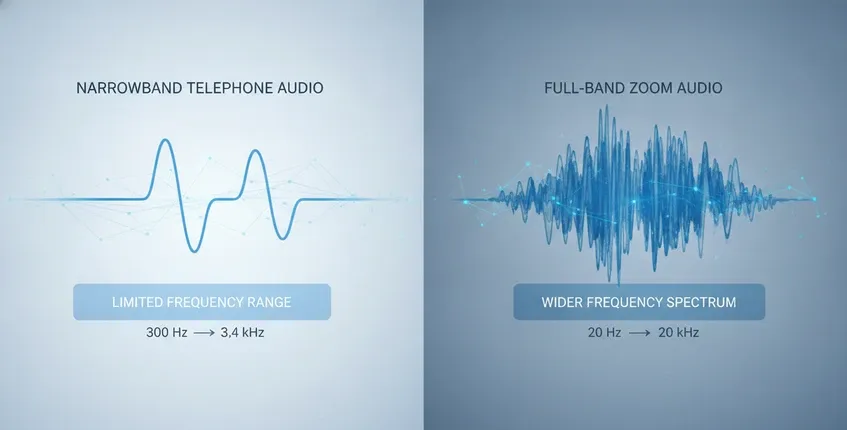
Full-band audio: Traditional phone calls use narrowband audio (300Hz–3.4kHz), which sounds "telephonic" but is forgiving of microphone quality and room acoustics. Zoom supports full-band audio (up to 20kHz), which captures more vocal nuance but also captures more room noise, echo, and acoustic imperfections. A headset that sounded acceptable on phone calls may reveal its limitations when transmitting the broader frequency range that Zoom supports.
Bidirectional high-fidelity: On a phone call, only your voice needs to be clear. On a Zoom call, you're both transmitting and receiving high-quality audio simultaneously. This bidirectional flow means that any echo, feedback, or audio processing artifacts become immediately apparent. A headset with poor echo cancellation creates the disorienting experience of hearing your own voice delayed or garbled.
Visual-audio synchronization: Video calls demand tight lip sync. If your audio arrives even slightly out of sync with your video, the conversation feels subtly wrong—like a poorly dubbed movie. This puts pressure on the headset's latency characteristics, particularly for wireless connections.
Extended duration: The average Zoom meeting is 31% longer than the average phone call. Back-to-back meetings mean your headset stays on for hours at a time. Comfort features that seem optional for quick calls become essential for marathon meeting days. The best headsets for Zoom meetings prioritize all-day comfort because they understand that meeting duration isn't within your control.
This growing reliance on video meetings is reflected in Microsoft's Work Trend Index, which found that virtual collaboration has become a core part of modern work, making clear communication and meeting quality more important than ever. As professionals spend more time in online meetings, investing in a headset designed specifically for video conferencing delivers measurable productivity benefits.
The Acoustic Reality of Home Offices
Let's walk through a typical workday from an acoustic perspective. Your morning standup happens at 9 AM—your household is quiet, your HVAC system is off, and you sound great. At 10:30, your one-on-one with your manager coincides with your neighbor starting their lawn mower. Your 1 PM client presentation overlaps with your kids arriving home from school. Your 3 PM team sync happens while someone is using a leaf blower three houses away.
Each of these scenarios introduces different noise profiles. Morning HVAC hum is low-frequency and consistent—relatively easy for basic noise suppression to handle. The lawn mower is loud and variable—challenging for simple algorithms. Children's voices are high-frequency and spectrally similar to your voice—extremely difficult to separate from your speech. The leaf blower creates broad-spectrum noise that overwhelms basic microphone systems.
A headset with AI-powered ENC handles all of these scenarios through neural network processing that has been trained on thousands of hours of similar noise samples. Rather than using simple frequency-based filtering, the AI recognizes patterns: the harmonic signature of a lawn mower engine, the spectral characteristics of children's voices, the broadband noise of power equipment. It separates your voice from these noise sources with a sophistication that traditional noise suppression can't match.
Why does your environment matter more on Zoom than on phone calls?
Because Zoom transmits more audio bandwidth than traditional phone systems. The broader frequency range captures more detail—both desirable (vocal nuance, emotional tone) and undesirable (room echo, background noise, keyboard clicks). Your acoustic environment becomes part of your professional presentation whether you want it to or not.
Zoom's noise suppression does help, but it processes audio after it leaves your computer. By the time Zoom receives your audio signal, your microphone has already captured the room noise mixed with your voice. Zoom's software attempts to separate them, but this post-processing introduces artifacts—your voice can sound compressed, robotic, or artificially gated when aggressive noise suppression kicks in. A headset with ENC removes noise before transmission, giving Zoom a clean signal that requires minimal processing and sounds natural.
Why does headset comfort affect meeting performance?
Because discomfort creates cognitive load that competes with your attention. When your headset creates pressure points, heat buildup, or ear fatigue, your brain allocates processing resources to managing that discomfort instead of focusing on the meeting content. Over a day of back-to-back calls, this accumulated distraction degrades your engagement, responsiveness, and memory of what was discussed. The communication headset isn't just an audio device—it's a tool that either supports or hinders your cognitive performance during meetings.
What to Look for in a Zoom-Optimized Headset
Environmental Noise Cancellation (ENC): This is the non-negotiable feature for Zoom calls. Look for headsets with multiple microphone elements (3–4+) and dedicated DSP processing. The noise cancellation should happen in the headset hardware, not rely on software processing after the fact. Noise cancelling communication headsets with 4-mic arrays represent the current standard for professional call environments.
Boom microphone positioning: A boom mic places the primary microphone element closer to your mouth than ear-mounted mics. This proximity improves the signal-to-noise ratio before any digital processing begins, giving the ENC system a cleaner voice signal to work with. For professional Zoom calls where clarity is paramount, a boom mic provides consistent performance that integrated mics can't match.
Instant connectivity: You shouldn't need to troubleshoot Bluetooth pairing when you're already two minutes late for a meeting. USB dongle headsets are genuinely plug-and-play: insert the dongle, turn on the headset, and you're connected. For hybrid workers who move between locations, this instant connectivity eliminates the pre-meeting tech scramble that Bluetooth pairing often creates.
Comfort for extended wear: Memory foam cushions, adjustable headband tension, and breathable materials become essential when you're wearing a headset for 4+ hours of daily meetings. The 180° rotatable ear cups on the Nearity EP320 accommodate different head shapes without creating pressure points, while the memory foam cushions conform to your ears for personalized comfort.
Where the Nearity EP320 Fits for Zoom Professionals
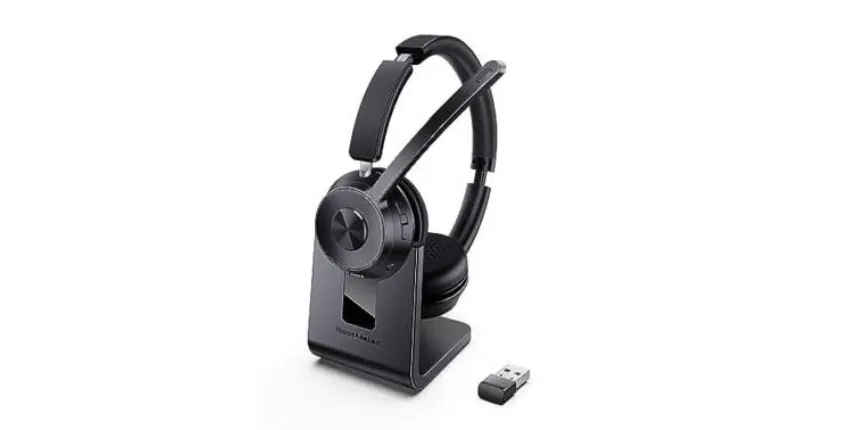
The Nearity EP320 addresses the Zoom call challenge through its 4-mic AI ENC system that processes noise at the headset level, before transmission to your computer. This gives Zoom a clean audio signal that requires minimal software noise suppression, resulting in more natural voice quality. The boom mic places the primary microphone element near your mouth for optimal voice pickup, while the HiFi5 DSP runs real-time noise suppression algorithms.
Connectivity flexibility supports various Zoom setups: USB dongle for primary PC workstations, Bluetooth 5.4 for laptop users who value wireless convenience, and USB-C cable for situations where maximum reliability is essential (client presentations, job interviews, executive briefings). The mute button on the microphone boom provides instant muting when household interruptions inevitably occur.
At $127.50, it occupies a practical position for professionals who make their living on video calls—delivering the microphone quality and noise cancellation that Zoom demands without the premium pricing of enterprise-focused alternatives.
FAQs
Does Zoom certification matter for headsets?
Zoom certification means the headset has been tested and verified by Zoom for compatibility and audio quality. Certified headsets typically work seamlessly with Zoom's advanced audio features. However, non-certified headsets with quality microphones and proper USB or Bluetooth connections work excellently with Zoom. Certification is more important in enterprise environments with standardized IT policies than for individual users. The Nearity EP320 works seamlessly with Zoom through its universal USB audio interface regardless of certification status.
How can I reduce echo on my Zoom calls?
Echo typically occurs when your microphone picks up sound from your speakers. The solution is to use a headset instead of speakers—when audio plays through your ear cups, it doesn't feed back into the microphone. If you must use speakers, enable Zoom's echo cancellation in settings and reduce your speaker volume. A proper communication headset eliminates echo at the source by separating what you hear (ear cups) from what transmits (microphone).
Should I use the mute button on my headset or in Zoom?
Both work, but the physical mute button on your headset offers significant advantages. It's always accessible without looking at your screen, it works instantly without software delay, and it typically provides tactile feedback (a click or LED indicator) confirming your mute status. Software mute controls require you to find the Zoom window, locate the mute button, and confirm the visual indicator—all while your interruption continues. For professional calls where interruptions are unacceptable, the hardware mute button is the more reliable choice.
Why do I hear myself talking during Zoom calls?
This is called sidetone or microphone monitoring—your headset plays your own voice back to you at low volume. Some headsets include this feature so you don't unconsciously raise your voice when wearing headphones. If it's distracting, you can usually adjust or disable it in your headset's settings or your computer's audio control panel. Not all headsets have this feature, and whether it's desirable depends on personal preference.
Ready to sound professional on every Zoom call? Explore the Nearity EP320 with 4-mic AI ENC, boom microphone, and instant plug-and-play connectivity for Zoom, Teams, and all major platforms.