The Top 5 Video Conferencing Platforms for Hybrid Teams in 2026
This comprehensive guide evaluates the leading video conferencing platforms based on features, pricing, and use cases, highlighting how pairing the right software with high-quality hardware like the Nearity 360 Alien optimizes hybrid collaboration.
Video Conferencing
Hybrid Work
Remote Collaboration
Updated: Aug 19, 2026 · 7 minutes read
Global Business, Brought Near.
No Installer, No Hassle, Just Works.
In today's highly distributed business landscape, seamless collaboration is no longer a luxury—it is the backbone of organizational success. Whether you are running a fast-growing small-to-medium business (SMB), managing an IT department, leading a remote school district, or coordinating a global project team, clear virtual communication is essential.
However, with dozens of tools flooding the market, finding the best video conferencing platform tailored to your specific workflows can feel overwhelming. Many teams struggle to balance rich collaboration features with budget constraints, leading them to search for high-quality free video conferencing platforms that do not compromise on security or call quality.
To help you make an informed decision, this comprehensive guide compares the top five video conferencing platforms of 2026. We will break down their core features, free-tier availability, pricing, pros, cons, and ideal use cases. Plus, we will look at how your choice of hardware can make or break your virtual meeting experience.
Key Takeaways
Platform Selection Depends on Workflow: Choosing the right tool depends heavily on your current ecosystem—Microsoft Teams and Google Meet excel at ecosystem integration, while Zoom focuses on external ease of use.
Security vs. Simplicity: Google Meet provides a lightweight, zero-install browser experience, whereas Cisco Webex offers ironclad, enterprise-grade security tailored for highly regulated industries.
Unified Communications: RingCentral Video stands out for SMBs looking to merge traditional phone systems, SMS, and video meetings under a single billing framework.
Free Tiers Have Limitations: Most major platforms offer free tiers capping group meetings between 40 to 60 minutes for up to 100 participants.
Hardware Matters: Software is only half the battle; utilizing premium plug-and-play hardware like the Nearity 360 Alien with 4K resolution and AI tracking is vital to eliminating hybrid meeting friction.
What Makes a Great Video Conferencing Platform?
Before diving into individual platforms, it helps to understand the key criteria that separate industry leaders from mediocre software:
Audio and Video Reliability: High-definition video and lag-free audio, even on lower-bandwidth networks.
Collaboration Tools: Interactive features like screen sharing, digital whiteboarding, in-meeting chat, and real-time transcription.
Integrations: The ability to connect seamlessly with your existing tech stack (e.g., Slack, Google Workspace, Microsoft 365, Salesforce).
Security and Compliance: End-to-end encryption (E2EE), secure meeting rooms, and compliance with standards like GDPR, HIPAA, and SOC 2.
User Experience: An intuitive interface that requires minimal training for both external clients and internal team members.
Deep Dive: The Top 5 Video Conferencing Platforms
Let’s analyze the market’s leading software solutions to help you identify the best video conferencing platform for your team's unique requirements.
Zoom: The Global Gold Standard
Zoom continues to dominate the corporate and educational sectors due to its unmatched ease of use and consistent connection quality. It popularized one-click join links, making it exceptionally easy for external guests to hop onto a call without downloading software.
Free Plan Details: Zoom remains one of the most popular free video conferencing platforms. Its free tier allows up to 100 participants per meeting, but imposes a strict 40-minute time limit on group sessions.
Pricing: Paid plans start at $14.99/user/month (billed annually), which removes meeting time limits and adds cloud storage.
Best For: Businesses of all sizes looking for a reliable, highly familiar interface that external clients can navigate effortlessly.
Microsoft Teams: The Ultimate Enterprise Ecosystem
For organizations heavily invested in the Microsoft 365 ecosystem, Microsoft Teams is the logical choice. More than just a video tool, Teams is a comprehensive collaboration hub that centralizes chat, file storage, task management, and video calls.
Key Features: Deep integration with Word, Excel, and PowerPoint; live captions in multiple languages; virtual stage modes (Together Mode); and advanced enterprise-grade security.
Free Plan Details: The free version of Teams offers unlimited 1-on-1 meetings for up to 30 hours, group meetings for up to 60 minutes (with up to 100 participants), and 5 GB of cloud storage.
Pricing: Standalone Teams plans start at $4.00/user/month, while full Microsoft 365 business suites start at $6.00/user/month.
Best For: SMBs and enterprises already utilizing Microsoft 365 who want a unified communication workspace.
Google Meet: Seamless, Browser-Based Simplicity
Google Meet is designed for simplicity and speed. Because it runs entirely within your web browser, users do not need to download or install desktop clients. It is deeply integrated into Google Workspace, making meeting scheduling via Google Calendar entirely frictionless.
Key Features: Noise cancellation, real-time translated captions, seamless screen sharing directly from Google Docs/Sheets/Slides, and direct integration with Jamboard.
Free Plan Details: Google Meet ranks highly among free video conferencing platforms. Anyone with a basic Gmail account can host 1-on-1 meetings for up to 24 hours, or group meetings of up to 100 people for up to 60 minutes.
Pricing: Google Workspace plans (which include advanced Meet features) start at $6.00/user/month.
Best For: Remote teams, educators, and startups who rely heavily on Google Workspace and prefer a zero-install, lightweight browser experience.
Cisco Webex: Enterprise-Grade Security and Hybrid Events
Cisco Webex is renowned for its industry-leading security frameworks and advanced hardware-software integration. It is highly favored by IT managers in highly regulated sectors like healthcare, finance, and government.
Key Features: Real-time translation in over 100 languages, AI-powered background noise removal, robust gesture recognition, and highly secure end-to-end encryption by default.
Free Plan Details: The free Webex plan supports up to 100 participants with a 40-minute meeting limit, along with basic interactive features like polling and whiteboarding.
Pricing: Paid tiers start at $14.50/user/month, offering longer meeting durations and advanced administrative controls.
Best For: Large organizations, IT managers, and security-conscious businesses that require ironclad data privacy and extensive webinar capabilities.
RingCentral is a powerhouse in the Unified Communications as a Service (UCaaS) market. RingCentral Video combines video conferencing with cloud-based business phone systems and team messaging, making it an excellent all-in-one communications tool.
Key Features: Smart meeting insights and summaries, carrier-grade reliability (99.999% uptime), seamless switching from mobile to desktop calls with one click, and extensive app integrations.
Free Plan Details: RingCentral offers a free version (RingCentral Video Pro) allowing meetings of up to 100 participants for up to 50 minutes.
Pricing: Core video plans start around $10.00 to $15.00/user/month, while full omni-channel phone plans are priced higher.
Best For: SMBs looking to replace legacy landline phone systems with a modern, cloud-based phone and video solution.
At-a-Glance Comparison Table
Platform
Free Plan Group Limit
Max Capacity (Paid)
Key Advantage
Best For
Zoom
40 mins / 100 users
1,000+
Industry-wide familiarity & ease of use
Client-facing meetings & webinars
Microsoft Teams
60 mins / 100 users
1,000+
All-in-one hub for Microsoft files & chat
Microsoft-centric organizations
Google Meet
60 mins / 100 users
1,000
Zero-install browser simplicity
Google Workspace users & startups
Cisco Webex
40 mins / 100 users
1,000
Enterprise-grade security & translation
Government, finance, & healthcare
RingCentral Video
50 mins / 100 users
200+
Native cloud-phone & video integration
SMBs looking for unified communications
Elevating the Meeting: Why Hardware Matter
Choosing the best video conferencing platform is only half the battle. If your remote team members or conference rooms are plagued by grainy, low-resolution video and muffled audio, even the most expensive software suite will fail to deliver a productive meeting.
Meet the Nearity 360 Alien: The Ultimate Hybrid Meeting Solution
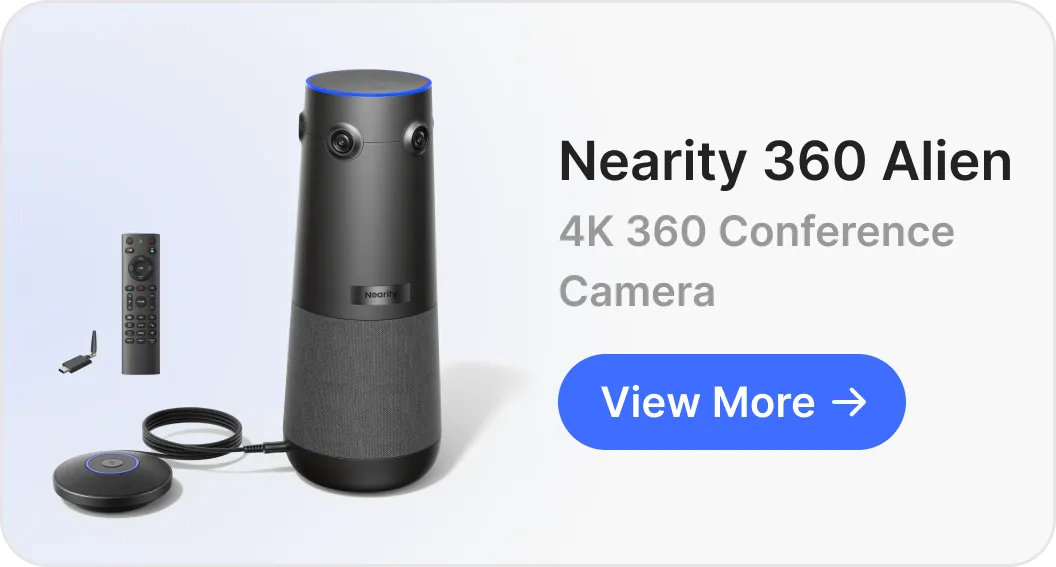
If your organization conducts meetings in medium-to-large conference rooms, a standard laptop webcam simply won't cut it. The Nearity 360 Alien is a premier True 4K conference camera designed to work flawlessly with all major video conferencing platforms, including Zoom, Microsoft Teams, and Google Meet.
What makes the Nearity 360 Alien a game-changer for hybrid teams?
True 4K Ultra-HD Resolution: Deliver crystal-clear video quality so remote participants feel like they are sitting in the exact same room.
360-Degree Panoramic View: Ensure no one is left out of the frame. The camera captures the entire room in a high-fidelity panorama.
AI Speaker Tracking: The intelligent camera automatically pivots and focuses on whoever is actively speaking, keeping the conversation engaging and dynamic.
Plug-and-Play Simplicity: Connects instantly via USB—no complex IT configurations or drivers required.
By combining a top-tier platform like Google Meet or Microsoft Teams with the physical capabilities of the Nearity 360 Alien, businesses can improve meeting audio, reduce hybrid communication friction, and enable shorter, more productive meetings.
FAQs
Is the Nearity 360 Alien fully compatible with all top video conferencing platforms?
Yes, absolutely. The Nearity 360 Alien is designed to be platform-agnostic. It works seamlessly out-of-the-box with Zoom, Microsoft Teams, Google Meet, Cisco Webex, RingCentral, and other major software clients. It acts as a standard USB audio and video peripheral, meaning any platform that can detect a camera and microphone will support it instantly.
Do I need specialized IT support or drivers to install the Nearity 360 Alien?
No. The device features a strict plug-and-play design. You do not need to download proprietary software, install system drivers, or have an IT background to set it up. Simply connect it to your meeting room computer or laptop via the provided USB cable, select "Nearity 360 Alien" as your active camera and audio source in your platform settings, and your meeting is ready to begin.
How does the AI speaker tracking work on this hardware?
The Nearity 360 Alien combines its 360-degree panoramic camera with smart directional audio algorithms. When someone in the room starts speaking, the onboard AI localizes the source of the sound and automatically pivots or splits the screen view to focus on the active speaker. This ensures remote participants can clearly see facial expressions and body language, simulating a natural face-to-face conversation.
What makes its audio capabilities better than standard laptop or built-in conference microphones?
Built-in laptop microphones are omnidirectional and capture a massive amount of ambient noise, resulting in muffled voices. The Nearity 360 Alien is equipped with a premium multi-microphone array powered by deep-learning AI noise cancellation. It actively suppresses background disturbances—such as air conditioning hums, paper rustling, and keyboard typing—while boosting human vocal frequencies to deliver crystal-clear, full-duplex communication.
Which Platform is Best for Your Organization?
Ultimately, your choice depends on your daily operational workflows:
Choose Zoom if you host frequent meetings with external clients, partners, or vendors who need a fast, hassle-free way to connect.
Choose Microsoft Teams if your business already relies on Outlook, Word, Excel, and OneDrive for its daily operations.
Choose Google Meet if you want a straightforward, budget-friendly option that operates beautifully inside a web browser without desktop installations.
Choose Cisco Webex if you work in a highly regulated industry where absolute security, data compliance, and end-to-end encryption are non-negotiable.
Choose RingCentral if you are looking to combine virtual meetings, team SMS messaging, and a business phone system under one billing umbrella.
Regardless of the software platform you choose, pairing it with high-quality AV equipment like the Nearity 360 Alien ensures your team always presents a polished, professional image to clients and colleagues alike