Specialized Industry Displays: Command Centers, Studios & Venues
How to choose displays for command centers, design studios, churches, and event venues — where duty cycle, ambient light, and operator skill decide before features do.
command center video wall
church presentation screen
design studio display
Updated: Aug 19, 2026 · 8 minutes read
Global Business, Brought Near.
No Installer, No Hassle, Just Works.
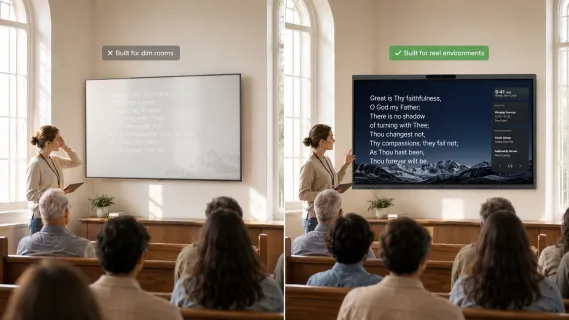
Easter Sunday, 9:15 a.m. A church's media volunteer — a retired accountant who runs the slides because nobody else volunteered — queues up the first hymn on the sanctuary's brand-new screen. The congregation was generous; the screen was expensive. And at 9:15, when the sun hits the east windows, the lyrics simply vanish. Not dim — gone, washed to a pale glow by ambient light the showroom never had. He tries the brightness remote. Nothing left to give. Three hundred people hum through a verse they can't read, and by the second service the board is already discussing "what went wrong with the screen." Nothing went wrong with the screen. It was a dim-room product bought for a bright-room job.
That story has a twin in every specialized industry: the command center whose consumer panels faded after eighteen months of 24/7 dashboards, the architecture firm whose "4K" TV made fine blueprint text illegible from six feet away. In specialized rooms, the environment decides before the features do — and this guide is organized around the four environmental forces that actually eliminate options: duty cycle, light, operator skill, and content type.
The First Principle: Environment Eliminates Options
In a normal office, you shortlist displays and then check whether they fit the room. In specialized rooms, the logic runs in reverse: the room's physics disqualifies most of the market before you've compared a single feature.
Work through the four forces in order, because each one is a hard gate:
Duty cycle. How many hours per day will this panel be lit? Consumer displays are designed around a few hours of daily use; commercial panels are rated for 16/7 or 24/7 operation. A command center running dashboards around the clock will physically age a consumer panel years early — dimming, image retention, failure. This is not a defect; it's a product used outside its design envelope.
Light. Ambient light is a specification your room already wrote. Sunlit atriums, stage-lit sanctuaries, and windowed studios demand brightness headroom and anti-glare surfaces that dim-room products simply don't have. The test is free: evaluate at the brightest hour, not in a showroom.
Operator. Who drives the screen on an ordinary day — an AV professional, or a volunteer, a receptionist, a shift supervisor with eleven other duties? The more specialized the venue, the less likely a professional operator exists, and the more the interface must carry the load.
Content. Watching or working? A wall people watch (feeds, dashboards, lyrics) has different requirements than a surface people work on (markup, annotation, design review). This single distinction reorganizes every budget in this guide.
Run your room through the four gates and you'll find the "best display" question has usually answered itself. What remains is choosing well within the survivors — which is what the sector sections below are for.
Command Centers & Control Rooms
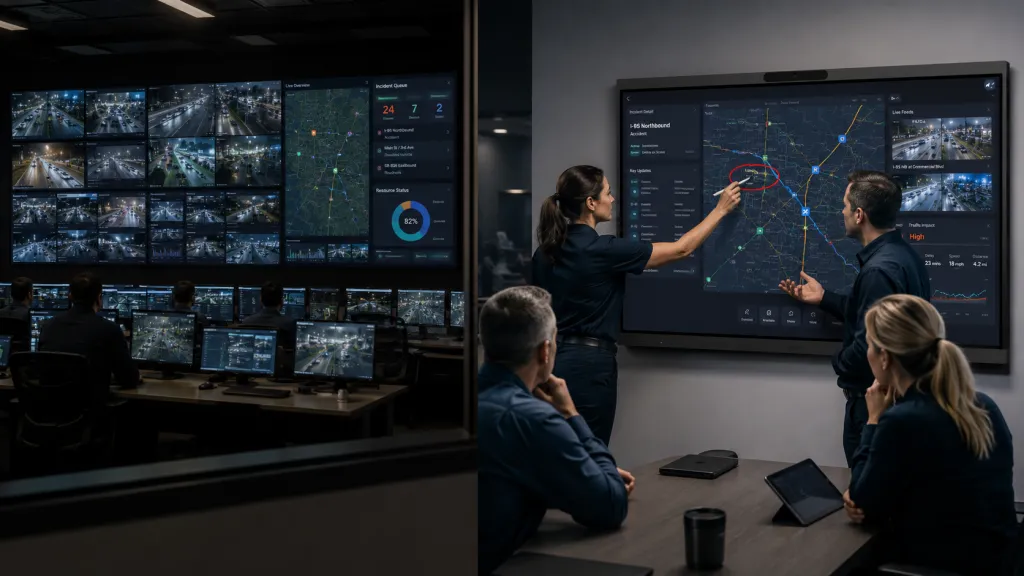
A command center video wall is the shared nervous system of an operations room: security feeds, network dashboards, maps, incident queues, all visible to everyone at once. The design question is not "how big a screen" but how many eyes, watching how many sources, for how long.
The central trade-off: tiled video wall vs. one large interactive display.
Dimension
Tiled video wall (LCD/LED)
Single large interactive display
Simultaneous sources
Dozens of feeds, dedicated controller
A few sources, switched or split
Operator count
5–50+ observers
2–12 collaborators
Interaction
Watch-only (typically)
Touch, annotate, drive content
Duty cycle
24/7-rated panels available
Commercial-rated panels; verify hours
Failure profile
One tile fails, wall survives
Single point of failure
Cost shape
High upfront, scales by tile
Far lower, all-in-one
The forgotten dimension
Controller/software complexity
Redundancy: what's the backup when it's down?
The decision logic: if your room has many simultaneous observers and many simultaneous feeds, a tiled wall earns its complexity. If your situation is a small operations team — a campus security office, a logistics control desk, an IT war room — that needs to see a handful of dashboards and occasionally get hands-on with the content, one large interactive display covers the mission at a fraction of the cost and complexity. Buyers routinely over-build here: a 2×2 video wall with a controller is an integration project; an 86" interactive board is an afternoon.
Whichever direction you go, apply three control-room rules: buy panels rated for your actual duty cycle (24/7 if the room never sleeps); plan sightlines so the farthest operator reads the smallest critical text without leaning; and answer the redundancy question out loud — "when this display fails during an incident, what do we look at instead?"
For briefing-adjacent government environments — EOCs, command posts, inter-agency coordination rooms — the requirements overlap heavily with the compliance-bound rooms in our guide to meeting room technology for healthcare, government, and law; read both if your room does double duty.
Design Studios, Architecture & Construction
Creative and technical studios are the purest case of content type = working, not watching. An architectural review screen earns its place the moment a team stops printing plans.
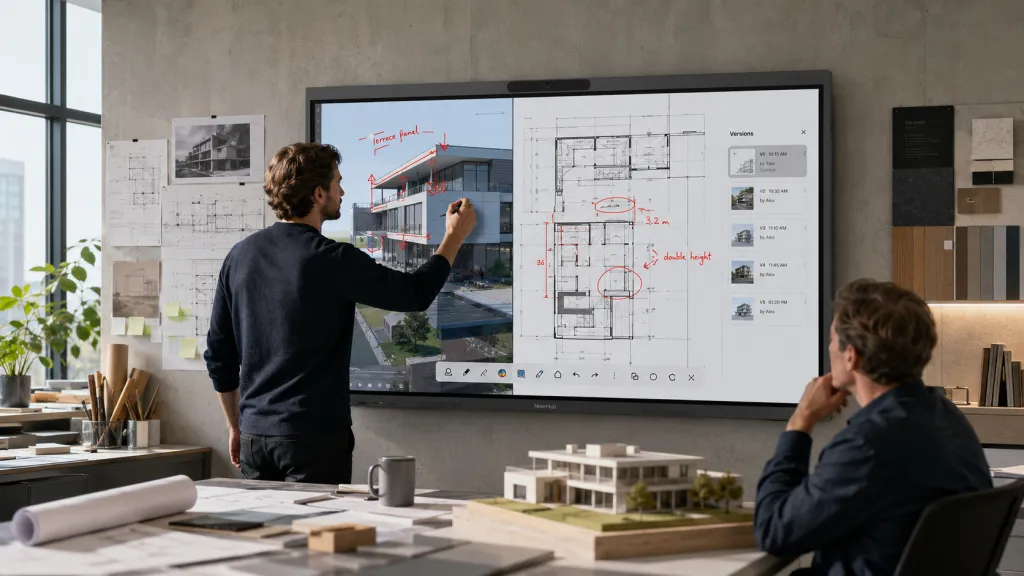
Consider the workflow these rooms actually run: a design team opens a full set of drawings, zooms into a detail, marks a conflict between systems, annotates a client render live in the meeting, and saves the marked-up set back to the project file. The old loop — print, mark up, scan, redistribute — didn't just waste paper; it created version chaos, where the marked set in the job trailer and the set in the office silently diverged, and someone ordered materials off the wrong one. A misread dimension isn't an inconvenience in construction; it's a change order.
Three requirements follow from that workflow:
Legibility of fine detail at working distance. Blueprints and renders are dense. 4K at a size where fine text survives from six feet away is the baseline, not the upgrade.
Precise, low-latency touch. Markup that lags or drifts breaks the pen-on-paper trust the whole workflow depends on. Test ink on the actual drawings you use, not on a demo whiteboard.
The board runs your real software. This is the hidden decider. A construction planning display that runs a full desktop OS opens your CAD viewers, markup tools, and project platforms directly — the same files, the same licenses, no export-to-some-app ritual. A board that only runs its own whiteboard app turns every review into a translation step. On Windows 11 Pro, the NearHub Board Max runs desktop tools like Revit and AutoCAD alongside native Zoom and Teams — which is why firms like Kindred Construction have rebuilt their planning reviews around it.
The same logic serves media companies and advertising agencies: client-facing creative review where the work is annotated live, on the wall, in the room, at full fidelity. An advertising agency presentation screen is judged by whether the client believes what they see — color and clarity are part of the pitch.
Churches & Event Venues
Houses of worship and venues combine the two harshest forces in this guide: brutal ambient light and non-professional operators. That combination eliminates most of the consumer market instantly.
Brightness and anti-glare are the entire ballgame for a church presentation screen. Sanctuaries have windows, stage lighting, and sightlines measured in tens of meters. Lyrics and sermon points must survive the 9:15 sun, not just the evening service. Evaluate on-site, at the brightest service, with real content — and size generously, because the back row of a sanctuary is farther than the back row of any classroom.
Design for the volunteer, not the enthusiast. The operator is a rotating cast of generous amateurs. The home screen should offer exactly the few actions the service needs — slides, video, camera feed, maybe a visitor's laptop — and nothing that requires a manual. This is where browser-based casting quietly shines: a guest musician or visiting speaker shares from their own device with a code, no installs, no adapters, no "who has the dongle." NearHub's church video configuration page maps camera and display setups for sanctuaries specifically.
Event venues and hospitality add one more force: turnover. A conference venue may host a corporate keynote at noon and a wedding slideshow at six. Inputs must be obvious, switching instant, and the screen must survive strangers. Hotels and event spaces configuring hybrid-capable rooms can start from the hotel and conference center solutions page.
A realistic scenario for the stakes: a venue books a corporate client whose keynote video won't play because the last event left the input system in a state nobody understands. The client's event coordinator doesn't blame the previous booking — they blame the venue, in the review, by name. In venue AV, reliability is the product being sold.
Call Centers, Media, Real Estate & Agencies
Four more environments, compactly, because the four forces resolve quickly for each:
Call centers use displays in two distinct ways — wallboards (queue stats, KPIs, always-on, watch-only) and team huddle screens (coaching, reviewing calls, working). The wallboard is a duty-cycle purchase: commercial-rated panels, high brightness for a lit floor, no interaction needed. The huddle screen is a small-room interactive purchase. Budget them separately; they're different products.
Media production rooms live on color and confidence: content review where "that's not the grade we approved" is a real failure. Prioritize panel quality and calibration discipline over smart features — the display is a reference surface first. One practical habit separates studios that trust their screens from those that don't: a standing weekly check where the same reference clip runs on the review display and a known-good monitor side by side. Drift is gradual, and nobody notices it until a client does.
Trade-show and event booths flip the usual logic: the screen travels. Here the deciding forces are setup time, transport survival, and stranger interaction — a booth display that takes two people and a manual to wake up costs you the first hour of every show. Favor all-in-one units that boot to a known state, and rehearse the full power-on-to-content sequence before the crate leaves the office.
Real estate offices need a real estate presentation screen that flatters listings and survives walk-in clients: bright, simple to cast to from any agent's phone or laptop, and impressive without a dedicated operator. The agent who can get a property video from their phone to the wall in ten seconds closes the room's professionalism argument without saying a word. The same screen doubles as the team's Monday pipeline-review surface — one purchase, two daily jobs, which is how a small brokerage justifies it.
Advertising and creative agencies — as covered above — sit with the studios: working surfaces for live client markup, judged on fidelity.
The Scenario Decision Table
Find your row; the right column is your buying brief.
Your situation
Buy toward
The one test to run
24/7 ops room, many feeds, many watchers
Tiled commercial video wall + controller
Sightline check from the farthest operator seat
Small ops/security team, a few dashboards, hands-on
Notice what this table never asks: brand, app store size, or how the demo looked. Specialized rooms are won in the environment, not the showroom. The sector-by-sector pillar guide shows how these specialized environments compare with corporate, education, and regulated-industry rooms if your building mixes several types.
Frequently Asked Questions
Should a command center use a video wall or one large display?
Count operators and sources, then ask "watching or working." Many observers tracking many simultaneous feeds — a regional security operations center, a utility control room — justify a tiled video wall with a dedicated controller, at integration-project cost. A small team watching a handful of dashboards that also needs to interact with content — annotate a map, drive an incident review — is better served by a single large interactive display at a fraction of the cost and complexity. Most small ops rooms over-build; most large ones can't afford to under-build.
What brightness does a church or venue screen need?
Enough to defeat your worst hour, not your average one. Sunlit sanctuaries and stage-lit venues require commercial panels with real brightness headroom and anti-glare surfaces; consumer TVs are engineered for dim living rooms and will wash out exactly when the room is fullest. The only trustworthy test is on-site: put lyrics or sermon text on the candidate screen at the brightest service time and read it from the back row.
Why do architecture firms use interactive displays for plan review?
Because markup is the workflow, and the print-markup-rescan loop is an error factory. Teams open full drawing sets, zoom to details, redline conflicts, and annotate renders live with clients — then save the marked set directly to the project file. The requirements that follow are 4K legibility at working distance, precise low-latency touch, and a board that runs desktop CAD and markup software natively rather than a proprietary whiteboard app.
Can consumer TVs be used in commercial venues?
They'll power on, and they'll typically fail early: consumer panels are rated for a few hours of daily use, while venues run 10–16 hour days, and consumer warranties frequently exclude commercial use entirely — so the first failure is yours to replace at full price. Commercial-rated panels cost more upfront and less over three years. The exception is genuinely light duty — a few hours a week — where the math can favor consumer gear with eyes open.
Specialized rooms don't forgive generic shopping. Run the four environmental gates — duty cycle, light, operator, content — and let them eliminate the wrong market before you compare features. If your room lands in the "work on it, not just watch it" column, see how the NearHub Board Max handles real desktop software, live markup, and one-code guest casting, and trial it in your brightest, busiest, least-forgiving room — that's the only demo that tells the truth.