Poly Studio X52 or a 360-Degree Conference Camera? How to Choose the Right Room Setup
A decision-focused comparison of the Poly Studio X52 front-of-room video bar and center-of-table 360-degree conference cameras, with a 12-person room test, buyer criteria and scenario-based recommendations.
poly studio x52
poly studio x52 alternative
360 conference camera
Updated: Nov 3, 2026 · 8 minutes read
Global Business, Brought Near.
No Installer, No Hassle, Just Works.
The Poly Studio X52 is a strong front-of-room video bar for medium, presentation-led rooms, but it is not the only camera architecture worth evaluating. Rooms where people sit around a central table often get a better experience from a 360-degree camera. Match the architecture to your seating layout before comparing specifications.
Key Takeaways
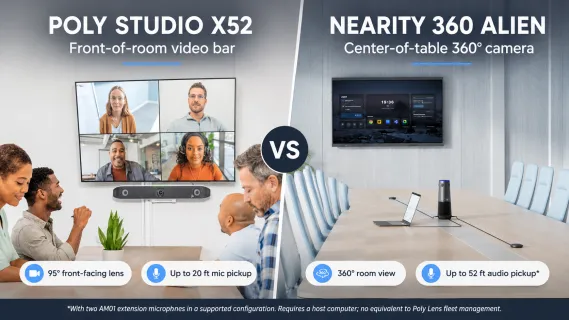
The Poly Studio X52 is officially positioned for medium rooms and lists microphone pickup up to 20 ft, so larger rooms need expansion microphones or a different architecture.
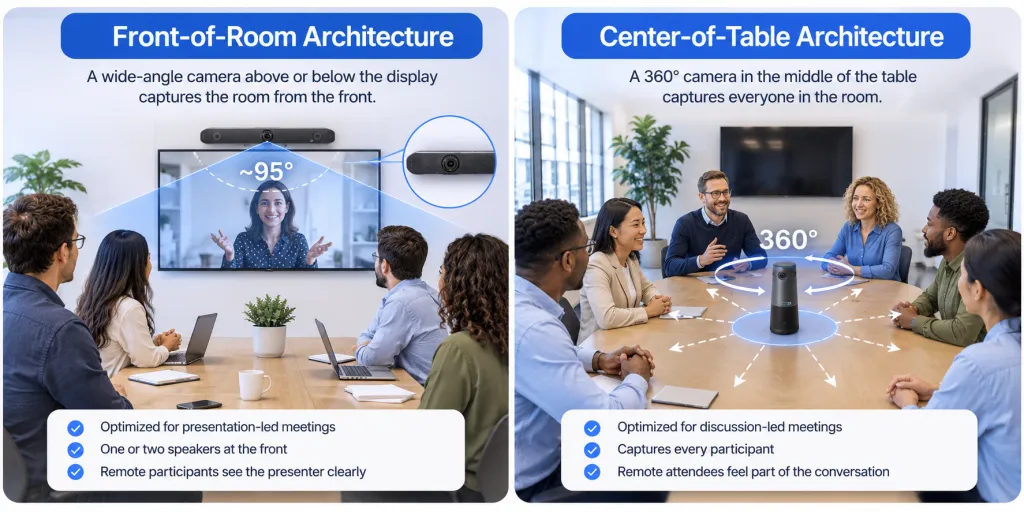
A 95-degree front-facing lens cannot capture participants seated beside or behind the display — seating layout, not resolution, decides whether a video bar fits.
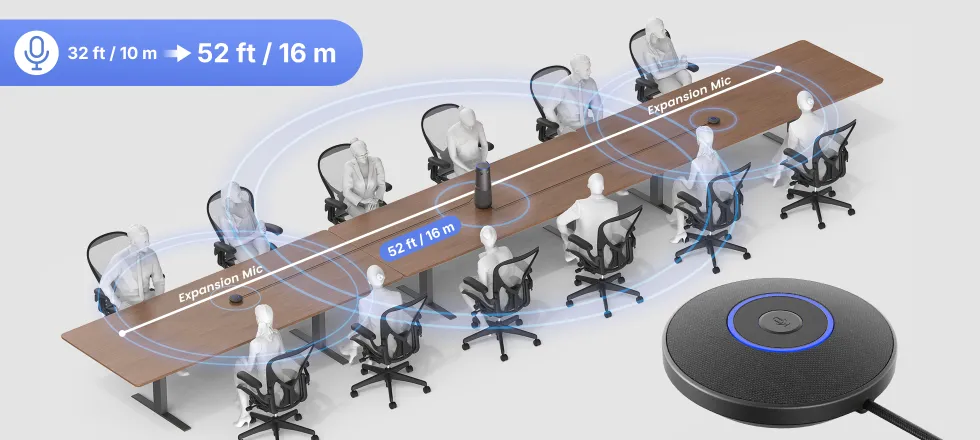
The Nearity 360 Alien covers up to 52 ft of audio pickup with two extension microphones, more than double the X52's built-in range, but it requires a host computer and has no equivalent to Poly Lens fleet management.
In a 12-person room, a center-of-table 360 camera captures every seat at full resolution, while a front-of-room bar needs careful room design and added audio to keep far seats visible and audible.
If you are researching the Poly Studio X52, you are probably further along than most buyers: you already know the room needs dedicated video hardware, and now the question is which architecture deserves the budget. The X52 is one of the most credible front-of-room video bars on the market. But a growing number of teams are quietly asking a different question — should we keep investing in a front-of-room enterprise video bar at all, or would a different camera architecture fit the way our teams actually collaborate?
This article compares the Poly Studio X52 with the most common alternative architecture, the center-of-table 360-degree conference camera, using the Nearity 360 Alien as the reference product. The goal is not to crown a winner. It is to help you decide between four realistic paths: keeping or upgrading an existing X52 setup, choosing another enterprise room system, deploying a simpler USB-based camera in selected rooms, or adopting a 360-degree center-of-table camera where collaborative seating justifies it.
If you are still evaluating the broader range of available hardware, our guide to choosing the right conference room camera provides a useful starting point for matching camera technology to your room layout and meeting style.
Two Camera Architectures, Two Meeting Philosophies
Every conference room camera on the market is built on one of two assumptions about how people meet.
Front-of-room architecture assumes everyone faces a display at the front. A single wide lens sits above or below the screen and looks down the length of the table. This design is optimized for presentation-led meetings: one or two people speak most of the time, the rest of the room faces forward, and remote participants mainly need a clear view of whoever is presenting.
Center-of-table architecture assumes the meeting is a conversation. A 360-degree camera sits in the middle of the table, captures every direction at once, and uses software to highlight whoever is speaking. This design is optimized for discussion-led meetings where participants face each other, not the screen, and where the remote side needs to feel present in the group rather than watching it from the front wall.
Neither philosophy is superior. They solve different problems, and most buying mistakes happen when a room built for one philosophy gets hardware designed for the other. Keep this distinction in mind — it will matter more than any specification in the sections that follow.
The reason this choice feels newly urgent is that hybrid work changed the mix of meetings. Before 2020, most conference rooms hosted presentations to a mostly in-room audience, which is exactly what front-of-room bars were designed for. Today, a typical room hosts a daily rotation of collaborative sessions where half the participants are remote and the in-room group faces each other. "Meeting equity" — the idea that remote participants should see and hear everyone as clearly as the people in the room — has moved from a nice-to-have to a procurement criterion, and it is precisely the criterion where camera architecture matters most.
New to this category? Our guide to 360° conference cameras explains how center-of-table placement captures participants across the room and how these devices differ from traditional front-facing cameras.
Poly Studio X52 vs Nearity 360 Alien: Head-to-Head
Dimension
Poly Studio X52
Nearity 360 Alien
Architecture
Front-of-room all-in-one video bar
Center-of-table 360° camera
Camera
20MP 4K, single lens
4 × 4K lenses, 360° capture
Field of view
95° horizontal
360°
Framing
Poly DirectorAI: group, speaker, people framing
AI speaker tracking, 3 view modes
Microphone pickup
Up to 20 ft; expansion mics available
Up to 52 ft with 2 extension mics
Speakers
Dual built-in speakers
Built-in full speakerphone
Noise handling
NoiseBlockAI + Acoustic Fence
AI noise suppression
Compute
Runs native Teams/Zoom/Meet apps on device
Requires host computer (USB)
Platform model
Certified native apps or USB Device Mode
Standard USB camera + speakerphone on any platform
Room control
Optional Poly TC8/TC10 touch controller
Controlled from the host computer
IT management
Poly Lens cloud fleet management
Per-room, via host PC and NearSync utility
Official room sizing
Medium rooms (roughly 6–9 people)
12–20+ people, 300–600 sq ft
These products overlap in price-adjacent territory but barely overlap in design intent. The X52 concentrates its engineering on making one direction excellent and giving IT centralized control. The 360 Alien concentrates on making every direction equally good and keeping deployment simple.
Poly Studio X52: What It Does Well
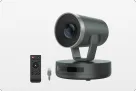
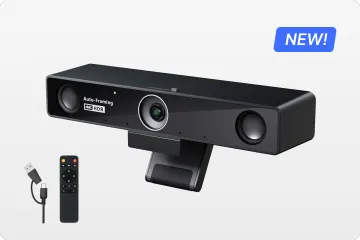
The Poly Studio X52 is HP Poly’s premium all-in-one video bar for medium conference spaces, and it earns that position with a genuinely complete package.
Optics and framing. The X52 uses a 20MP 4K UltraHD camera with a 95-degree horizontal field of view, paired with Poly DirectorAI, which handles group framing, speaker framing and people framing automatically. For rooms where everyone faces the front, the framing experience is polished and requires no user intervention.
Audio. A built-in microphone array covers pickup up to 20 ft (6.09 m), reinforced by Poly NoiseBlockAI and Acoustic Fence, two mature noise-filtering technologies that suppress sounds like keyboard typing, HVAC noise and voices from outside the meeting zone. Dual built-in speakers handle far-end audio, and expansion microphones are available for rooms that need more coverage.
It is a full room system, not just a camera. This is the X52's defining strength. It runs certified Microsoft Teams, Zoom and Google Meet applications natively on the device — no host PC required — or operates in USB Device Mode connected to a computer. Content sharing works through the native apps or wired input, and optional Poly TC8 or TC10 touch controllers give the room one-touch join.
Enterprise management. Through Poly Lens, IT teams get cloud-based visibility and control: deploy, configure, monitor and update entire fleets of devices across locations. For organizations standardizing rooms at scale, this management layer is often the deciding factor.
The X52 is best suited to medium-sized rooms with a front display, participants primarily facing the screen, presentation-led meetings, organizations using certified native meeting applications, IT teams that need centralized device management, and businesses standardizing hardware across multiple locations.
One consideration is built into its design: the front-facing, single-lens architecture is organized around a traditional front-of-room setup. If your participants sit around multiple sides of a central table, evaluate carefully whether a camera that only looks one direction matches the room.
Nearity 360 Alien: The Center-of-Table Alternative
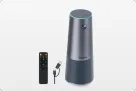
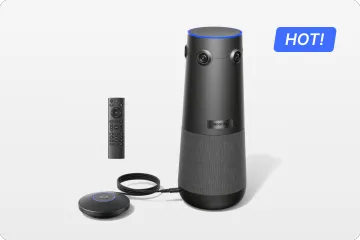
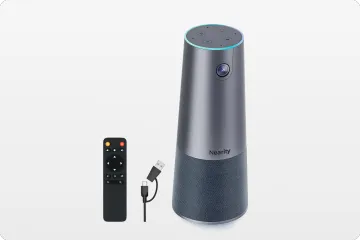
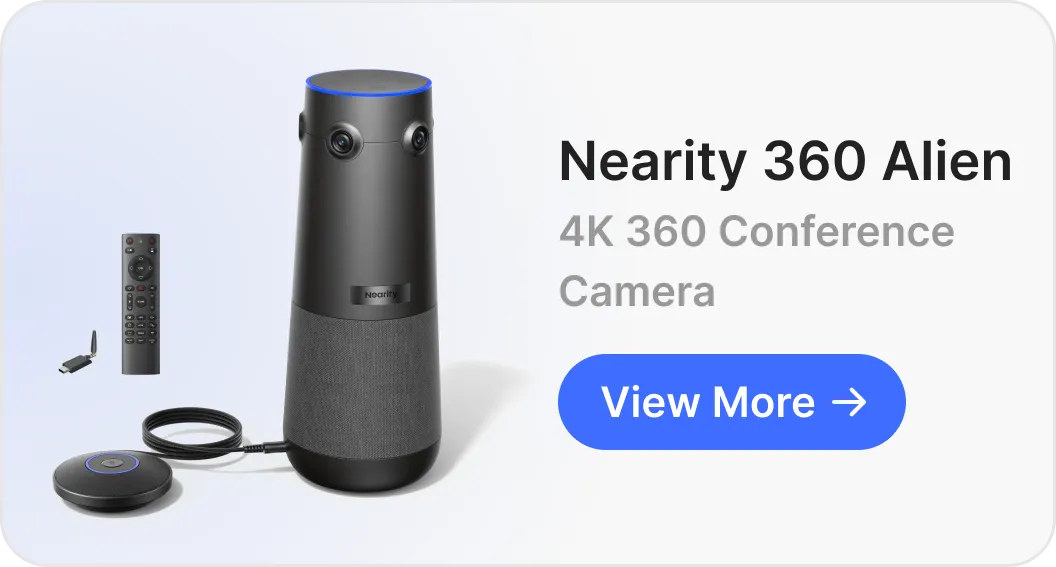
The Nearity 360 Alien represents the other philosophy: a 360-degree all-in-one conference camera designed to sit in the middle of the table.
Four lenses instead of one. Rather than a single wide lens, the 360 Alien uses a four-camera array with 4K sensors that captures every direction simultaneously. Each seat gets a full-resolution face with zero fisheye distortion — there are no stretched edges and no blind spots. AI speaker tracking follows the conversation, and three view modes (Discussion, Immersion and Presentation) let the room choose how remote participants see the group.
Audio rated for bigger tables. The device works as a full speakerphone with AI-powered pickup covering up to 52 ft (16 m) — more than double the X52's built-in microphone range — and up to two extension microphones can be daisy-chained for even larger tables. Nearity positions it for rooms of 12 to 20+ people, roughly 300 to 600 sq ft.
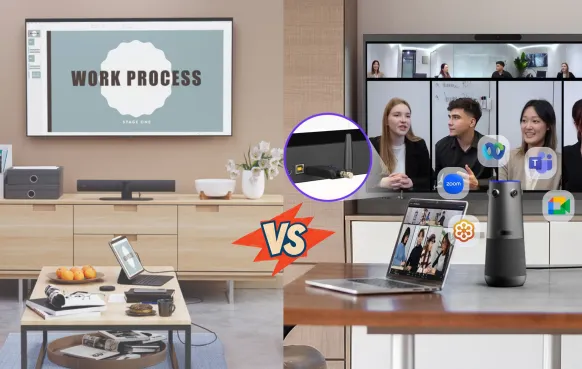
Deliberately simple deployment. It connects over USB-C or a wireless dongle and appears to the computer as a standard USB camera and speakerphone. That means it works with Microsoft Teams, Zoom, Google Meet, Webex and essentially any platform the host computer can run, with no extra software and no installer visit.
For a closer look at the connection process, device placement, and meeting software configuration, see our Nearity 360 Alien setup guide.
The honesty matters as much as the specs here: the 360 Alien is not an equivalent replacement for the X52's native room-system functionality. It requires a host computer in the room to run the meeting client, and its management model — per-room, via the host computer and Nearity's NearSync utility — is not a centralized fleet platform like Poly Lens. Buyers should verify host-computer requirements, platform behavior, room control, security and device management needs before choosing it.
It is best suited to central-table meeting layouts, discussion-led meetings, participants seated on multiple sides,teams that frequently change speakers, rooms where seeing the entire group matters, and organizations comfortable with a USB-based conference camera setup.
Five Questions That Should Drive the Decision
Before comparing any more specifications, answer these five questions about the room. They predict the right architecture far more reliably than resolution numbers.
1. Where do people actually sit?
This is the whole game. If everyone sits on one side of a table facing a display, a 95-degree front-facing lens covers them well. If people sit around multiple sides of a central table — common in collaborative teams, boardrooms and design reviews — a front-facing camera structurally cannot capture them. No amount of 4K resolution fixes a lens pointed the wrong way. For a more detailed breakdown of how room dimensions and seating arrangements affect camera selection, see our guide to choosing a conference room camera by room size.
2. Are your meetings presentations or discussions?
Presentation-led meetings (all-hands, trainings, client pitches) reward front-of-room framing, content sharing and a strong display-side speaker. Discussion-led meetings (project standups, workshops, negotiations) reward speaker tracking and equal visibility for every seat. Audit your last ten meetings in the room before deciding.
3. Appliance or USB: who owns the room's brain?
The X52 runs certified Teams, Zoom and Meet apps natively — walk in, tap the touch controller, join. That simplicity costs more upfront but removes the host PC from the equation. A USB camera like the 360 Alien needs a computer in the room running the meeting client, which is more flexible (any platform, easy updates, familiar troubleshooting) but adds a device someone must own and maintain.
This choice also has a security dimension worth raising with your IT team early. An appliance joins your network as a managed endpoint with its own certificates and update channel; a USB peripheral inherits the security posture of the host computer it plugs into. Neither is inherently safer, but they answer to different owners: the appliance is IT's device, the USB setup is only as well-managed as the laptop or room PC behind it. Decide who owns patching and access control before the hardware arrives, not after the first audit.
4. How many rooms will IT manage, and from where?
For one to ten rooms, per-room management is a non-issue. For fifty rooms across three offices, Poly Lens-style centralized monitoring, configuration and remote firmware updates can justify an ecosystem decision on its own. Be honest about which organization you are.
5. Do the audio numbers cover your table?
Microphone pickup range is the most skipped line in the spec sheet and the first complaint after installation. The X52 covers up to 20 ft from the bar; the 360 Alien covers up to 52 ft in every direction from the table's center, extendable with two more microphones. Measure your actual table and seating distance, then check which number covers it with margin.
The 12-Person Room Test
Abstract architecture talk only goes so far, so here is a concrete scenario: a 12-person hybrid conference room, roughly 30 by 20 ft, with a long central table, eight seats along the sides, two at each end, and a display on the front wall. Six remote participants join a weekly project review.
First, an important framing note: Poly officially positions the Studio X52 for medium rooms, typically quoted around six to nine people. A 12-person room is therefore a larger-room evaluation scenario for the X52, not a recommended out-of-the-box configuration. Treat the comparison below as a stress test of both architectures.
Setup A: Front-of-room Poly Studio X52
The X52 mounts below the front display. The six to eight participants seated along the sides, facing forward, are captured well — DirectorAI frames the group cleanly, and the 20MP sensor keeps faces sharp even when digitally zoomed. NoiseBlockAI and Acoustic Fence do their usual excellent work suppressing the hallway and the HVAC.
The strain shows at the edges of its design envelope. The two participants at the far end of the table sit near or beyond the 20 ft microphone pickup limit, so their voices arrive thinner unless you add expansion microphones. The two seats at the near end, close to the display, sit at the extreme edge of the 95-degree field of view — visible, but compressed at the frame's edges. And when a discussion breaks out between people facing each other across the table, the remote side watches a row of profiles rather than faces. None of this is a defect; it is the predictable behavior of a front-facing bar asked to cover a bigger, more conversational room than it was sized for. Making it work well requires added audio hardware and deliberate seating discipline.
Setup B: Center-of-table Nearity 360 Alien
The 360 Alien sits in the middle of the table. Every seat is now roughly equidistant from the camera, and the four-lens array captures all twelve participants at full resolution — including the two end seats that the front-of-room setup struggled with. When the discussion moves around the table, AI speaker tracking switches the highlighted view to whoever is talking, which keeps remote participants oriented in a fast-moving conversation. The three view modes earn their keep here: Discussion mode for the weekly review, Immersion mode when the room wants remote attendees to feel present in the group, and Presentation mode when one person takes over with slides.
Audio is where the architecture difference is largest: pickup rated to 52 ft in every direction covers the entire 12-seat table with headroom, and daisy-chained extension microphones would stretch further still — no additional audio design work needed. Because the camera hears equally well in all directions, the two end seats that sat at the edge of the X52's pickup pattern sound identical to everyone else.
The trade-offs are organizational rather than optical. A host laptop or room PC must run the Teams or Zoom client. There is no native one-touch-join appliance experience and no Poly Lens-style fleet dashboard. The table needs a cable run or the wireless dongle, and center-of-table placement means thinking about table grommets and cable management. For a single collaborative room these are one-time setup tasks; for a fifty-room enterprise standard, they are a real operational model difference.
What the test shows
One detail worth calling out is what the six remote participants experience in each setup. In Setup A, they watch the room from the front wall's perspective: sharp, well-framed, but fundamentally a broadcast view — great for following a presentation, harder for reading reactions across the table. In Setup B, remote participants see faces head-on and watch the highlighted speaker change as the conversation moves, which is closer to being seated at the table themselves. For a weekly project review where remote attendees are expected to contribute, not just observe, that difference compounds meeting after meeting.
In a 12-person, discussion-led room, the center-of-table camera wins the meeting experience decisively, while the front-of-room bar wins on native room-system polish and manageability. The right question is not "which device is better" but "which set of trade-offs matches this room." Poly itself would point a 12-person room toward its larger models — which is exactly the lifecycle-cost conversation worth having before defaulting to a bigger bar.
A 12-person room is only one example. If you are planning equipment across multiple spaces, our conference camera guide by room size explores how room dimensions and participant capacity influence the choice of camera architecture.
Total Cost of Ownership: Looking Past the Sticker
Room hardware pricing is where architecture decisions quietly become budget decisions. A front-of-room appliance like the X52 bundles compute, camera, microphones and speakers into one device, and the room can run without any PC — but the appliance itself carries the cost of that integration, and optional touch controllers and expansion microphones add to it. A USB-based setup like the 360 Alien shifts the compute cost to a host computer the room needs anyway, so the hardware line item is smaller, but someone must own that computer's maintenance, updates and security posture.
Three cost lines are easy to miss in either direction. First, additional audio: if your room exceeds the built-in pickup range, expansion microphones are a real line item on both platforms. Second, installation: an appliance bar often involves mounting, cabling and configuration time, while a center-of-table camera needs table power and cable management instead. Third, lifecycle: appliances eventually age out of platform certification programs, while USB peripherals stay current as long as the host computer's meeting client does. Model three to five years, not the first invoice.
Room Evaluation Checklist
Before requesting quotes for either architecture, walk the room with this checklist:
Seating map: sketch where every chair sits relative to the display and the table center. Note any seat outside a front camera's 95-degree cone.
Meeting audit: review the last ten meetings held in the room. Count how many were presentation-led versus discussion-led.
Audio distance: measure from the proposed device location to the farthest seat. Compare against 20 ft (front bar) or 52 ft (center-of-table, with expansion headroom).
Compute plan: decide whether the room runs a native appliance, a dedicated room PC, or a presenter's laptop — and who maintains it.
Management scale: list how many rooms IT will support this year and next, and whether centralized monitoring is a requirement or a nice-to-have.
Content workflow: confirm how participants share slides and documents today, and whether the new setup must support wired content input.
Pilot plan: pick the one room whose layout best matches the device's design intent, and run a two-week pilot with real meetings before rolling out further.
Which Setup Fits Your Situation
Customer situation
What you actually need
Recommended evaluation
Existing Poly Studio X52 is working well
Consistent room experience and centralized management
Keep or upgrade within the Poly ecosystem
An X52 room is due for renewal
Lifecycle cost clarity against current room requirements
Compare renewal, replacement and alternative deployment costs
Participants sit around a central table
Visibility across the entire group
Evaluate a 360° center-of-table camera
Meetings are mostly presentations
Reliable front-of-room framing
The Poly Studio X52 remains a suitable choice
Employees prefer laptop-based meetings
Flexible BYOD workflow
Evaluate USB deployment requirements
IT manages many standardized rooms
Centralized monitoring, configuration and updates
Evaluate Poly Lens against the alternative's actual management capabilities
Selected rooms have simpler requirements
Avoid unnecessary AV complexity
Consider whether a simpler camera setup already meets the room's needs
Where Other Poly, Crestron and Cisco Options Fit
A complete evaluation acknowledges the surrounding ecosystem without pretending every product competes head-on.
Legacy Polycom and Plantronics speakerphones still live in thousands of meeting rooms. They solve audio only — no camera, no video framing — and belong to a generation of audio-conferencing-first design. If your room already has one, treat it as a phone, not as a video solution, and evaluate cameras on their own merits.
Crestron occupies the custom-integration end of the market: programmed room control, automation, displays and multi-camera switching designed by an integrator. It makes sense for divisible training spaces and flagship boardrooms with AV staff, not as a like-for-like alternative to an all-in-one bar.
Cisco Webex Room devices, like the X52, are appliance-style room systems with native apps and centralized management (Control Hub). Teams already standardized on Webex should evaluate within that ecosystem first; switching platforms costs more than switching hardware.
The common thread: ecosystem and management model decisions come first, camera architecture second, individual specifications last.
Common Mistakes When Comparing These Two
Comparing resolution instead of architecture. Both devices shoot 4K. The difference that determines daily experience is where the lenses point, not how many megapixels they carry.
Skipping the microphone math. Buyers check camera specs obsessively and install rooms where the farthest seat sits beyond pickup range. Measure the table, then read the audio line of the spec sheet.
Assuming a 360 camera replaces a room system. A USB camera plus a laptop is flexible and cost-effective, but it is not a native Teams Rooms appliance with one-touch join and fleet management. Decide which model your IT team actually wants to operate.
Piloting in the wrong room. Test each device in the seating layout it was designed for. An X52 piloted in a round-table room will disappoint; a 360 camera piloted in a theater-style training room will underwhelm.
Forgetting content sharing. If your meetings revolve around shared slides, verify the content-sharing workflow you will actually use — native app sharing, wired HDMI input or a USB connection from the presenter's laptop — before choosing hardware.
Treating the demo room as proof. Vendor demos happen in rooms sized for the product. A video bar demoed in a nine-person room says nothing about your fourteen-seat boardroom. Insist on testing in your own space, with your own table, your own acoustics and your own meeting platform — the checklist above exists to make that pilot honest.
Recommendations by Use Case
Standardized enterprise boardrooms, presentation-led, IT-managed at scale: the Poly Studio X52, optionally with TC8/TC10 touch control and expansion microphones. It is the mature, manageable default for this profile.
Collaborative rooms where teams sit around a table and talk: the Nearity 360 Alien. Center-of-table capture, 52 ft audio coverage and full-resolution faces from every seat are purpose-built for exactly this.
Mixed fleets: there is no rule forcing one architecture across an entire organization. Front-of-room bars for presentation rooms, 360 cameras for collaboration rooms, and USB simplicity where rooms have simple needs is a legitimate — and often optimal — strategy. Many IT teams find that a deliberate two-architecture fleet costs less to run than forcing one product category into rooms it was never designed for, because each room gets hardware matched to its actual meeting pattern rather than hardware sized for the worst case.
Renewal time on existing Poly rooms: before renewing like-for-like, re-audit how each room is actually used. Rooms that have drifted from presentations to workshops are candidates for a different architecture, and a USB-based deployment may cut lifecycle cost meaningfully.
FAQ
Is the Poly Studio X52 suitable for large rooms?
No. Poly positions the Studio X52 for medium rooms, with a 95-degree camera and microphone pickup up to 20 ft. For large rooms, Poly points buyers to bigger models such as the Studio X70 or X72, or to adding expansion microphones and careful room design.
Can the Nearity 360 Alien run Microsoft Teams Rooms without a PC?
No. The 360 Alien is a USB conference camera and speakerphone, so a host computer in the room runs the Teams, Zoom, Google Meet or Webex client. If you need a native, PC-free room system, an appliance-style video bar is the right category.
How do device management and firmware updates differ between the two?
The Poly Studio X52 is managed through Poly Lens, HP's cloud platform for deploying, configuring and updating fleets of devices. The Nearity 360 Alien is managed per room through the host computer and Nearity's NearSync utility, which suits smaller deployments but is not a centralized fleet platform.
Which video conferencing platforms does each device support?
The Poly Studio X52 is certified for Microsoft Teams, Zoom and Google Meet and can run those apps natively on the device. The Nearity 360 Alien connects as a standard USB camera and speakerphone, so it works with Teams, Zoom, Google Meet, Webex and most other platforms the host computer can run.
Do I still need a separate speakerphone with either device?
No. Both devices include full speakerphone functionality. A legacy Polycom or Plantronics speakerphone only makes sense as an audio-only fallback; adding one to either of these setups would duplicate hardware.
The Bottom Line
The real question was never "which camera has better specs." It is whether your rooms are built for presentations or for conversations. The Poly Studio X52 remains one of the strongest front-of-room video bars for medium, presentation-led, IT-managed rooms. But if your teams sit around a table and talk — especially in rooms beyond the medium size a single 95-degree lens and 20 ft of pickup were designed for — a 360-degree center-of-table architecture like the Nearity 360 Alien will change the meeting experience more than any incremental bar upgrade.
Audit your rooms by seating layout and meeting style, shortlist the architecture that matches, run an honest pilot in the actual space, and only then compare specifications. That order — layout first, specs last — is the single habit that separates room refreshes teams love from expensive hardware that quietly gets worked around. If you want to see what a 360-degree setup looks like in a real room, book a live demo and bring your toughest room layout as the test case.