Headset with Best Microphone Quality: Why Louder Doesn't Always Mean Clearer
Turning up the volume won't fix a muffled call.
headset with best microphone quality
headset mic
voice clarity
Updated: Sep 17, 2026 · 5 minutes read
Global Business, Brought Near.
No Installer, No Hassle, Just Works.
Cranking up headset volume only makes bad audio louder, not clearer. Voice clarity depends on microphone quality, pickup direction, and noise cancellation on both ends of the call. This guide explains each factor and shows how to choose a headset for genuinely clearer calls.
Key Takeaways
Volume amplifies everything in the signal — including distortion and noise — so raising it past a comfortable level can actively reduce speech intelligibility.
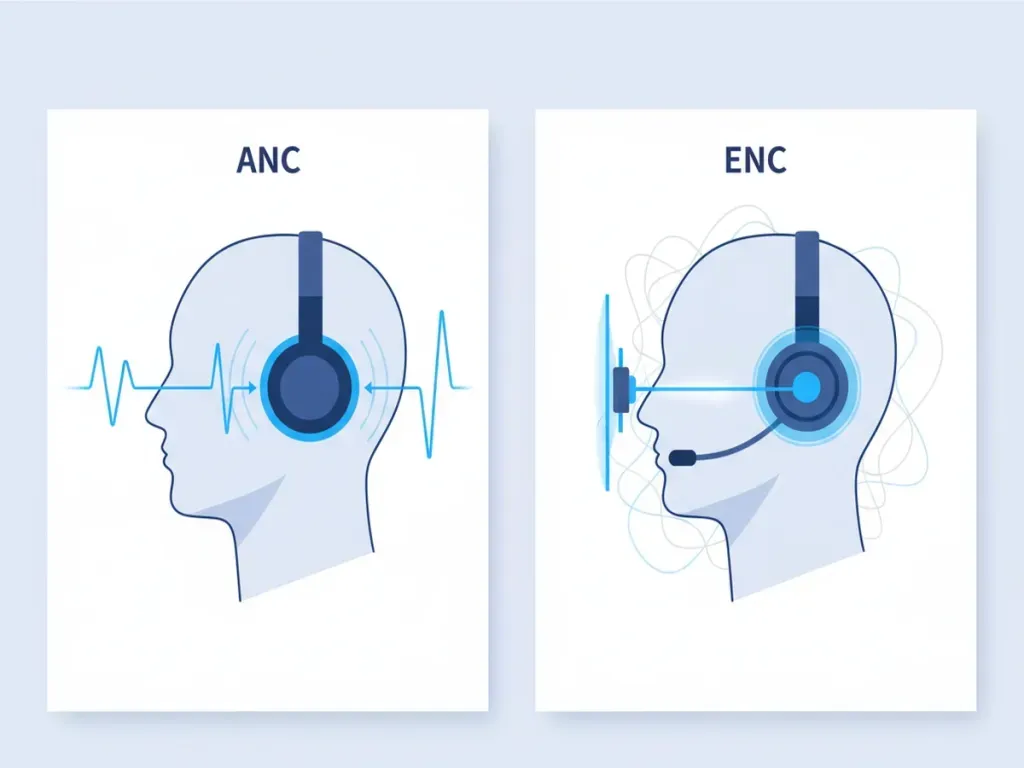
ANC improves what you hear, but only ENC (microphone-side noise cancellation) improves what your callers hear.
A 4-microphone beamforming array isolates speech far better than a single mic — the Nearity EP320's AI-driven array suppresses up to 99.9% of background noise.
Positioning a boom mic one to two finger-widths from the corner of your mouth improves clarity more than most software settings.
For noisy home offices and open-plan workspaces, prioritize ENC and mic count over speaker size or maximum volume specs.
Why Louder Doesn't Always Mean Clearer on a Headset: Understanding Voice Clarity
When a call sounds muddy, most people reach for the same fix: turn it up. But if you're simply trying to sound more professional on Zoom, here's the uncomfortable truth — volume and clarity are not the same thing, and confusing them leads to bad purchases and fatiguing workdays.
This guide breaks down what voice clarity actually is, the factors that determine it, and how to choose a headset that makes you easy to understand — not just easy to hear.
Clearer Doesn't Always Mean Louder
Loudness is simple: it's how much acoustic energy hits your eardrum. Clarity is different — it's how easily your brain can separate speech from everything else in the signal.
Turning up the volume amplifies the entire signal indiscriminately. If a colleague's audio is distorted, or buried in background noise, more volume gives you louder distortion and noise.
There's also a safety angle. Sustained listening above roughly 85 dB is a recognized hearing-risk threshold. If you find yourself maxing out the volume slider every day, the problem isn't loudness. It's clarity — and no amount of volume will fix it.
What Is Voice Clarity on a Headset?
Voice clarity is the combination of intelligibility (can listeners understand your words?), naturalness (do you sound like yourself?), and consistency (does it hold up when your environment changes?).
Crucially, clarity runs in two directions on every call:
Inbound clarity — how clearly you hear others. This is shaped by speaker drivers, speaker tuning, and Active Noise Cancellation (ANC).
Outbound clarity — how clearly others hear you. This is shaped by your headset mic, its pickup pattern, and microphone-side noise cancellation (ENC).
Most frustration about "bad call quality" is actually an outbound problem. Your colleagues hear your dog, your keyboard, and the HVAC rumble — even though everything sounds fine on your end.
Understanding this two-direction split is the key to choosing the right headset.
What Affects Voice Clarity on a Headset?
Four factors do almost all of the work.
1. Microphone quality and placement
The microphone is the first link in your voice's signal chain.
A boom mic positioned one to two finger-widths from the corner of your mouth captures a dramatically stronger voice signal than a mic buried in an earcup.
Mic count matters too: a single microphone hears everything equally, while a multi-mic array can compare signals and figure out which sound is your voice.
2. Background noise in your environment
Open offices, kitchens, coffee shops, and homes with kids all inject competing sound into your mic.
Room acoustics count as well — bare walls and hard desks create echo that makes even a good microphone sound hollow and distant.
3. Microphone pickup pattern
Pickup pattern describes which directions a microphone "listens" to.
Microphone Type
Description
Omnidirectional mics
Capture sound equally from all around— fine in a quiet studio, terrible in a shared space.
Directional and beamforming designs
Focus on your mouth and reject off-axis noise.
This is where professional headsets pull away from consumer earbuds: four-microphone beamforming arrays create a tight pickup zone that follows your voice and ignores the room.
4. Noise cancellation — and what it actually does
So, what does noise cancellation do? It depends entirely on which kind you're talking about:
The most advanced ENC systems now use neural networks trained on millions of real-world noise samples to separate speech from keystrokes, barking dogs, and espresso machines in real time.
How to Choose a Headset for Better Voice Clarity
Now that the factors are clear, here's a practical checklist for evaluating any headset:
Prioritize ENC over ANC if calls are your main use.
ANC is a listening feature; ENC is a communication feature. The best business headsets offer both, but ENC is the non-negotiable one for voice clarity.
Count the microphones.
Look for at least three to four mic elements. More mics means better beamforming and cleaner voice isolation.
Choose a boom mic for serious call time.
Physical proximity to your mouth beats software correction every time. A rotatable boom (250° or so) also lets you wear the headset on either side.
Match the headset to your noisiest environment, not your quietest.
How the Nearity EP320 Is Designed for Clearer Calls
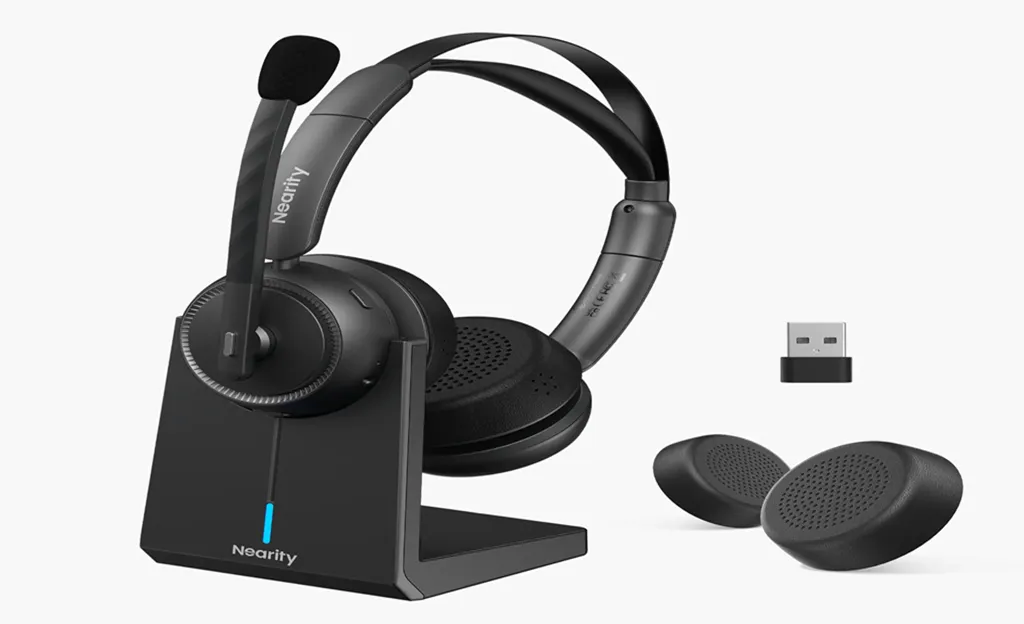
A headset that applies these principles end to end is the Nearity EP320, a wireless headset built specifically for office and work-from-home communication.
Four-microphone AI ENC:
The EP320's mic array runs on a HiFi5 DSP with a neural network trained on massive noise datasets, suppressing up to 99.9% of background noise on the microphone signal. Your callers hear your voice — not the leaf blower outside your window.
Voice-first audio tuning:
Its 40mm drivers are tuned for speech frequencies, so incoming voices sound sharp and natural instead of boomy — you don't need to chase clarity with the volume slider.
Triple connectivity:
Bluetooth 5.4 with multipoint, a pre-paired USB-A dongle for rock-solid PC calls, and a USB-C wired fallback if the battery ever runs low mid-meeting.
Built for long call days:
Up to 35 hours of talk time (45 hours of music), a desktop charging stand, memory foam cushions, and a 250° rotatable boom mic for left- or right-side wearing.
If your daily reality is a noisy household or a chatty office floor, it's worth seeing why the EP320 was designed as a headset for noisy offices. Alternatives like Jabra's Evolve series offer similar enterprise features at a notably higher price point, so it's worth comparing based on how many hours you actually spend on calls each day.
Conclusion
The next time a call sounds bad, resist the volume slider. Ask instead: is this a listening problem or a microphone problem? Once you know the difference, choosing a headset that delivers real voice clarity — for you and for everyone you talk to — becomes a much simpler decision.
FAQs
What does noise cancellation do on a headset?
It depends on the type. Active Noise Cancellation (ANC) reduces the noise you hear through the earcups. Environmental Noise Cancellation (ENC) cleans up your microphone signal so callers hear only your voice. For call clarity, ENC is the one that matters most.
Does turning up the volume make my voice clearer to others?
No. The volume control only affects your own listening. How clearly others hear you depends on your headset mic, its position, and microphone-side noise cancellation.
Is a boom mic better than built-in earcup microphones?
For voice calls, generally yes. A boom mic sits close to your mouth and captures a much stronger voice signal before any processing happens, giving the noise-cancellation algorithms a cleaner signal to work with.