Best Headsets for Switching Between Your Laptop and Phone
A multipoint Bluetooth headset stays connected to your laptop and phone at the same time, so you can jump from a Zoom call to a mobile call without re-pairing.
multipoint bluetooth headset
bluetooth headset multiple devices
best work from home headset
Updated: Sep 20, 2026 · 5 minutes read
Global Business, Brought Near.
No Installer, No Hassle, Just Works.
A multipoint Bluetooth headset connects to two devices at once and automatically hands audio to whichever one needs it — no disconnecting and re-pairing. For laptop-plus-phone workflows, prioritize Bluetooth 5.3 or newer, true multipoint, a USB dongle for stability, a boom mic with ENC, and 35+ hours of talk time.
Key Takeaways
A multipoint Bluetooth headset holds two simultaneous connections but plays one audio stream at a time — calls take priority over media.
Manual device switching costs 10–30 seconds per swap and can drop incoming calls; multipoint removes that friction entirely.
A USB dongle connection is more stable than built-in laptop Bluetooth, which is a common source of stutter and dropouts.
Look for Bluetooth 5.3+, multipoint support, ENC for outgoing audio, and at least 35 hours of talk time for all-week work use.
Enterprise headsets from Jabra and Poly offer similar multipoint features at two to three times the price of mid-range options.
Your calendar says the client call is on Zoom. Your phone says the client is calling your mobile number instead. If your headset can only live on one device at a time, you already know the drill: disconnect, re-pair, apologize for being two minutes late.
A multipoint bluetooth headset eliminates that ritual by staying connected to your laptop and phone simultaneously — and this guide explains how the technology works, how it beats manual switching, and which features actually matter before you buy.
What Is a Multipoint Bluetooth Headset?
Bluetooth multipoint is a connection technology that lets one headset maintain active links to two (sometimes three) devices at the same time. A standard single-point headset pairs with many devices but stays connected to only one; switching means manually disconnecting and re-pairing.
A multipoint headset changes that model. Pair it once with your laptop and once with your phone, and both connections stay alive in the background.
How Does Bluetooth Multipoint Work With a Laptop and Phone?
Under the hood, the headset runs two Bluetooth connections in parallel but streams audio from only one source at a time. A priority system decides which device gets the audio channel:
Calls outrank media
An incoming phone call interrupts laptop audio instantly; when you hang up, music or meeting audio resumes.
Active playback wins ties
If your laptop is playing audio, a notification sound from your phone usually will not hijack the stream — but a call will.
Answer from the headset
Call controls (answer, end, mute) work regardless of which device the call arrives on.
Setup takes about two minutes: pair the headset with your laptop, pair it with your phone, and enable multipoint in the headset's settings or companion app if it is not on by default. From then on, the headset reconnects to both devices automatically whenever it powers up.
Bluetooth Multipoint vs. Traditional Bluetooth Device Switching
If you have never used multipoint, the alternative approaches are what you are used to — and each has real costs:
Approach
How it works
Manual re-pairing
Disconnect from laptop, connect to phone, repeat
Bluetooth switch (software or hardware)
Moves one connection between devices on demand
Two separate headsets
One per device
Multipoint
Two simultaneous connections, automatic priority
For a workflow with even three or four device switches a day, multipoint saves real time and, more importantly, removes the failure mode that matters most: the missed call.
What to Look for in a Bluetooth Headset for Multiple Devices
Not every headset that claims "multipoint" delivers a good experience. Evaluate these in order:
True multipoint support
Check the spec sheet, not the marketing headline. Some headsets offer "dual connection" that drops one device during calls.
Bluetooth 5.3 or newer
Newer versions bring better connection stability, range, and power efficiency — the foundation multipoint depends on.
A USB dongle option
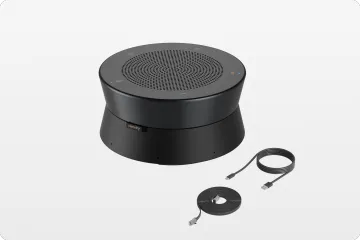
Built-in laptop Bluetooth radios are a common weak link. A dedicated dongle creates a cleaner, more stable link for meetings.
Platform compatibility
Certification or confirmed support for Teams, Zoom, and Google Meet avoids button-mapping surprises.
Best Features for Seamless Device Switching
Beyond the basics, a few details separate a frustrating multipoint experience from an invisible one:
Fast, automatic reconnection to both devices at power-on, without opening Bluetooth settings.
Multipoint memory that survives charging cycles and firmware updates without re-pairing.
Dongle-based laptop connection, which sidesteps the stutter and dropouts that built-in Bluetooth sometimes introduces mid-meeting.
These are the qualities that turn a decent headset into the best work from home headset for people whose attention — and audio — moves between screens all day.
How to Choose the Best Multipoint Bluetooth Headset for Your Workflow
Match the headset to your actual day.
If you are in back-to-back meetings, prioritize microphone quality, ENC, and talk-time battery.
If you split time between focus work and calls, comfort and music playback move up the list.
If you commute between home and office, multipoint plus a compact dongle keeps both environments frictionless.
1.Can a Bluetooth headset connect to two devices at the same time?
Yes. That is exactly what Bluetooth multipoint does.
A multipoint Bluetooth headset maintains active connections to two devices, such as a laptop and a phone, at once. Only one device plays audio at a time, but the headset switches automatically when a call comes in or you start playback on the other device.
2. Is a multipoint Bluetooth headset worth it for working from home?
For most remote workers, yes.
If your workday mixes laptop meetings and mobile calls, multipoint eliminates constant re-pairing and missed calls. It is one of the defining features of the best work from home headset, alongside a good microphone, noise suppression, and all-day battery life.
3.What is the difference between Bluetooth multipoint and a Bluetooth switch?
A Bluetooth switch is a manual or hardware-based way to move a single Bluetooth connection between devices — you still disconnect from one device before using another.
Multipoint keeps both connections alive simultaneously and switches audio automatically, so there is no manual step and no risk of missing a call.
4.Does multipoint drain a headset's battery faster?
Slightly. Holding two connections uses a little more power than one, but the difference on modern Bluetooth 5.x chipsets is small — typically a few percentage points of battery per day.
Talk time ratings already account for real-world use, so a headset rated for 35 hours of calls remains practical for a full workweek.
5.Why does my headset keep disconnecting when I switch between my laptop and phone?
Usually because the headset lacks multipoint, so each switch forces a full disconnect-and-reconnect cycle that can fail or stall.
Weak laptop Bluetooth radios and outdated drivers make it worse.
Upgrading to a multipoint headset, or connecting the laptop through a USB dongle instead of built-in Bluetooth, resolves most cases.