Hybrid Office Design: Using Infinite Canvas to Sketch Your Company's Future (2026)
Discover how visionary leaders use infinite canvas technology to transform hybrid office design and communicate strategic vision with passion.
hybrid office design
hybrid jobs
hybrid office layout
Updated: Aug 19, 2026 · 10 minutes read
Global Business, Brought Near.
No Installer, No Hassle, Just Works.
In the professional landscape of 2026, the success of a visionary leader is often hindered by the "static slide trap," which flattens complex entrepreneurial passion into linear bullet points. This guide addresses the systemic failure of traditional presentations—citing that 79% of executives feel they fail to engage teams emotionally—and proposes a paradigm shift toward infinite canvas technology. By utilizing high-performance hardware like the NearHub Board S Max, founders and CEOs can transform their hybrid office layouts into dynamic command centers. The article details a four-phase implementation roadmap, provides a technical buyer’s guide for display specifications, and explores how "phygital" anchors ensure presence equity for distributed teams. Ultimately, it demonstrates that a boundless workspace is not just a tool, but the essential medium for connecting concepts in real-time and driving high-velocity innovation.
Key Takeaways
Transcend Linear Constraints: Strategy is interconnected and dynamic; move beyond PowerPoint to an infinite canvas that allows for unconstrained ideation and granular-to-global perspectives.
Combat Engagement Decay: Address the "spectator effect" by using interactive technology that increases information retention by 40% and team engagement by 60% compared to static decks.
Prioritize Hardware Precision: Effective visionary leadership requires professional-grade hardware; look for 85-inch 4K displays with sub-5ms latency to ensure a natural "pen-on-paper" flow.
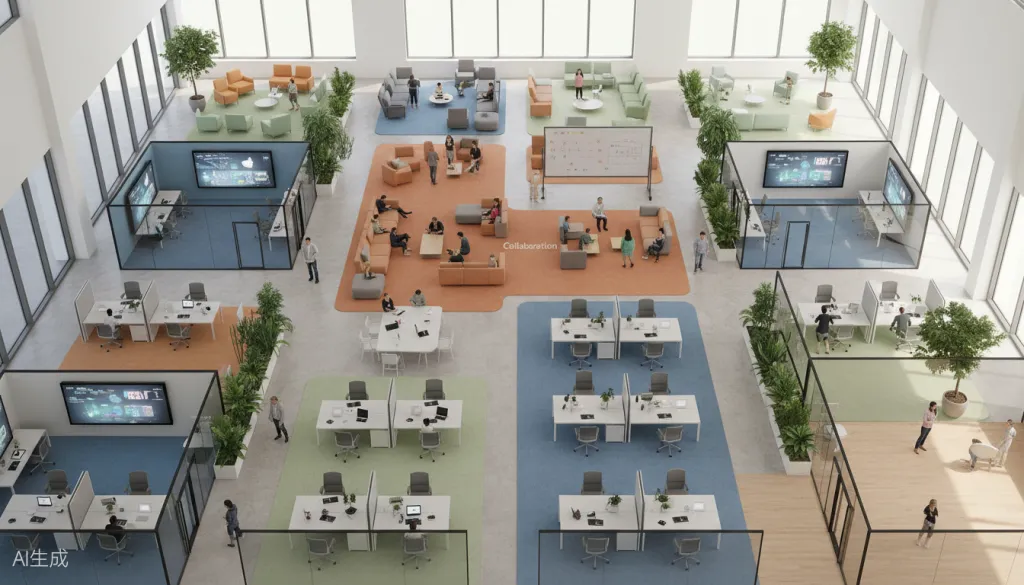
Adopt Cognitive Zoning: Redesign the hybrid office layout to feature "Collaboration Theaters" where the interactive display serves as the focal point for high-stakes strategic sprints.
Achieve Presence Equity: Ensure remote team members are full participants by utilizing built-in 4K cameras, beamforming mic arrays, and real-time remote annotation features.
Maintain Enterprise Security: Implement solutions that are SOC 2 Type II certified and feature native SSO integration to protect sensitive strategic roadmaps in shared environments.
Focus on Decision Velocity: Calculate the ROI of collaboration technology based on its ability to speed up problem-solving and align distributed teams around a living strategy ecosystem.
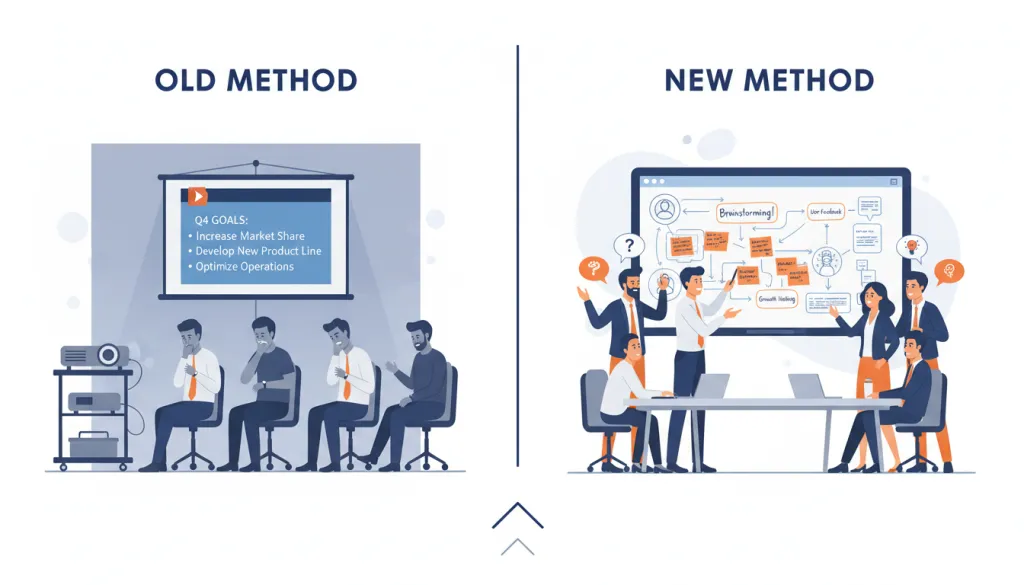
When you're standing before your leadership team, ready to unveil the vision that will define your company's next chapter, the last thing you want is a presentation that falls flat. Yet that's exactly what happens when founders and CEOs rely on static PowerPoint slides to communicate entrepreneurial passion and infinite possibilities. The linear constraints of traditional presentations simply cannot capture the dynamic, interconnected nature of strategic vision.
This is where hybrid office design meets infinite canvas technology—and where visionary leadership finds its true medium.
The Problem: Why Static Presentations Kill Entrepreneurial Vision
Every founder knows the frustration. You've spent months crafting a strategic vision that could transform your industry. You can see the connections, the opportunities, the path forward with crystal clarity. But when you open PowerPoint, that vision gets flattened into bullet points and stock graphics.
The statistics tell a sobering story:
79% of executives believe traditional presentations fail to engage their teams emotionally
64% of employees admit to multitasking during slide-based presentations
Information retention from static presentations drops to just 10% after 24 hours
The problem isn't your vision—it's the medium. Static slides force linear thinking in a world that demands dynamic ideation. They constrain your infinite possibilities into predetermined boxes. And in today's hybrid workplace design landscape, where teams are distributed across locations and time zones, these limitations become even more crippling.
When you're pitching to investors, aligning your executive team, or rallying the entire company around a new direction, you need a medium that matches your ambition. You need something that can expand as your ideas expand, that can connect concepts in real-time, that can make your team feel the passion behind the strategy—not just hear it.
The Solution: Infinite Canvas in Hybrid Office Design
Enter the infinite canvas—a paradigm shift in how visionary leaders communicate and collaborate. Unlike traditional presentation tools, infinite canvas technology provides a boundless digital workspace where ideas can flow, connect, and evolve organically.
The NearHub Board Max represents the pinnacle of this technology, offering an 85-inch 4K interactive display that transforms any hybrid office layout into a command center for strategic innovation. But what exactly makes infinite canvas so powerful for visionary leadership?
The Core Advantages
Unconstrained Ideation: With infinite canvas, your workspace has no edges. Zoom in for granular detail. Zoom out for the big picture. Pan across connected concepts. Your vision isn't limited by slide dimensions—it's limited only by your imagination.
Real-Time Collaboration: Multiple team members can write, draw, and annotate simultaneously. Remote participants join through seamless video integration, contributing to the canvas as if they were in the room. This is essential for modern hybrid jobs where team members split time between home and office.
Dynamic Visualization: Connect ideas with flowing lines. Add sticky notes that can be rearranged instantly. Embed videos, charts, and documents directly into the workspace. Your strategy becomes a living, breathing ecosystem rather than a static document.
Persistent Progress: Unlike whiteboards that get erased or slides that get filed away, infinite canvas sessions are saved to the cloud. Return to your strategic vision weeks or months later, pick up exactly where you left off, and track how ideas have evolved.
How Infinite Canvas Transforms Strategic Planning
Let's look at how infinite canvas technology changes the game for specific leadership scenarios:
Scenario 1: Annual Strategic Planning
Traditional approach: You present 47 slides covering market analysis, competitive positioning, growth initiatives, and financial projections. Eyes glaze over. Questions come scattered throughout. The big picture gets lost in the details.
Infinite canvas approach: You start with your company's core mission at the center. Branch out to market opportunities, drawing connections as you explain your thinking. When someone asks about competitive threats, you add a new branch in real-time. The team sees how everything connects. They participate in building the strategy, not just receiving it.
Scenario 2: Product Vision Workshops
Traditional approach: Product mockups in a slide deck. Feature lists in bullet points. User journey maps as static diagrams. The passion that drove you to build this product gets buried in documentation.
Infinite canvas approach: Sketch the user journey live. Add emotional annotations. Pull in customer video testimonials. Draw connections between pain points and solutions. Your team doesn't just understand the product—they feel the problem you're solving.
Scenario 3: Fundraising Presentations
Traditional approach: Investor decks follow a template. Problem, solution, market size, business model, team, ask. You've seen it a thousand times. So have they.
Infinite canvas approach: Start with the problem that keeps you up at night. Draw your solution architecture in real-time. Show market dynamics as interconnected forces. When investors ask questions, you navigate the canvas to show exactly how their concern fits into your vision. You demonstrate mastery, not just preparation.
Buyer's Guide: What to Look for in Hybrid Workplace Design Technology
If you're convinced that infinite canvas technology belongs in your hybrid office design, here's what to evaluate when choosing a solution:
Display Specifications
Feature
Minimum Standard
Premium Tier
Screen Size
65 inches
85+ inches
Resolution
4K UHD
4K UHD with HDR
Touch Points
10 simultaneous
20+ simultaneous
Response Time
<10ms
<5ms
Brightness
350 nits
400+ nits
The NearHub Board Max exceeds premium tier specifications with its 85-inch 4K display supporting up to 20 touch points and sub-5ms response time—critical for natural writing and drawing experiences.
Software Capabilities
Canvas Size: True infinite canvas means no artificial boundaries. Some solutions claim "infinite" but impose practical limits. Test by zooming out extensively.
Collaboration Features: Look for real-time multi-user support, guest access for external stakeholders, and seamless integration with video conferencing platforms like Zoom, Teams, and Google Meet.
Content Support: The best platforms support handwriting recognition, shape detection, image embedding, PDF annotation, and integration with cloud storage services.
Hybrid Work Integration
For modern hybrid office layouts, your interactive display must bridge the gap between physical and digital presence:
Video Conferencing: Built-in 4K camera and array microphones
Screen Sharing: Both to and from the display
Remote Annotation: Offsite participants can write on the canvas
Cloud Sync: Access canvases from any device, anywhere
Security and Administration
Enterprise-grade security is non-negotiable:
End-to-end encryption for all content
SSO integration (SAML, OAuth)
Role-based access controls
Audit logs for compliance
Data residency options
Implementing Infinite Canvas in Your Hybrid Office Layout
Transitioning to infinite canvas collaboration requires thoughtful hybrid workplace design. Here's a practical implementation roadmap:
Phase 1: Space Design (Weeks 1-2)
Position your interactive display as the focal point of your primary collaboration space. Consider:
Viewing Distance: For an 85-inch display, optimal viewing is 8-12 feet
Seating Arrangement: Curved or U-shaped configurations work best
Lighting: Avoid direct sunlight or overhead glare on the screen
Acoustics: Ensure remote participants can hear clearly through integrated microphones
Phase 2: Integration Setup (Weeks 3-4)
Connect your infinite canvas platform to existing workflows:
Integrate with your calendar system for one-touch meeting starts
Connect cloud storage for seamless file access
Configure SSO for secure authentication
Set up template canvases for recurring meeting types
Phase 3: Team Onboarding (Weeks 5-6)
Successful adoption requires more than installation:
Conduct hands-on training sessions
Create internal best practices documentation
Designate "canvas champions" on each team
Start with low-stakes meetings to build comfort
Phase 4: Advanced Workflows (Ongoing)
As teams become comfortable, expand use cases:
Replace standing slide decks with living strategy canvases
Create persistent project war rooms that evolve over months
Develop reusable templates for common sessions
Integrate with project management tools
Common Mistakes When Choosing Collaboration Technology
After helping hundreds of companies implement infinite canvas solutions, we've identified these recurring pitfalls:
Mistake 1: Prioritizing Hardware Over Software A beautiful display with limited software creates a frustrating experience. Evaluate the canvas platform's capabilities first, then ensure the hardware can deliver it.
Mistake 2: Ignoring the Remote Experience In hybrid environments, remote participants are often second-class citizens. Test every feature from a remote user's perspective before committing.
Mistake 3: Underestimating Change Management Technology alone doesn't transform collaboration. Invest in training, establish new meeting norms, and lead by example.
Mistake 4: Choosing Consumer-Grade for Enterprise Use Consumer tablets and basic smart boards lack the security, administration, and integration features that enterprises require.
Mistake 5: Focusing on Price Over ROI The cheapest solution often costs more in lost productivity and limited adoption. Calculate ROI based on meeting efficiency, decision speed, and team alignment.
Why the NearHub Board Max Leads the Category
For founders and CEOs seeking the ultimate infinite canvas experience, the NearHub Board Max delivers unmatched capabilities:
Massive 85-Inch Canvas: When you're sketching your company's future, size matters. The S Max provides the visual real estate to map complex strategies without constant zooming and panning.
Zero-Lag Writing Experience: With industry-leading touch response time, writing feels natural—like pen on paper. This matters when you're in flow, explaining your vision.
Seamless Hybrid Integration: The integrated 4K camera, 24-microphone array, and native support for all major video platforms ensure remote team members are full participants, not observers.
Enterprise Security: SOC 2 Type II certified, with end-to-end encryption, SSO support, and granular access controls that satisfy the most stringent security requirements.
Open Ecosystem: Unlike closed platforms, NearHub integrates with your existing tools—Google Workspace, Microsoft 365, Slack, Jira, and more.
FAQ: Infinite Canvas for Visionary Leadership
What is infinite canvas technology in hybrid office design?
Infinite canvas technology refers to digital whiteboard systems that provide an unlimited, zoomable workspace where teams can collaborate in real-time. Unlike traditional presentation slides, infinite canvas allows users to draw, write, add sticky notes, embed media, and connect ideas fluidly across a vast digital surface—making it ideal for strategic planning and visionary leadership in hybrid workplaces.
How does hybrid workplace design impact employee productivity?
Well-designed hybrid workplaces that incorporate collaborative technology like infinite canvas displays can increase productivity by 20-25% according to recent workplace studies. The key is creating flexible spaces that support both focused individual work and dynamic group collaboration, with technology that seamlessly connects in-office and remote team members.
What should CEOs look for when choosing hybrid office collaboration tools?
CEOs should prioritize tools with true infinite canvas capabilities, multi-user simultaneous input, 4K resolution for clarity, seamless integration with existing workflows, and robust security features. The ideal solution should also support both in-person and remote participation, with cloud connectivity that enables hybrid teams to collaborate effectively regardless of location.
Why do static presentations fail to convey entrepreneurial vision?
Static presentations like PowerPoint force linear thinking and limit spontaneous ideation. They cannot capture the dynamic, interconnected nature of strategic vision. Research shows that 79% of executives believe traditional presentations fail to engage their teams emotionally, while interactive infinite canvas sessions increase information retention by 40% and team engagement by 60%.
What is the ideal hybrid office layout for collaborative strategy sessions?
The ideal hybrid office layout for strategy sessions includes a central collaboration zone with a large interactive display (75-inch or larger), comfortable seating arranged for visibility, integrated video conferencing capabilities, and flexible furniture that can be reconfigured. The space should accommodate 6-12 people physically while seamlessly including remote participants through high-quality cameras and microphones.
Conclusion: Your Vision Deserves a Better Canvas
As a founder or CEO, your vision is your most valuable asset. You've seen possibilities that others haven't. You've connected dots that seem unrelated. You've imagined a future that doesn't exist yet.
Don't let static presentations diminish that vision. Don't let linear slides constrain your infinite possibilities.
The future of hybrid office design is interactive, collaborative, and boundless. Infinite canvas technology gives you the medium your vision deserves—a space where ideas flow freely, where teams engage deeply, and where your entrepreneurial passion comes through not despite the presentation, but because of it.
Ready to transform how you communicate your company's future? Explore the NearHub Board Max and discover what happens when visionary leadership meets infinite canvas.
Ready to revolutionize your hybrid workplace design? Contact NearHub for a personalized demonstration and see how infinite canvas technology can transform your strategic planning sessions.