The Best Meeting App for Business in 2025: Features, Benefits, and Top Picks
This comprehensive guide breaks down what modern businesses really need in a video conferencing tool.
Hybird working
Meeting app
Meeting apps
Updated: Aug 19, 2026 · 8 minutes read
Global Business, Brought Near.
No Installer, No Hassle, Just Works.
In the age of hybrid work and global teams, choosing the right meeting app can dramatically impact productivity, collaboration, and communication. Whether you're managing remote teams, onboarding clients, or hosting webinars, a reliable video conferencing tool is no longer optional — it’s essential.
This blog is designed to help business owners, team leaders, and IT managers find the best meeting app tailored to their specific business needs in 2025.
What Do Businesses Really Need in a Meeting App?
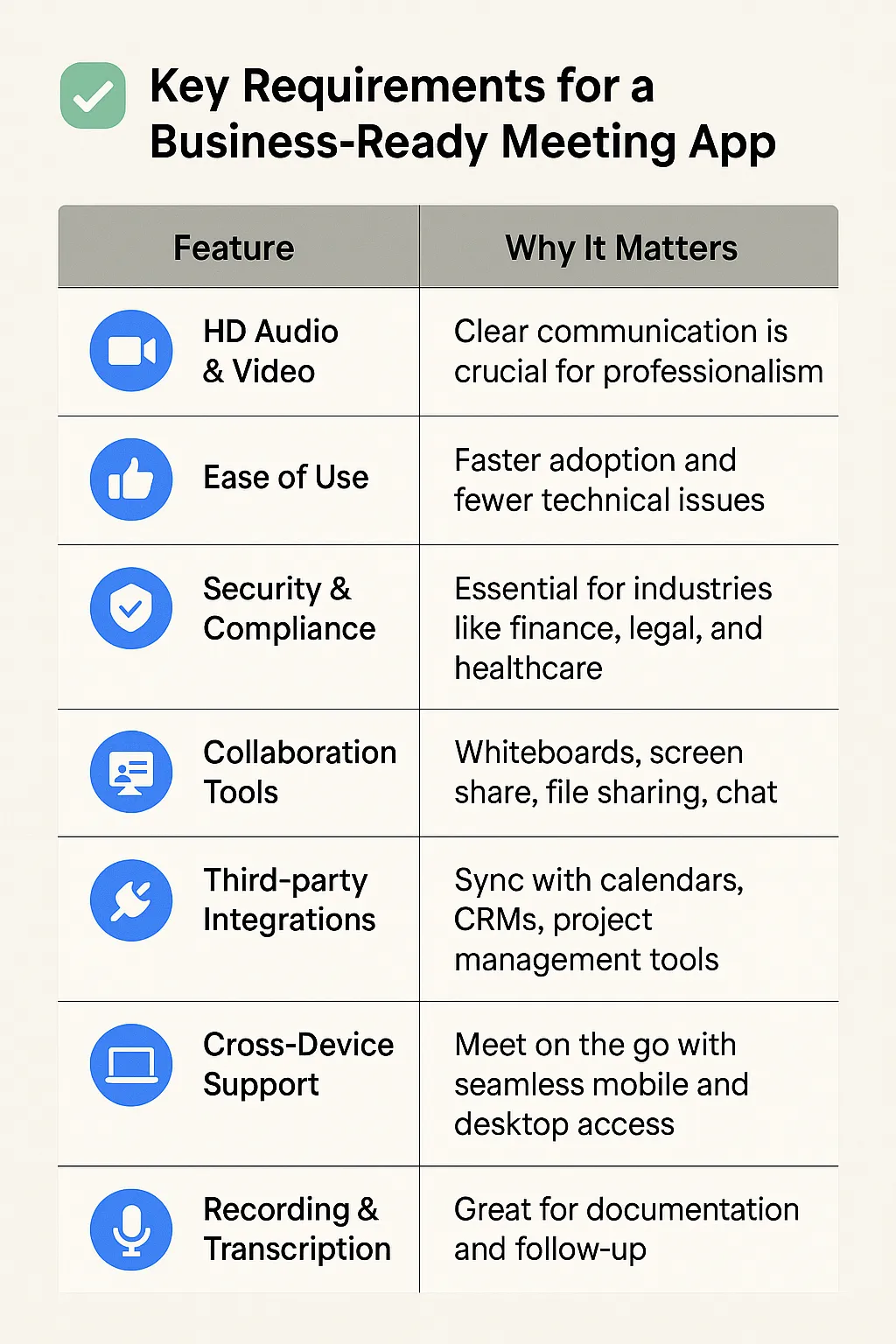
Before diving into recommendations, it's important to understand what makes a meeting tool great for business use. Here are the core features and functionalities modern businesses should look for:
✅ Key Requirements for a Business-Ready Meeting App:
Why Not All Meeting Apps Are Created Equal
In a market flooded with video conferencing tools, each app brings its own unique strengths. While some focus on simplicity and ease of use, others cater to enterprise-grade security or deep workflow integrations. Selecting the right tool hinges on understanding your team’s specific meeting style, collaboration needs, and tech ecosystem.
Let’s break down the top 5 meeting apps in 2025, highlighting their key features, benefits, and ideal use cases — with a comparison table to make the decision even easier.
🔍 Top 5 Business Meeting Apps (Detailed Breakdown)
How to Choose the Right Meeting App for Your Business
Choosing the ideal meeting app isn’t just about picking the most popular platform — it’s about aligning the tool with your company’s structure, size, and communication needs. Different types of businesses prioritize different features, from affordability and ease of use to security and advanced collaboration tools. Below is a quick reference guide to help you match the right solution with your business type.
One of Zoom’s biggest strengths lies in its ability to integrate with powerful collaboration hardware — especially when brainstorming and visual ideation are involved.
Imagine running a remote design sprint, team strategy session, or product planning meeting where everyone — whether in the room or across the globe — can sketch ideas, annotate diagrams, and interact in real time. That’s where Zoom + Smart Whiteboards shine.
💡 Enter NearHub: a next-generation smart whiteboard that comes with native Zoom integration. With NearHub, you can host Zoom meetings directly on the board, share your screen wirelessly, and collaborate on a digital canvas with your team — no messy cables or clunky setups.
“It’s like bringing your Zoom room into a giant touchscreen — meetings become more interactive, ideas flow faster, and hybrid collaboration feels natural again.”
Whether you're leading a creative workshop, a sales demo, or remote onboarding, Zoom + NearHub makes every meeting feel like you’re in the same room.
Final Thoughts: Build Meetings That Work for You
The best meeting app isn’t the one with the most features — it’s the one that fits seamlessly into your team’s daily flow, scales with your growth, and empowers meaningful collaboration. Whether you’re a startup looking for simplicity or an enterprise demanding robust security and integrations, today’s tools offer something tailored for you.
By aligning your business goals with the right platform — and even enhancing your setup with smart hardware like NearHub — you’re not just hosting better meetings. You’re building a smarter, more connected way to work.