topmost

Back-to-School Deals are Here — Save Big on Your Board

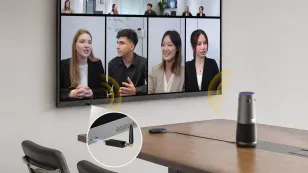
No Installer, No Hassle, Just Works with Nearity 360 Alien

Unlock $300 Worth Free Shipping?

Go Big and Beyond with the New Win11 Pro NearHub Board!

NearHub Release Note V1.0.9.1

In an effort to improve user experience and system performance, NearHub has undergone three rapid iterations in the recent past, and we're pleased to announce the release of the latest version of NearHub, 1.

NearHub
Release Note
Updated: Aug 19, 2026 · 8 minutes read
Global Business, Brought Near. No Installer, No Hassle, Just Works.
In an effort to improve user experience and system performance, NearHub has undergone three rapid iterations in the recent past, and we're pleased to announce the release of the latest version of NearHub, 1.0.9.1, which includes important updates and improvements to the system and software. Here are the key highlights of our three release updates from version 1.0.8.8 to 1.0.9.1.

NearHub OS:

  1. New Feature - Added NearHub Tail screen mirroring option: Simply attach the Tail to your conference room whiteboard, then plug it into your computer to experience swift and seamless screen casting, which can elevate your meeting and presentation efficiency.https://resource.auditoryworks.co/server/nearhub/images/e59e801e-99cc-4ec7-a234-68cac7f8149c.gif
https://resource.auditoryworks.co/server/nearhub/images/e98b226e-2d37-47cc-b13a-fb6294a457c3.gif
  1. New Feature - Added default video conferencing switching function:We've added default toggle support for popular video conferencing platforms, including Tencent Meet, Zoom, Google Meet, Microsoft Teams, Webex Meet, and VooV Meeting, in the settings so users can join a meeting more quickly from the home page.
https://resource.auditoryworks.co/server/nearhub/images/6f2a97f4-e790-4174-94df-c1c92c58e571.gif
  1. Optimization - Improved the logic for determining the default language during startup: We have improved the initial language selection at startup and simplified the bootstrap process to allow users to get into system use more quickly.
  2. Optimization - Performance Optimization: We have significantly improved the speed and stability of firmware updates through OTA version updates, so you can get the latest system features and improvements faster and more reliably.
  3. Optimization - Optimized the display of default audio and video device descriptions: we optimized the display of default audio and video device descriptions within the system, so that users can more clearly understand the status of the device and its connection, and freely select them to be accessed.
  4. Bug Fix 1: We removed the useless NearHub Tail icon, further simplified the user interface, and improved the clarity and smoothness of operation.
  5. Bug Fix 2: We fixed the problem that AirPlay can't cast screen in special scenarios to ensure that Apple users can use the casting function smoothly.https://resource.auditoryworks.co/server/nearhub/images/bddec8a8-e2a2-4b42-aec6-a2261c769899.gif

NearHub Canvas:


  1. New Feature - Circle Selection: We've added a new Circle Selection feature, which now allows you to easily select and edit line elements, drag and delete them freely, greatly enhancing the flexibility and convenience of user operations on the whiteboard.https://resource.auditoryworks.co/server/nearhub/images/21557b16-9df5-4111-97db-52aa64726faa.gif
  1. New Feature - Palm Erase: We added the palm erase feature, which allows users to erase more naturally and improves the smoothness of writing and editing on the whiteboard.https://resource.auditoryworks.co/server/nearhub/images/b2db145d-7560-4421-b7fe-29cc81d7ff89.gif
  1. New Feature - Export PDF: We have introduced the PDF export function, now you can easily share your whiteboard content via QR code or email, which facilitates the exchange and sharing of information between you and others.https://resource.auditoryworks.co/server/nearhub/images/d2fc4275-1f88-4471-941c-e6aaa654ab96.gif https://resource.auditoryworks.co/server/nearhub/images/7a8d93eb-73d2-445b-8aef-c488cf279c7c.gif
  1. Optimization - Optimized Drag-and-Drop Experience: We optimized the drag-and-drop experience to improve the smoothness and responsiveness when using the whiteboard on a large screen.
  2. Optimization - Support local whiteboard upload with large data volume: We have optimized the local whiteboard upload function and now support uploading with larger data volume, which makes it easier for users to save and share whiteboard content.https://resource.auditoryworks.co/server/nearhub/images/588cb55e-9e5f-439b-a9c1-7e1e50929d56.gif
 
We believe that these updates will bring users a more convenient, smooth and enjoyable experience. If you find any bugs or features that need optimization during your product experience, feel free to submit a ticket at any time. We will continue to work hard to improve and refine NearHub's system and software to meet the needs and expectations of our users. We also welcome everyone to join our NearHub Community for in-depth communication. Thank you for your support and trust in NearHub!


If you have any questions or feedback about these updates, please feel free to contact our customer service team.
 

Author:By The NearHub Team

Share To:
More interesting articles for you