Join Teams Meeting Online: How Clear Audio Reduces Meeting Fatigue
Discover why poor audio drains your energy when you join Teams meeting online, and how the right wireless headset can sharpen focus, cut fatigue, and improve every call.
Remote Work
Business Headsets
Meeting Productivity
Updated: Aug 20, 2026 · 8 minutes read
Global Business, Brought Near.
No Installer, No Hassle, Just Works.
Back-to-back virtual meetings can leave you exhausted even when your schedule does not seem overwhelming. The hidden reason is often poor audio — your brain spends extra energy decoding unclear voices, filtering background noise, and compensating for connection issues. This guide explains how audio quality affects remote work fatigue, what makes a headset ideal for online meetings, and how the Nearity EP320 helps professionals stay focused, comfortable, and clearly heard throughout the workday.
Key Takeaways
Meeting fatigue is often caused by poor audio quality that increases cognitive load during online calls.
A professional bluetooth communication headset reduces distractions with clearer sound and better voice pickup.
The most important features for remote work are noise-cancelling microphones, wireless stability, and all-day comfort.
Bluetooth 5.4 + USB dongle connectivity provides reliable performance for Teams, Zoom, and Webex meetings.
Nearity EP320 delivers 4-mic AI noise cancellation, 35-hour talk time, and a comfortable design for long meeting days.
When you join Teams meeting online for the fourth time in a day, the exhaustion is rarely about the agenda. It is about the audio. A colleague's voice drops into a murmur, a dog barks on someone's open mic, and your laptop speakers flatten every word into a tinny blur. By the end of the call you feel drained, even though you barely spoke.
This is meeting fatigue, and sound is one of its biggest hidden drivers. The good news is that it is also one of the most fixable. A reliable bluetooth communication headset removes the audio friction that quietly taxes your brain, so you can stay focused, be heard clearly, and actually finish a workday with energy to spare. In this guide we break down why poor audio makes remote meetings harder, what it costs your productivity, and how to choose a headset that makes every virtual call feel effortless.
Why Poor Audio Makes It Harder to Join Teams Meeting Online
When you join a Teams meeting online, your brain is doing far more work than it does in a face-to-face conversation. In person, you rely on subtle cues: lip movement, direction of a voice, the small pauses between speakers. A video call strips most of those away, and bad audio strips away the rest.
The core problem is cognitive load. Research on videoconferencing fatigue consistently points to cognitive overload as a root cause — when audio is unclear, your working memory has to fill in the gaps, decoding muffled syllables and separating speech from background noise in real time. That decoding is unconscious, but it is expensive. It is the same reason a phone call in a moving car feels harder than one in a quiet room, except remote workers repeat it six or eight times a day.
Poor audio shows up in familiar ways:
Muffled or compressed voices that force you to concentrate just to make out individual words.
Echo and delay that make you second-guess when to speak, creating awkward overlaps and silences.
Background noise — typing, fans, traffic, coworkers, kids — that competes with the speaker for your attention.
"You're on mute" moments and constant reconnection, which break the flow of thought.
Each of these is a small interruption, but they compound. By the third call, your attention is fragmented; by the fifth, you are no longer listening so much as struggling to hear.
This is why so many professionals describe the end of a remote meeting day as a different kind of tired than office work. The meeting itself was not harder — the listening was. And unlike a slow internet connection, you cannot simply wait out audio fatigue. Your brain never stops trying to make sense of the sound, which is exactly why investing in a proper headset with noise cancelling mic pays off from the very first call.
The Hidden Impact of Audio on Remote Work Productivity
Audio quality does not just affect how you feel — it affects what you get done. When every call demands extra concentration, the cost shows up across your entire workday.
Listening fatigue erodes comprehension. When speech is unclear, you retain less. Action items get missed, decisions have to be re-explained, and follow-up emails multiply. A meeting that should have settled a question instead generates three more, because nobody fully heard the answer.
Background noise damages your professional presence. If teammates hear your dog, your doorbell, or your neighbor's lawnmower, they unconsciously trust the message less — and you spend the call apologizing for your environment instead of contributing. A noise cancelling headphone for work removes that friction, letting you speak with the same authority you would in a conference room.
Repeated strain builds across the day. A single bad call is manageable. Five bad calls back-to-back leave you foggy, irritable, and less effective at the focused work that follows. Many remote workers blame "too many meetings" when the real culprit is "too much effort listening through bad audio."
The productivity math is straightforward: the less mental energy you spend decoding sound, the more you have for the actual content of the meeting — and for the deep work afterward. Clearer audio means shorter, sharper calls, fewer repeats, and a calendar that finally feels sustainable.
What Makes a Good Headset for Online Meetings?
Not every headset is built for the demands of remote work. A gaming headset, a pair of music earbuds, and a purpose-built business headset can all produce sound, but only one is engineered for clear two-way conversation across long days. When you are shopping for the best headset for video calls, look for these core qualities.
Effective noise cancellation. The microphone matters as much as the speakers. A bluetooth noise cancelling headset with mic positions a noise-cancelling boom mic close to your mouth to isolate your voice and suppress everything else, so callers hear you, not your room. Multi-mic arrays with dedicated DSP processing outperform single-mic designs by a wide margin.
Comfort for all-day wear. Remote workers wear headsets for hours. Pillow-soft ear cushions, an adjustable padded headband, and a lightweight build prevent the pressure points that make you want to rip the headset off by 3 p.m. A rotatable boom mic that works on either ear adds flexibility.
Reliable wireless connectivity. Bluetooth 5.4 offers faster pairing, a more stable link, and lower latency than older standards. A range of roughly 30 feet lets you grab a coffee mid-call without dropping the connection, and multi-point pairing lets you switch between a laptop meeting and a phone call instantly.
Battery life that outlasts your day. Anything under 20 hours is a liability for back-to-back meetings. Look for 30 hours or more of talk time, ideally with a charging stand so the headset is always ready when you are.
Broad compatibility. The headset should work with the platforms you actually use — Teams, Zoom, Webex — and connect to PC, Mac, phone, and tablet through a dongle, Bluetooth, or USB cable. Plug-and-play setup means no software drivers and no IT tickets.
Nearity EP320: A Better Audio Solution for Remote Meetings
The Nearity EP320 is built specifically for the problems we have just described. It is an enterprise-grade dual-ear wireless business headset designed for office, home-office, and call-center use, and it pairs naturally with the platforms remote workers live in.
At its core is an AI-powered environmental noise cancellation (ENC) system. A four-microphone array feeds a HiFi5 DSP processor running a compressed neural network trained on extensive noise data, suppressing up to 99.9% of background sound. In practical terms, callers hear your voice — not your typing, your fan, or the chaos of a busy household. For anyone who has ever muted themselves to hide a barking dog, that is the difference between a stressful call and a smooth one.
Connectivity is where the EP320 solves a common remote-work headache. Bluetooth 5.4 delivers a stable link up to 33 feet, and multi-point pairing lets you stay connected to both your computer and your phone at once — so an incoming call can be answered without dropping out of a meeting. For computers without reliable Bluetooth, the included USB dongle provides a plug-and-play wired-wireless bridge. You can also fall back to a USB-C cable for a zero-latency wired connection, which means you are never one dropped signal away from silence. This makes it a genuinely dependable professional wireless noise cancelling Headset rather than a consumer gadget.
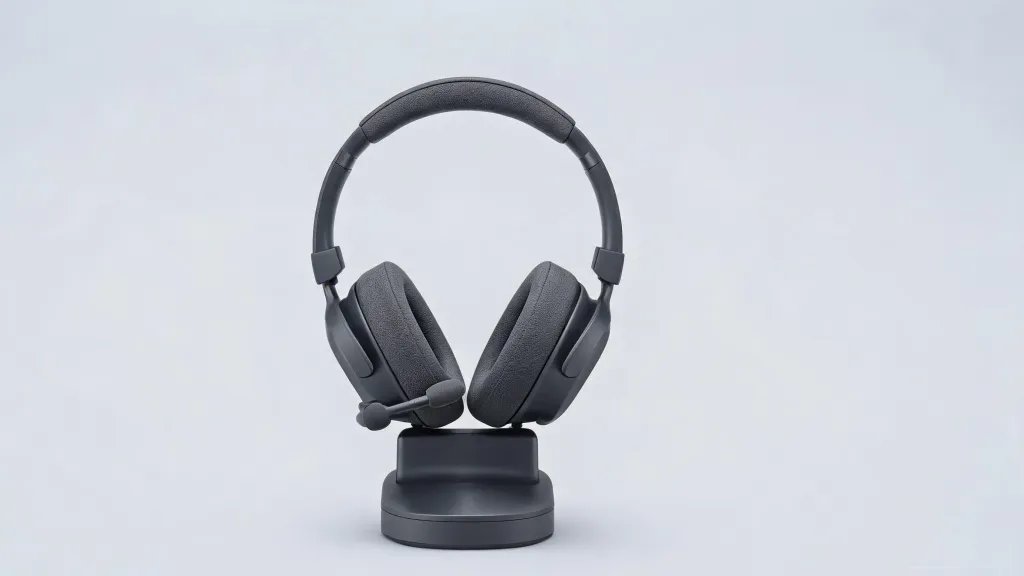
Battery life is another quiet advantage. The EP320 delivers up to 35 hours of continuous talk time and 45 hours of music playback on a single charge, with a charging stand that keeps it topped up between calls. For hybrid workers who split their week between home and office, that eliminates the daily "did I charge my headset?" anxiety. Intuitive controls — a multi-function button and a dedicated hardware mute button — let you manage calls without reaching for your mouse, which keeps you present in the conversation instead of fumbling with settings.
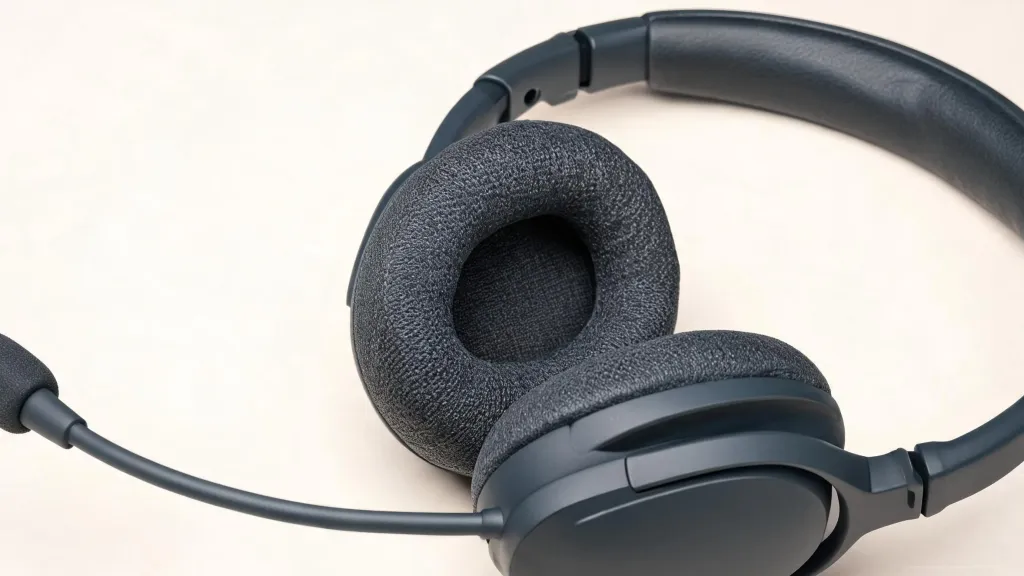
Comfort is engineered for the long haul. Pillow-soft ear cushions, a stretchable headband with a padded leather sling, a 250° rotatable boom mic, and 180° rotatable ear cups accommodate different head shapes and wearing preferences. It works with Windows, Mac, Linux, Android, and iOS, and is certified-ready for Teams, Zoom, and Webex. Priced well below premium competitors while offering a four-mic array and a charging stand in the box, the EP320 is a practical wireless headphone with noise cancelling mic for anyone whose work happens on calls.
How to Choose the Best Wireless Headset for Online Meetings
Once you understand the criteria, choosing the best wireless headset for online meetings comes down to matching features to how you actually work. Use this comparison to frame your decision.
Priority
What to look for
Why it matters
Call clarity
4-mic ENC array + HiFi5 DSP
Callers hear your voice, not your room
Comfort
Soft cushions, padded headband, <250g feel
Survives back-to-back calls without pain
Connectivity
Bluetooth 5.4 + USB dongle + USB-C
Never loses a call to a weak signal
Battery
30+ hours talk time + charging stand
No mid-day charging anxiety
Compatibility
Teams, Zoom, Webex; PC/Mac/mobile
Works with every tool you already use
A few use-case notes can sharpen the choice. If you take calls from a busy open office or a shared home, prioritize the strongest noise cancellation — a noise cancelling headphone with mic for office environment should suppress speech, typing, and HVAC hum, not just low rumble. For customer-facing roles with near-constant calls, battery life and comfort move to the top; a noise cancelling headphone for call center style workload demands a headset that lasts a full shift and stays comfortable under it. If you travel between locations, multi-point Bluetooth and a wide wireless range let you stay connected while moving.
The market is full of headsets that excel at one thing — great music, great looks, great battery — but falter on the fundamentals of conversation. The best noise cancelling headset for remote work is the one that handles the unglamorous basics flawlessly: your voice is clean, your ears are comfortable, the connection holds, and the battery outlasts you. By that standard, a purpose-built headset for work like the EP320 covers every base without the premium-tax of fashion-forward brands.
FAQs
Why do I feel so tired after joining Teams meetings online?
Meeting fatigue is usually driven by cognitive load. When audio is muffled, echoey, or noisy, your brain works overtime to decode words and separate speech from background sound. That hidden effort, repeated across several calls, drains your attention before the day is done.
Can a better headset really reduce meeting fatigue?
Yes. Active noise cancellation and a noise-cancelling microphone remove the distractions your brain would otherwise filter out. Clearer incoming audio and cleaner outgoing voice mean less effort on every call, which adds up to noticeably less fatigue over a full day.
Is the Nearity EP320 compatible with Microsoft Teams?
Yes. The EP320 works with Microsoft Teams, Zoom, Webex, and other leading platforms. It connects via USB dongle, Bluetooth 5.4, or USB-C cable and is compatible with Windows, Mac, Linux, Android, and iOS.
What should I look for in the best wireless headset for online meetings?
Focus on noise-cancelling microphones, all-day comfort, reliable wireless range, long battery life, and broad platform compatibility. Multi-point Bluetooth that switches between a laptop and a phone is especially useful for hybrid work.
How long does the Nearity EP320 battery last?
The EP320 delivers up to 35 hours of continuous talk time and up to 45 hours of music playback on a single charge, with an included charging stand for easy top-ups between calls.