Headset with Mute Button: Why Nearity EP320 Is the Best Choice for Work Calls
This article explores why the Nearity EP320 is the best headset with mute button, highlighting its noise cancellation, comfort, and productivity benefits for work calls.
mute button
work calls
Updated: Aug 19, 2026 · 5 minutes read
Global Business, Brought Near.
No Installer, No Hassle, Just Works.
Have you ever been in the middle of a high-stakes Zoom call when your dog starts barking or a delivery driver rings the doorbell? We’ve all been there. Finding the "mute" icon on a cluttered screen while panicking is a recipe for stress. That is why a physical headset with mute button is no longer just a luxury—it is a workplace necessity.
In this comprehensive article, we will explore why the Nearity EP320 stands out as the premier choice for professionals. We’ll dive deep into its noise-canceling capabilities, ergonomic design, and most importantly, how its intuitive controls help you reclaim command over your virtual meetings.
Key Takeaways
Physical headset with mute button provides faster control and reduces interruptions during calls.
Nearity EP320 delivers clear voice with AI noise cancellation for professional communication.
Ergonomic design ensures all day comfort for long meetings and remote work.
Plug and play compatibility makes it easy to use across Zoom Teams and other platforms.
The Critical Need for a Headset with Mute Button in the Modern Office
The shift toward hybrid work has transformed our homes into offices, but homes aren't built for silence. According to a study by Stanford University, remote work productivity is heavily dependent on the quality of the technical setup. A reliable headset with mute button is the first line of defense against domestic distractions.
Why Physical Buttons Trump Software Controls
Speed: You can hit a physical button faster than moving a mouse to a software icon.
Certainty: Many headsets, like the Nearity EP320, provide tactile or visual feedback so you know you are muted.
Focus: Staying "in the zone" is easier when you aren't hunting for UI elements during a presentation.
Introducing the Nearity EP320: A Professional Powerhouse
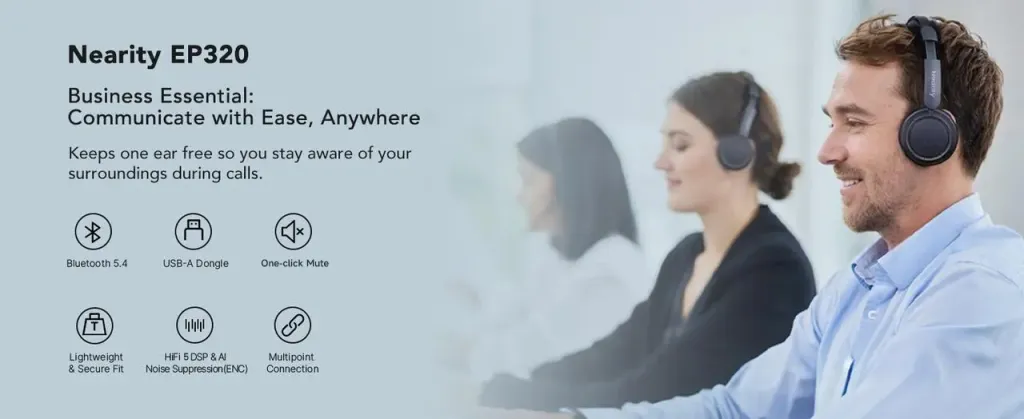
When looking for a noise cancelling headphone for work, the Nearity EP320 immediately grabs attention. It isn't just a pair of headphones; it is a communication tool engineered for clarity.
The EP320 is designed specifically for the "Power User"—someone who spends 4+ hours a day in meetings and requires a noise cancelling headphone with mic for office use that won't fatigue their ears or fail during a critical pitch.
Key Specifications at a Glance
Dual-Microphone Array: Advanced beamforming technology to isolate your voice.
AI Noise Reduction: Filters out up to 50dB of ambient background noise.
Plug-and-Play: USB-A/USB-C connectivity for instant setup.
Ergonomic Build: Memory foam ear cushions for all-day comfort.
Why the Nearity EP320 is the Best Headset with Mute Button
What makes a headset with mute button "the best"? It comes down to placement and reliability. On the Nearity EP320, the headset mute button is positioned for instinctual access. You don't have to look for it; your thumb finds it naturally on the inline controller.
The Anatomy of the EP320 Mute Function
The mute button for headset users on the EP320 is integrated into a sleek inline control pod. This pod includes:
Dedicated Mute Toggle: A large, tactile button that provides immediate silence.
LED Status Indicator: A clear visual cue (usually red) that confirms your status, preventing the dreaded "You're on mute!" awkwardness.
Volume Up/Down: Independent of system volume for finer control.
Feature
Nearity EP320
Standard Office Headset
Mute Control
Dedicated Physical Inline
Software-only or small side button
Visual Feedback
Yes (LED Indicator)
No (Check screen only)
Noise Cancellation
50dB AI-Driven
Basic Passive Only
Connection
USB-A/C Dual
Single USB or 3.5mm
Build Quality
Professional Grade
Consumer Grade Plastic
Solving the "Ambient Noise" Problem in Open Offices
Open offices were designed for collaboration but often result in cacophony. A Professional Wireless Noise Cancelling Headset (or a high-end wired one like the EP320) is essential for maintaining professional standards.
Research from Oxford Economics suggests that noise is the single biggest distraction in the workplace, reducing employee satisfaction and performance. The Nearity EP320 addresses this with its specialized mic boom.
How the AI-Mic Works
Step 1: The primary mic captures your voice.
Step 2: The secondary mic monitors environmental noise (clacking keyboards, HVAC, chatter).
Step 3: The onboard processor in the EP320 subtracts the noise from the voice signal.
Step 4: Your clients hear only your voice, crisp and clear.
Ergonomics and All-Day Comfort: More Than Just a Mute Button
While the headset with mute button functionality is the star of the show, comfort is what keeps you wearing it. The Nearity EP320 features an adjustable headband and pivoting ear cups.
Comfort Features of the EP320
Protein Leather Ear Pads: Soft to the touch and breathable to prevent heat buildup.
Lightweight Frame: Engineered to distribute pressure evenly across the head.
Adjustable Boom: The microphone rotates 270 degrees, allowing you to wear it on the left or right side.
Compatibility: Does Your Headset Work with Everything?
Nothing is more frustrating than a headset mute button that works on Zoom but fails on Microsoft Teams. The Nearity EP320 is engineered for universal compatibility.
Tested Platforms
Microsoft Teams: Fully integrated for seamless muting.
Zoom: Certified for high-fidelity audio.
Google Meet: Instant recognition with no driver installation.
Skype/Webex: Reliable performance across legacy and modern VoIP tools.
Maximizing Productivity with a Headset Mute Button
A mute button for headset workflows isn't just about silence; it's about multitasking. In a world of "back-to-back" meetings, the ability to mute quickly allows you to:
Take a quick sip of water without "gulping" into the mic.
Briefly consult with a colleague in the room without the client hearing.
Clear your throat or cough without interrupting the speaker.
Using the Nearity EP320 ensures that these transitions are silent and professional. The tactile feedback of the headset mute button gives you the confidence to manage your environment while remaining fully present in the digital space.
Value Proposition: Why Invest in the Nearity EP320?
When you choose the Nearity EP320, you aren't just buying hardware; you're investing in your professional image. A high-quality headset with mute button prevents the "unprofessional" moments that can undermine your authority.
Long-term Benefits
Durability: Unlike cheap consumer headphones, the EP320 is built for the rigors of daily 9-to-5 use.
Audio Quality: Enhanced drivers provide rich audio for both calls and focus music.
Ease of Use: No batteries to charge and no Bluetooth pairing issues to troubleshoot.
Conclusion
The Nearity EP320 is more than just a headset with mute button; it is a comprehensive solution for the challenges of the modern workspace. By combining industry-leading AI noise cancellation with intuitive physical controls and all-day comfort, it empowers professionals to communicate with confidence and clarity, regardless of their surroundings.
Whether you are working in a bustling office or a busy home, having a reliable headset mute button at your fingertips ensures that you are always in control of your voice. Upgrade to the Nearity EP320 today and experience the difference that professional-grade audio can make in your daily workflow.
FAQs
1. Why is a physical mute button better than a software mute?
A physical headset mute button provides an immediate, hardware-level disconnect. It is faster to access during emergencies and often includes an LED light so you can verify your status at a glance without looking at your meeting software.
2. Does the Nearity EP320 require special drivers for the mute button to work?
No, the Nearity EP320 is a plug-and-play device. The mute button for headset functionality is designed to work out of the box with Windows, macOS, and ChromeOS, integrating seamlessly with major platforms like Zoom and Teams.
3. Can I use the Nearity EP320 for gaming as well as work?
While designed as a noise cancelling headphone with mic for office use, the EP320's high-fidelity audio and noise-canceling mic make it an excellent choice for casual gaming and discord chats where clear communication is vital.
4. How do I know if the mute button is active on the EP320?
The Nearity EP320 features an inline controller with a clear LED indicator. When the headset mute button is pressed, the light changes color (usually to red), providing an unmistakable visual signal that your microphone is inactive.