Going Back to School? Here's How to Choose the Best Headset with Mic for Students
A comprehensive guide to choosing the right headset for school — covering wired vs wireless, noise cancellation, microphone quality, comfort, and why the Nearity EP320 stands out as a top pick for students in 2026.
Back to School
Student Headsets
Study Productivity
Updated: Aug 19, 2026 · 8 minutes read
Global Business, Brought Near.
No Installer, No Hassle, Just Works.
Back-to-school shopping usually starts with laptops and backpacks—but one essential tool is often overlooked: a reliable headset. Whether you're attending hybrid lectures, collaborating on group projects, interviewing for internships, or studying in a noisy dorm, the right headset can dramatically improve both productivity and communication. This guide explains exactly what students should look for in 2026, compares wired and wireless options, and highlights the features that deliver the best long-term value.
Key Takeaways
A dedicated headset with a quality microphone is no longer optional for students—it improves online classes, group projects, internships, and everyday communication.
When shopping during the going back to school season, prioritize microphone clarity, AI-powered noise cancellation, comfort, battery life, and flexible connectivity over price alone.
Wireless headsets with Bluetooth, USB dongles, and multi-device pairing offer the versatility students need across classrooms, dorms, libraries, and coffee shops.
Effective noise cancellation helps students stay focused in shared environments while ensuring professors and classmates hear their voices clearly.
The Nearity EP320 combines enterprise-grade AI ENC, long battery life, ergonomic comfort, and multiple connection options, making it a strong all-around headset for students.
The back-to-school season is here, and if your shopping list still reads "laptop, notebooks, backpack," you might be overlooking one of the most impactful tools for academic success: a quality headset with mic for laptop use. Whether you're attending hybrid lectures, joining study groups over Zoom, recording presentations, or simply trying to focus in a noisy dorm, the right headset can transform your entire learning experience.
This guide walks you through every factor that matters — from noise cancellation and microphone clarity to comfort during marathon study sessions — so you can make a confident, informed choice during your back to school shopping. We'll also take a close look at one model that consistently ranks among the best headsets for students: the Nearity EP320.
Why a Dedicated Headset Matters for Students
Your laptop's built-in microphone and speakers might seem adequate for casual calls, but they fall short in almost every academic scenario. Built-in mics pick up keyboard clicks, room chatter, and HVAC hum, then broadcast all of it to your classmates and professors. Built-in speakers project audio into an open room — not ideal for shared living spaces or library study sessions.
A dedicated headset solves both problems. The directional microphone captures only your voice, while the over-ear drivers deliver clear audio directly to you. For students who regularly participate in online classes, this isn't a luxury — it's a practical necessity. Beyond academics, a good headset for work and study sessions doubles as your tool for remote internships, freelance gigs, podcast projects, and casual gaming during downtime. Thinking of it as a multi-purpose investment rather than a single-use purchase makes the value proposition much clearer.
Key Features to Look For When Choosing a Student Headset
Not all headsets are created equal, and the cheapest option on the shelf rarely delivers the experience you need. Here are the features that actually make a difference for students.
Microphone Quality and Noise Cancellation
This is the single most important feature for any student headset. If your professors and classmates can't hear you clearly, the entire point of having a headset is undermined. Look for a headset with noise cancelling mic that uses multiple microphones — ideally three or more — to distinguish your voice from background sounds.
The technology behind this matters. Entry-level headsets use simple noise gating (they mute when you're not speaking), which creates awkward cutouts. Better models use AI-powered environmental noise cancellation (ENC) that continuously filters out typing, fan noise, conversations, and other ambient sounds in real time. The best systems, like the Nearity EP320's four-mic array powered by a HiFi5 DSP processor, can suppress up to 99.9% of background noise — meaning your voice comes through clearly even if you're studying in a bustling coffee shop.
For comparison, a professional noise cancelling headphone with mic for office typically uses similar multi-mic ENC technology, and bringing that same capability to your academic setup gives you a noticeable advantage in virtual classrooms.
Connectivity Options: Wireless, Wired, or Both
Your connection choice affects daily convenience more than you might expect.
Wireless (Bluetooth) headsets give you freedom to stand up, stretch, or grab a drink during long lectures without losing audio. Bluetooth 5.4, the latest standard, offers improved range (up to 33 feet) and more stable connections than older versions. Look for best noise cancelling headset models that support multi-point connection — this lets you pair with both your laptop and phone simultaneously, automatically switching audio between devices as calls come in.
Wired headsets are simpler: plug in and they work. No charging, no pairing, no latency. They're ideal if you prefer a set-it-and-forget-it approach. Many models offer both a USB dongle for wireless use and a USB-C cable for wired mode, giving you maximum flexibility.
USB dongles deserve special attention. If your laptop lacks Bluetooth — or if Bluetooth interferes with your Wi-Fi connection — a dedicated 2.4 GHz USB dongle provides a rock-solid wireless connection with near-zero latency. This is particularly important for real-time collaboration during group projects.
Battery Life That Lasts Through Your Schedule
If you choose a wireless headset, battery life becomes a critical spec. Consider your typical school day: a morning lecture, an afternoon study group, an evening online class, and maybe a collaborative project session at night. That's easily six to eight hours of active headset use.
Look for a model that delivers at least 30 hours of battery life on a single charge. The Nearity EP320 offers up to 35 hours of talk time and 45 hours of music playback — more than enough for a full week of classes on a single charge, even with daily use. Models that include a charging stand are particularly convenient, since you can simply drop the headset onto the stand at the end of the day and pick it up fully charged the next morning.
Comfort for Marathon Study Sessions
Comfort is easy to underestimate until you've worn an uncomfortable headset for three hours. For students who regularly spend long periods in online classes or study sessions, these ergonomic factors make a real difference:
Ear cushion material: Memory foam with a breathable fabric or leatherette covering provides the best balance of comfort and noise isolation. Pillow-soft cushions reduce pressure around the ears during extended wear.
Headband adjustability: A stretchable headband with a padded sling distributes weight evenly across the top of your head rather than concentrating it at one pressure point.
Clamp force: The headset should stay secure during normal movement without pinching. Models with 180° rotatable ear cups accommodate different head shapes more naturally.
Weight: Lighter headsets (under 250 grams) cause less fatigue over time.
A Professional Wireless Noise Cancelling Headset designed for enterprise use often prioritizes these comfort features because office workers wear them eight hours a day — and students can benefit from that same engineering.
Wired vs. Wireless Headsets: Which Is Better for Students?
The wired-versus-wireless debate comes down to your daily routine and priorities. Here's how they compare across the factors that matter most to students:
Feature
Wireless Headsets
Wired Headsets
Freedom of movement
Excellent — move around during lectures
Limited — must stay near device
Battery management
Requires charging (30–45 hr typical)
No charging needed
Connection stability
Very good with Bluetooth 5.4 or USB dongle
Consistently stable
Latency
Minimal with dongle; slightly higher with Bluetooth
Virtually zero
Price
Generally $80–$150
Generally $30–$80
Multi-device use
Easy with Bluetooth multi-point
One device at a time
For most students in 2026, a wireless headphone with noise cancelling mic is the stronger choice. The convenience of moving freely during long classes, switching between laptop and phone, and not dealing with tangled cables outweighs the slightly higher price — especially when models like the EP320 offer wired connectivity as a backup.
Wired headsets still make sense if you're on a tight budget, if you exclusively use a desktop computer, or if you simply prefer the reliability of a physical connection.
Why Noise Cancellation Deserves Special Attention
Noise cancellation isn't just about blocking distractions — it's about being heard clearly and hearing others clearly. In a typical student environment, you're dealing with multiple noise sources simultaneously: roommates talking, music from neighboring rooms, construction outside, keyboard clicking, and fan hum from your laptop.
Active Environmental Noise Cancellation (ENC) uses an array of microphones to sample ambient sounds and then digitally subtracts them from your audio feed. This is what ensures the person on the other end of your call hears only your voice. A high-quality ENC system — like the one in a noise cancelling headphone for work — can filter out 90% or more of background noise.
Passive Noise Isolation comes from the physical design of the headset: padded ear cups that create a seal around your ears, blocking outside sound from reaching your eardrums. This helps you focus by reducing what you hear, separate from what the microphone transmits.
The combination of both gives you the best of both worlds: you hear less distraction, and others hear less of your environment. For students who regularly take calls from shared spaces — dorms, apartments, libraries — this dual approach is essential.
Nearity EP320: A Close Look at a Top Student Pick
After evaluating dozens of headsets across different price points, the Nearity EP320 consistently stands out as one of the best headsets for students — especially for those who want professional-grade features without paying a premium price.
Noise Cancellation That Delivers
The EP320 uses four omnidirectional microphones paired with a HiFi5 DSP processor and a compressed neural network trained on extensive noise data. In practical terms, this means the headset actively analyzes your sound environment 60 times per second and filters out non-voice sounds with up to 99.9% effectiveness. Keyboard clicks, fan hum, background conversations, and even barking dogs are suppressed before they reach your caller's ears.
This level of noise cancellation is comparable to what you'd find in a noise cancelling headphone for call center use — environments where clear communication is mission-critical. Bringing that same technology to a student-friendly price point makes the EP320 particularly compelling.
Connectivity Without Compromise
The EP320 supports three connection modes: Bluetooth 5.4, a 2.4 GHz wireless USB dongle, and wired USB-A/USB-C via cable. The Bluetooth multi-point connection lets you pair with two devices simultaneously — your laptop for classes and your phone for personal calls — with automatic switching between them. The included USB dongle provides an alternative for laptops without Bluetooth or situations where you need the lowest possible latency.
Battery Life and Comfort Built for Students
With up to 35 hours of talk time and 45 hours of music playback on a single charge, the EP320 easily covers a full week of academic use. The included charging stand makes it simple: place it on the stand overnight, and it's ready the next day.
The EP320 features pillow-soft ear cushions, a stretchable headband with a padded leather sling, a 250° rotatable boom mic that supports both left and right wearing, and 180° rotatable ear cups. You can wear it through a three-hour lecture and a two-hour study group without the pressure or heat buildup that cheaper models cause.
What's in the Box
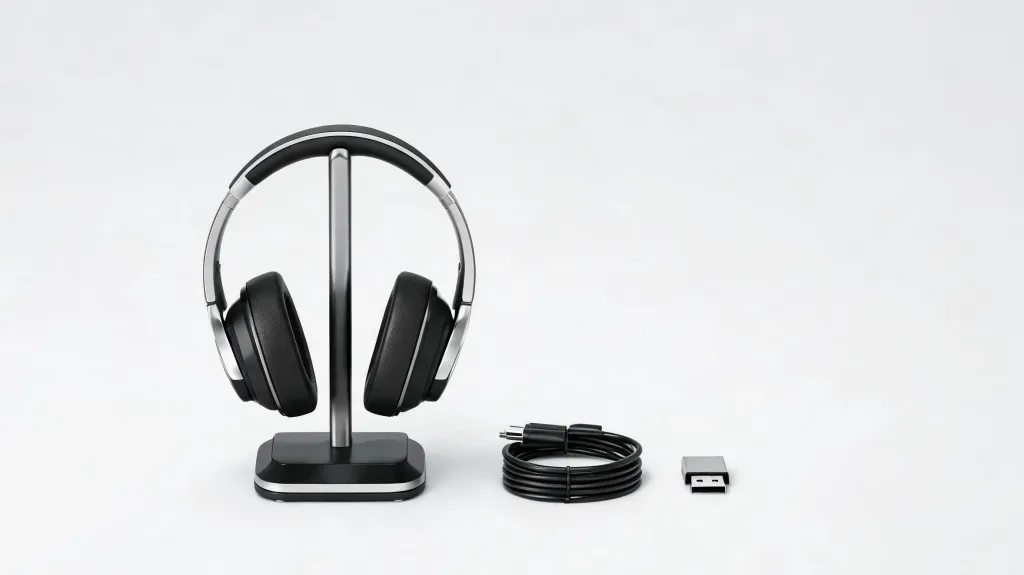
The EP320 comes with everything you need: the headset itself, a charging stand, a USB cable, a wireless USB dongle, a user manual, and a quick start guide. There's nothing extra to buy.
FAQs
What is the best headset for students in 2026?
The best headset for students should combine clear microphone quality, effective noise cancellation, all-day comfort, and reliable connectivity. If you regularly attend online classes, study in shared spaces, or participate in group projects, a wireless headset with AI-powered noise cancellation and a long battery life offers the best overall value.
Are noise cancelling headphones worth it for students?
Yes. Noise cancelling headphones for students can significantly reduce distractions in dorm rooms, libraries, coffee shops, and other shared environments. They help improve concentration during study sessions and make your voice clearer during online classes and virtual meetings.
Should students choose a wired or wireless headset?
It depends on your needs. Wired headsets provide stable audio without charging, while wireless headsets offer greater freedom of movement and easier switching between devices. For most students using laptops, tablets, and smartphones throughout the day, a wireless headset is the more versatile choice.
Can I use the same headset for studying, gaming, and online meetings?
Absolutely. Many modern headsets are designed for multiple uses. A quality headset can handle virtual classes, video meetings, music, casual gaming, and voice calls, making it a practical investment for students who want one device for everyday activities.