Top 5 Video Conferencing Equipment Benefits: Why 360° Cameras are Better for Remote Collaboration
Traditional video conferencing often leaves remote participants feeling disconnected due to 'distance bias' and limited camera views.
360 video camera 4k
video conferencing equipment
telecommuter meaning
Updated: Aug 19, 2026 · 9 minutes read
Global Business, Brought Near.
No Installer, No Hassle, Just Works.
Imagine you are joining an important quarterly meeting from your home office. You click the link, and the screen pops up. On the other end, five of your colleagues are gathered in the main boardroom. However, the camera is fixed at the end of a long table.
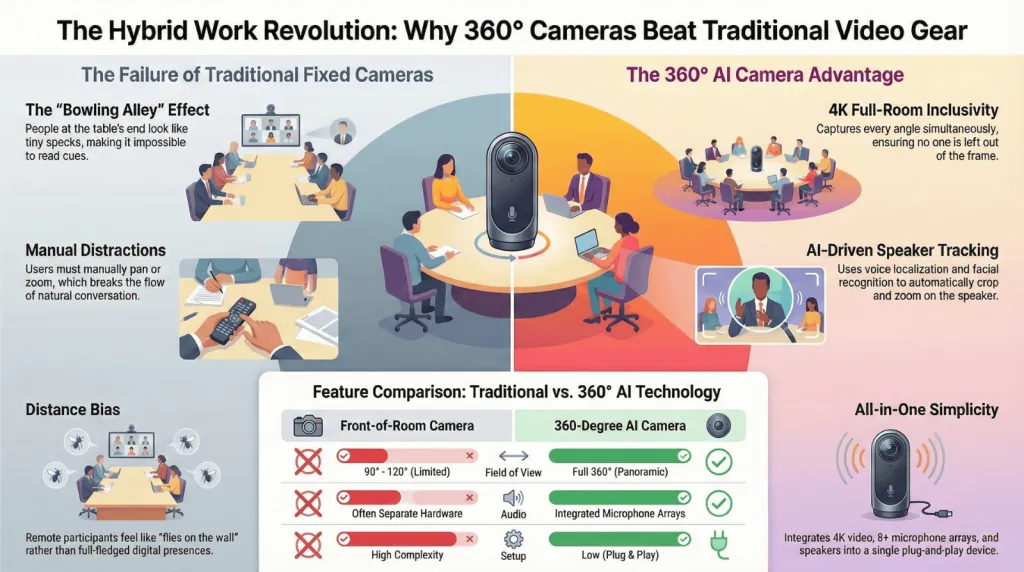
You can see the back of one person’s head, a blurry side-profile of another, and the person speaking at the far end looks like a tiny speck. You feel like a fly on the wall rather than a participant. This "distance bias" is a common frustration for the modern workforce looking for effective conference room solutions.
Choosing the right video conferencing equipment is no longer just an IT checkbox; it is the foundation of a functional hybrid culture. In this guide, we will explore why the shift toward immersive technology—specifically using a 360 meeting camera—is the ultimate solution for bridging the gap between the physical office and remote participants.
1. Achieving Meeting Equity with Advanced Video Conferencing Equipment
The shift to hybrid work has redefined our professional lives. However, the technology used in many offices hasn't quite caught up. Traditional "front-of-room" cameras often leave people at the back of the table looking like tiny specks. To solve this, companies are turning to integrated conference room solutions that prioritize inclusivity.
The Power of 360-Degree Vision
When you invest in modern video conferencing equipment, you are investing in "meeting equity." A 360-degree camera sits in the center of the table, acting as the "eyes" of the remote participants. Instead of a flat, one-dimensional view, remote workers get a panoramic perspective. This allows them to see body language, side conversations, and the general "vibe" of the room.
Real-World Inclusivity
For the modern hybrid team, the goal is to make the remote experience indistinguishable from being in the room. By placing the camera in the center of the action, you remove the "bowling alley" effect where people at the far end of the table feel disconnected. This fosters a culture where remote talent feels just as present as the executives sitting in the head office.
2. The 4K Advantage: Why Resolution Defines the Best Video Conferencing Equipment
Resolution is the foundation of professional communication. In a high-stakes environment, low-quality video translates to low-quality communication. If your camera cannot capture the subtle nuances of a speaker's expression, vital information is lost.
Why 360 Video Camera 4K is Non-Negotiable
Using a 360 video camera 4K ensures that every detail is crisp. Whether it’s a detailed architectural blueprint being held up to the camera or subtle facial expressions during a negotiation, 4K provides the clarity needed for high-stakes decision-making.
According to a report by Gartner, by 2026, 75% of enterprise users will expect high-definition video as a standard for all internal and external communications. Falling behind on this trend means risking your brand's professional image and diminishing the impact of your remote work tools.
AI-Powered Image Clarity
Modern video conferencing equipment often comes with AI-driven features. These cameras can automatically "zoom in" on the person speaking without losing clarity. Brands like Nearity have pioneered these high-definition solutions, integrating smart audio-visual tracking to make meetings feel fluid and natural.
3. Top 5 Video Conferencing Equipment Choices for 2026: The Ultimate Image Quality Review
To help you navigate the market, we’ve analyzed the five most popular cameras. In this review, we prioritize image quality (optics) and examine the technical approach each brand takes to capturing a room.
1. Nearity 360 Alien (The Professional Gold Standard)
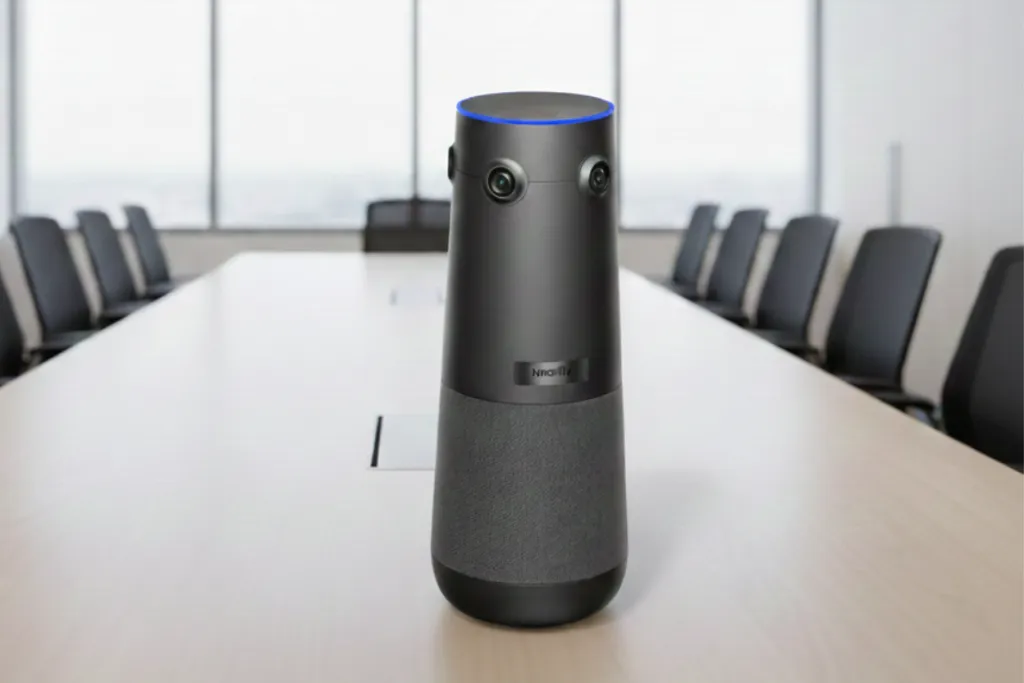
The Nearity 360 Alien takes a radically different approach to optics than traditional models. While most cameras try to capture the whole room with one lens, the Alien uses a sophisticated four-lens 120° optical array, where each lens captures its specific segment at full clarity.
Physical Excellence: 360 Alien takes a different approach: it uses a four-lens 120° optical array, each capturing its segment at full clarity.
True Frontal Angles: By using four distinct sensors, the Alien captures faces from a true frontal perspective rather than an overhead "curved" angle—delivering consistently sharp, natural images.
No Fisheye Distortion: This multi-lens architecture eliminates the blurry edges and stretched faces typical of single-lens systems. Just consistently clear 4K panoramic video that feels true-to-life.
Industry Scenarios: Ideal for Healthcare (Telemedicine) and Design Firms where high-fidelity visual data is paramount.
2. Meeting Owl 4+ (The Single-Lens Evolution)
The new owl conference camera model, the Meeting Owl 4+, is a significant brand name in the space, but it relies on a Single 360° pano fisheye camera design.
The Usable Pixel Challenge: Because a single lens must capture 360 degrees and then "unwarp" the image digitally, it often results in only ~20%-30% usable pixels.
Image Quality: While upgraded to 4K, the digital cropping required to focus on speakers can lead to blurry edges and digital noise in larger rooms.
Industry Scenarios: Best for Creative Huddles and Education where portability and an iconic design are prioritized over pure optical precision.
3. Logitech Sight (The Tabletop AI Eye)
Logitech Sight works as a companion to front-of-room systems, using a dual-lens setup to capture participants around a table.
Image Quality: Excellent color reproduction and 4K clarity, though it lacks a full 360-degree unified view on its own.
Industry Scenarios: Best for Finance and Legal sectors where board members sit at long, rectangular tables.
Key Advantage: Expertly integrates with the existing Logitech Rally ecosystem.
4. Jabra PanaCast 50 (The 180° Triple-Lens Solution)
The PanaCast 50 uses a triple-camera array to provide a 180-degree flat view of the room from the wall.
Image Quality: Crisp 4K with minimal distortion, thanks to real-time video stitching across three sensors.
Industry Scenarios: Ideal for Education/Higher Ed lecture halls where the "stage" area needs to be fully visible.
Key Advantage: Combines an ultra-wide field of view with powerful built-in audio.
5. Poly Studio V52 (The Cinematic Video Bar)
Poly focuses on the "front-of-room" experience, using high-end sensors and cinema-grade processing.
Image Quality: Exceptional color grading that makes skin tones look natural and professional.
Industry Scenarios: Best for Executive Suites and HR Recruiting, where a polished, professional first impression is vital.
Key Advantage: "DirectorAI" provides smooth, cinematic transitions between speakers.
Comparison Table: Optical Performance & Usability
Model
Sensor Type
Effective Resolution
Image Clarity
Best Industry Scenario
Nearity 360 Alien
Quad-Lens Array
✅ Full 32MP usable (8MP×4)
✅ Sharp, true-to-life
Telemedicine / Design
Meeting Owl 4+
Single Fisheye
~20%-30% usable pixels
Standard 4K (Fisheye)
Casual Collaboration
Logitech Sight
Dual-Lens
High
Crisp UHD
Corporate Boardrooms
Jabra PanaCast 50
Triple-Lens
High
Panoramic 4K
Large Lecture Halls
Poly Studio V52
Single Fixed
High
Cinematic 4K
Executive Interviews
4. Maximizing ROI: Why High-End Video Conferencing Equipment Saves Money
One of the biggest misconceptions in business is that premium hardware is an "unnecessary expense." In reality, failing to provide adequate video conferencing equipment is much more expensive in the long run.
Reduced Travel Costs and Environmental Impact
Before the rise of high-definition remote collaboration, companies spent billions on business travel. While face-to-face meetings will always have value, a premium camera system can replace 80% of routine site visits. The ROI is realized almost instantly when you calculate the cost of flights, hotels, and lost productivity.
Employee Retention and Productivity
As Harvard Business Review reports, "The quality of digital tools is now a primary factor in employee satisfaction for remote and hybrid workers." Providing top-tier remote work tools shows that you value your team's time. When technology works, it disappears, reducing cognitive load and allowing employees to focus on the agenda rather than the hardware.
5. Beyond Visuals: Superior Audio Integration in 360° Systems
We often talk about the "video" in video conferencing, but audio is actually 50% (if not more) of the experience. You can tolerate a slightly blurry image, but if the audio cuts out, the meeting is over.
Beamforming Mic Arrays and Noise Suppression
Most 360 video camera 4K units include sophisticated "beamforming" microphone arrays. These microphones are designed to ignore background noise and focus purely on human speech. Nearity, for instance, has specifically focused on deep-learning noise suppression, ensuring that even in a busy office, remote participants hear nothing but crystal-clear voices.
Full-Duplex Audio
Standard laptop microphones often struggle with "clipping," where audio cuts out if two people speak at once. Professional video conferencing equipment supports full-duplex audio, allowing for natural, simultaneous conversation without the robotic "walkie-talkie" effect.
6. Security, Setup, and Ease of Deployment for Modern Teams
In an era of cyber threats, your video conferencing equipment cannot be a weak link in your network security. Furthermore, it must be simple enough for any employee to use.
Plug-and-Play Simplicity
The IT department shouldn't have to be called for every meeting. Modern remote work tools are designed to be "driverless." You simply plug the USB cable into your laptop, and the software recognizes the device instantly. Standardizing across all branches ensures a consistent user experience regardless of location.
Privacy by Design
Many modern 360-degree cameras feature physical privacy shutters or "sleep modes" that ensure the camera isn't recording when not in use. This is a critical feature for sensitive boardrooms and private legal consultations.
7. Future-Proofing Collaboration: AI and the Next Evolution
What is next for the "telecommuter meaning"? As we look toward the future, the line between physical and digital will continue to blur, powered by AI and immersive data.
AI Summaries and Telepresence
We are already seeing video conferencing equipment that can take notes, summarize action items, and even translate languages in real-time. By having a 360-degree view of the room, AI can better attribute quotes to specific speakers. This captured data is also the first step toward true "telepresence" in virtual reality, where headsets will allow you to feel as if you are actually sitting at the table.
Choosing the Right Infrastructure
When selecting your conference room solutions, it's important to compare features and reliability. While many look for an owl conference camera, alternatives like Nearity offer superior 4K clarity and AI noise-canceling features that are essential for long-term scalability.
Frequently Asked Questions (FAQ)
What is the best video conferencing equipment for a small huddle room?
For small rooms, a 360-degree camera is still highly effective as it allows everyone to sit around a small circular table and remain in the frame. However, ensure the camera has a high-quality integrated speakerphone to save space.
Is a 4K 360 video camera necessary for standard Zoom calls?
While Zoom often compresses video, starting with a 4K source allows the AI to crop and zoom into speakers without losing significant detail. It provides a much "cleaner" digital zoom than a standard 1080p camera could ever achieve.
How does 360-degree video conferencing equipment improve remote team culture?
It reduces the "us vs. them" mentality. When remote workers can see everyone in the room clearly, they feel more included in the company culture and less like an outside observer.
Does professional video conferencing equipment require special software?
Most professional-grade tools like the Nearity 360 Alien are "UVC compliant," meaning they work natively with Zoom, Teams, and Google Meet without needing extra drivers.
What should I look for in a 360 meeting camera?
Prioritize 4K resolution, AI speaker tracking, high-quality microphone pick-up range (at least 15 feet), and ease of connectivity (USB plug-and-play).
Conclusion: Investing in Your Team's Success
Choosing the right video conferencing equipment is one of the most impactful decisions a modern business leader can make. As the "telecommuter meaning" evolves into a permanent fixture of our global economy, the tools we use to connect must be up to the task.
By moving away from static, front-of-room cameras and embracing the immersive power of a 360 video camera 4K, you are signaling to your team that their presence matters. You are removing the barriers of distance and ensuring that collaboration happens naturally, clearly, and effectively.
High-quality video conferencing equipment is the bridge that makes human connection possible in a digital world. Whether you are upgrading a single room or an entire enterprise, prioritize the tools that provide the clearest vision and the most inclusive experience.