This blog explores 2025’s top 7 cloud-based platforms for real-time team productivity, offering insights into tools like Google Workspace, Microsoft Teams, and ClickUp. With a focus on how to improve team productivity, the article highlights key benefits of cloud technology—such as real-time collaboration, automation, and centralized communication. Practical tips, product pairings (like ergonomic chairs and height adjustable desks), and FAQs make this a must-read guide for modern teams.
Feeling the Productivity Pinch?
💻 Ever find yourself juggling multiple apps, endless email threads, and scattered documents, only to wonder why your team's productivity isn't soaring? You're not alone. Many teams grapple with 🧩 fragmented tools and disjointed workflows, leading to missed deadlines and mounting frustration.
📉 So, how can you turn the tide? The answer lies in understanding 🔍 what is a cloud based platform and leveraging it to its fullest potential.
☁️ A cloud-based platform is a suite of tools and services hosted on remote servers, accessible via the internet. Unlike traditional software that requires local installation, cloud platforms offer:
✅ Real-time collaboration
🔄 Automatic updates
📈 Scalability
This means your team can work together seamlessly, regardless of:
📍 Location
💻 Device
🌍 Time zone
By embracing cloud platforms, you're not just adopting new tools—you're transforming the way your team:
🤝 Collaborates
💬 Communicates
🎯 Achieves goals
Understanding how to improve team productivity starts with recognizing the limitations of outdated systems. Cloud platforms address these challenges by:
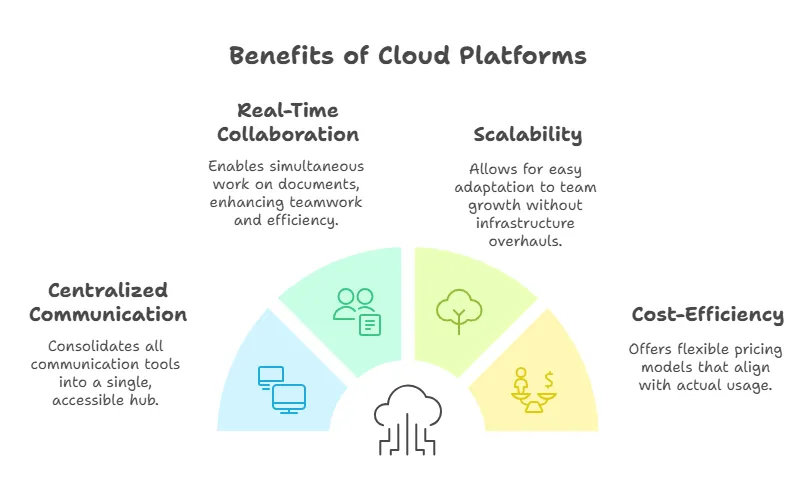
- Centralizing Communication: No more toggling between apps; everything from chats to video calls is in one place.
- Real-Time Collaboration: Multiple team members can work on the same document simultaneously, reducing version control issues.
- Scalability: As your team grows, cloud platforms adapt without the need for significant infrastructure changes.
- Cost-Efficiency: Pay for what you use, with the flexibility to scale up or down as needed.
1. Google Workspace
Google Workspace remains a powerhouse, offering tools like Gmail, Docs, Sheets, and Meet. Its real-time collaboration features ensure that teams can co-edit documents, hold video conferences, and manage calendars seamlessly.
Pro Tip: Pairing Google Workspace with ergonomic office solutions, like a motorised height adjustable desk, can further enhance productivity by promoting comfort during long work sessions.

2. Microsoft Teams
Integrated with the Microsoft 365 suite, Teams offers chat, video conferencing, and file sharing. Its deep integration with Office apps allows for smooth transitions between communication and document editing.
Pro Tip: For prolonged meetings, consider investing in a desk chair with a large seat to ensure comfort and focus.

3. Slack
Slack's intuitive interface and robust integration capabilities make it a favorite for many teams. Channels, direct messages, and app integrations streamline communication and workflow.
Pro Tip: Enhance your workspace with a 40 inch keyboard tray to maintain an organized and ergonomic setup.

4. ClickUp
ClickUp offers a unified platform for task management, document collaboration, and goal tracking. Its customizable views and automation features help teams stay aligned and efficient.
Pro Tip: For those with smaller frames, an office small chair can provide the necessary support during extended work periods.
5. Notion
Notion combines note-taking, task management, and database functionalities. Its flexible structure allows teams to create personalized workflows that cater to their specific needs.
6. Asana
Asana excels in project management, offering features like task assignments, timelines, and progress tracking. Its user-friendly interface ensures that teams can quickly adapt and stay on top of their responsibilities.
7. Trello
Trello's card-based system provides a visual approach to task management. Its simplicity and flexibility make it ideal for teams looking to organize projects without a steep learning curve.
Understanding how to improve team productivity involves more than just selecting the right tools. It's about integrating these platforms into your team's daily routines effectively.
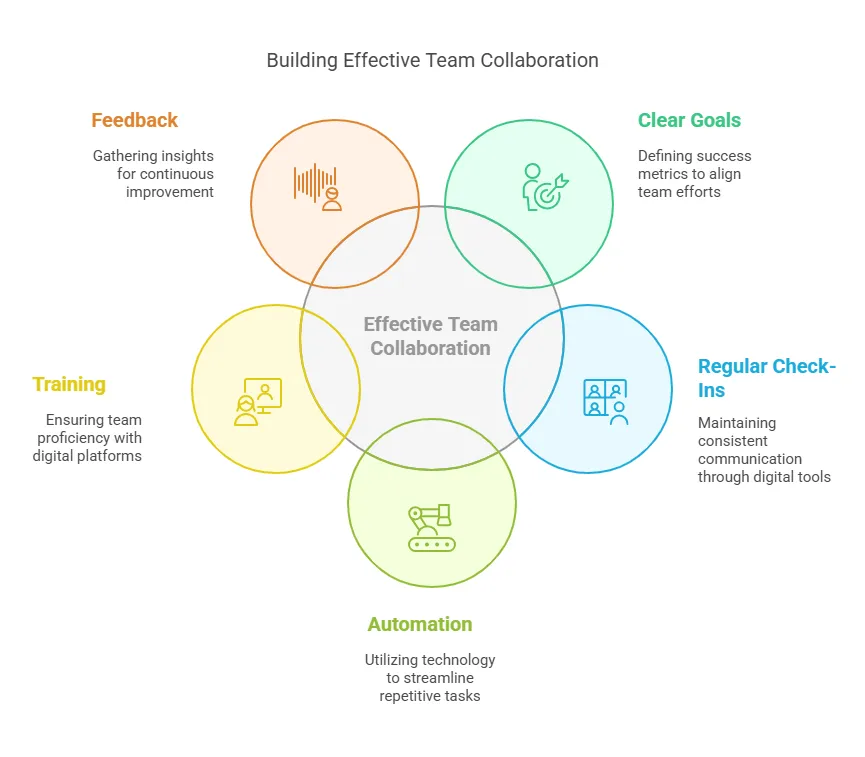
1. Set Clear Objectives
Define what success looks like for your team. Whether it's completing projects ahead of schedule or improving communication, having clear goals ensures everyone is aligned.
2. Encourage Regular Check-Ins
Utilize features like video conferencing and chat to maintain regular communication. This fosters a sense of connection and ensures that any issues are addressed promptly.
3. Leverage Automation
Many cloud platforms offer automation features that can handle repetitive tasks, such as sending reminders or updating statuses. This frees up time for more strategic work.
4. Provide Training
Ensure that all team members are comfortable using the chosen platforms. Regular training sessions can help maximize the tools' potential and address any challenges.
5. Solicit Feedback
Regularly gather feedback on the tools and processes in place. This allows for continuous improvement and ensures that the platforms are meeting the team's needs.
FAQs
Q1: What is a cloud based platform?
A cloud based platform is a collection of tools and services hosted online, allowing users to access and collaborate on projects in real-time from any location.
Q2: How can cloud platforms improve team productivity?
By centralizing communication, enabling real-time collaboration, and offering scalable solutions, cloud platforms streamline workflows and reduce inefficiencies.
Q3: Are cloud platforms secure?
Yes, reputable cloud platforms implement robust security measures, including data encryption and regular backups, to protect user information.
Q4: Can small teams benefit from cloud platforms?
Absolutely. Cloud platforms offer scalable solutions that cater to teams of all sizes, ensuring that even small teams can operate efficiently and effectively.