
































































In today’s world of remote work, virtual learning, and frequent online calls, having the right USB headset with microphone can dramatically improve communication clarity and overall user experience. Whether you’re joining back‑to‑back meetings, teaching a class online, or supporting customers over voice calls, choosing the right headset matters. This guide will explore why a USB headset with mic is an essential tool, the differences between wired and wireless models, what features to prioritize, and how to pick the best one for your needs.
If you’re also exploring compact alternatives, our guide on the best USB-C earbuds recommends the top wired and wireless options for different scenarios, helping you find a portable solution that delivers clear sound and convenience for both professional and personal use.
Key Takeaways
- USB headsets with microphones offer plug-and-play convenience, stable digital audio, and better voice clarity than analog alternatives.
- Wired USB headsets are ideal for maximum reliability and long meetings, while wireless USB headsets provide mobility and flexibility for hybrid work.
- ENC (Environmental Noise Cancellation) is a critical feature for clear communication in noisy environments such as homes, offices, and classrooms.
- Comfort features—lightweight design, breathable ear cushions, and proper wearing style—are essential for all-day use.
- The best USB headset choice depends on your specific scenario: remote work, online learning, call centers, or hybrid environments.
- Compatibility with platforms like Zoom, Microsoft Teams, and Google Meet ensures a seamless professional workflow.
Why Choose a USB Headset with Microphone?
When selecting a headset for professional or educational use, a usb headset with microphone offers key advantages over traditional audio solutions.
Plug-and-Play Convenience
USB headsets typically require no driver installation—just plug the device into your computer’s USB port and start talking immediately. This simplicity makes them ideal for corporate environments, remote employees, and students who need reliable performance without setup hassle.
Clear and Stable Audio Quality
Compared with analog solutions, a USB headset with mic delivers a digital audio connection directly to your device, reducing noise, interference, and signal dropouts. This means voices are clearer, calls sound sharper, and participants on the other end of the line hear you better.
Ideal for Calls and Meetings
Whether you’re on Zoom, Microsoft Teams, Google Meet, or any other platform, a well‑built USB headset enhances voice clarity and reduces background noise. For professionals and learners alike, this translates to fewer misunderstandings and more productive conversations.
Wired vs Wireless USB Headsets
When choosing a USB headset with microphone, one of the first decisions you’ll need to make is whether to go with a wired or wireless model. Both options have their advantages depending on your work environment, mobility needs, and call volume.
The table below highlights the key differences between wired USB headsets with mic and wireless USB headsets, helping you decide which type is best for your specific situation.
| Feature | Wired USB Headset with Mic | Wireless USB Headset |
| Power Source | Constant power via USB, no need to charge | Battery powered, may require charging |
| Connection Stability | Very stable, low latency, ideal for long back-to-back calls | Stable with USB dongle, better than standard Bluetooth, but depends on battery |
| Mobility | Limited by cable | High mobility, freedom to move around workspace |
| Setup | Plug-and-play, simple | Plug-and-play via USB dongle, no extra drivers needed |
| Best For | Call center agents, professionals with long calls, environments needing uninterrupted performance | Remote workers, hybrid work setups, users who move between desks or rooms frequently |
Key Features to Look for in a USB Headset with Mic
Before picking a model, consider the features that will impact your experience most.
Microphone Quality
A high-quality microphone is essential for clear communication, and this is where ENC (Environmental Noise Cancellation) technology comes in. ENC uses advanced signal processing to filter out background noise, such as keyboard typing, fans, or ambient chatter, while keeping your voice clear and natural.
A USB headset with microphone that features ENC ensures that your speech is consistently crisp, even in noisy environments like open offices, classrooms, or busy homes.
Comfort for Long-Term Use
If your workday involves hours of continuous use, comfort becomes just as important as sound quality. A usb headset with mic should feel almost weightless to prevent fatigue.
- Lightweight Engineering: Look for headsets constructed from premium, lightweight materials (such as reinforced plastics or aluminum frames). A weight of under 250–300 grams is ideal for minimizing pressure on your neck and spine during marathon meetings or study sessions.
- Choosing Your Wearing Style: Not all ears are the same. Depending on your comfort preference, you can choose from:
- Over-Ear (Circumaural): Features large cushions that fully surround the ears, providing the best passive noise isolation and plush comfort.
- On-Ear (Supra-aural): Sits directly on the ears. These are typically more compact and "breathable," making them great for users who don't want their ears to get too warm.
- Single-Ear (Mono) vs. Dual-Ear (Stereo): A mono usb headset with microphone is perfect if you need to stay aware of your office surroundings, while stereo models are better for total focus.
- Breathable Materials: Prioritize memory foam ear cushions wrapped in protein leather or fabric mesh to ensure airflow and a soft touch against your skin.
Seamless Controls and Broad Compatibility
- Easy-Access Controls: Whether it’s an in-line controller on a wired model or on-ear buttons on a wireless one, having tactile control over volume and muting is essential for staying focused during calls.
- Full Meeting Integration: The best usb headset with mic options are optimized for major conferencing tools like Zoom, Teams, and Webex. "Teams-certified" models, for instance, offer a dedicated button to join meetings or raise your hand with a single touch, ensuring a smooth workflow across Windows, macOS, and ChromeOS.
How to Choose the Right USB Headset for Your Needs
Selecting the perfect gear depends entirely on your specific work-from-home or office setup. Use the following logic to narrow down your search:
- If you spend 5+ hours in back-to-back meetings: Prioritize a usb headset with microphone that emphasizes ergonomics and soft memory foam. Look for "Stereo" models to help you stay focused on the conversation.
- If you need to move around or multitask: Opt for a wireless usb headset. The freedom to grab a document from the printer or stretch your legs without dropping the call is a game-changer for hybrid workers.
- If you demand zero-fail stability: Choose a wired usb headset with mic. Wired connections eliminate concerns about battery life, signal interference, or pairing issues, making them the most reliable choice for high-stakes presentations.
- If you work in a noisy or shared environment: Focus on models with ENC (Environmental Noise Cancellation) or AI-powered noise-canceling microphones. This ensures your listeners hear your voice, not your neighbor’s lawnmower or a co-worker’s chatter.
- If you switch between devices: Look for a headset with mic with usb that offers a USB-C connector or includes a USB-A adapter to ensure compatibility with both modern tablets and older desktop towers.
Recommended USB Headsets by Use Case
We’ve curated the top-performing models that balance price, comfort, and professional-grade audio. From AI-enhanced microphones to marathon-ready batteries, here are our top picks for 2026:
Remote Work & Professional Meetings
- JLab Go Work Wireless (Gen 2): A top-tier wireless usb headset that has become a home-office favorite. It offers an incredible 55+ hours of battery life and a dedicated red LED mute indicator on the boom mic—so you never have to guess if you’re heard.
- Jabra Evolve2 75: The gold standard for hybrid professionals. This wireless usb headphonefeatures an 8-microphone array and adjustable "Advanced ANC." Its hide-away boom arm allows you to switch from a professional meeting look to a casual headphone style in seconds. With its dedicated USB-A or USB-C Bluetooth adapter, you get a rock-solid 100ft range that standard Bluetooth simply can't match.
Online Learning & Virtual Classes
- Logitech Zone Learn: Specifically engineered for learners, this best headphones with mic for distance learning is built to withstand the rigors of daily school use. It features a "swappable" cable system and ear cushions tuned for voice clarity, making it the most durable and student-friendly option on the market.
- Audio-Technica ATH-M50xSTS-USB: Ideal for educators and graduate students, this "StreamSet" combines legendary studio sound with a professional-grade condenser microphone. As a high-end headset with mic with usb, it delivers broadcast-quality audio that makes online lectures sound like professional podcasts.
Customer Support & Call Centers
- Logitech H390: The industry's gold standard for affordability. This usb headset with microphone is legendary for its "tank-like" durability and a simple, effective noise-canceling mic that delivers consistent clarity at an unbeatable price point.
- Poly Blackwire 5220: A versatile wired USB headset with mic designed as a reliable call center headset, offering both USB-C and 3.5mm connectivity for high-stakes professional clarity.
Hybrid Work & Flexible Environments
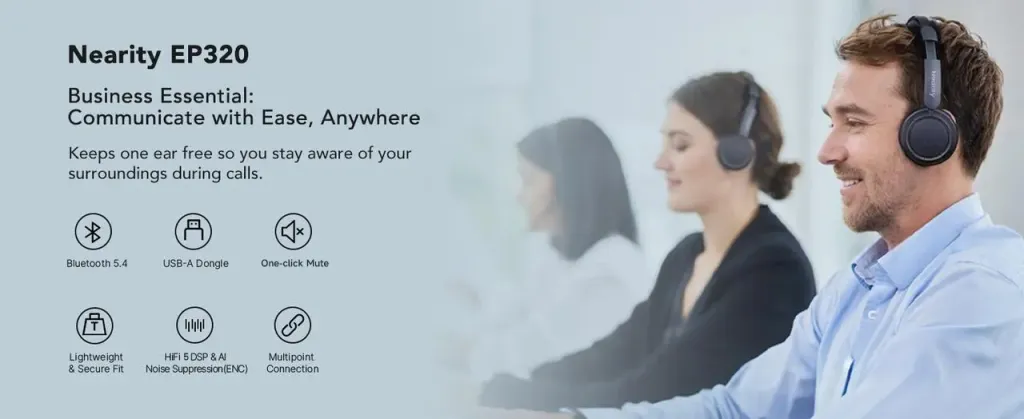
- Nearhub Nearity EP320: A flexible solution that combines the reliability of a usb headset with mic with wireless convenience. It delivers stable performance through a dedicated USB dongle and features powerful ENC technology that filters out background noise like keyboard typing or fans. It’s an ideal choice for workstations and meeting rooms alike.
- Belkin SoundForm Adapt – A lightweight champion with Environmental Noise Cancellation (ENC), specifically designed to keep your voice crisp and professional even in noisy environments, such as a vacuum cleaner running or a busy household. Its ergonomic over-ear design is comfortable for long calls and extendable to fit perfectly over your head. When not in use, the headset folds easily for compact storage and travel, making it an ideal wireless USB headset for hybrid work, flexible office setups, or remote calls on the go.
Conclusion
Choosing the right usb headset with microphone can transform how you communicate in remote work, online learning, and virtual calls. By understanding your use case—whether it’s stability, mobility, or all‑day comfort—you can select a headset that enhances clarity, reduces distraction, and supports your most important tasks.
From wired models for focused call center performance to wireless usb headsets that offer freedom and flexibility, the headsets highlighted above represent some of the best options available. Evaluate your priorities, and you’ll find a headset that truly elevates your communication experience.
FAQs
What is the difference between a USB headset with microphone and a 3.5mm headset?
A USB headset with microphone uses a digital audio connection, which delivers more consistent sound quality and better noise control than a traditional 3.5mm analog headset. USB models also support advanced features such as ENC, inline controls, and software-level optimization for conferencing platforms.
Is a wired USB headset with mic better than a wireless USB headset?
Neither option is strictly better—it depends on your use case. A wired USB headset with mic offers maximum stability, zero latency, and no battery concerns, making it ideal for call centers or long meetings. A wireless USB headset provides freedom of movement and a cleaner workspace, which is perfect for hybrid work and flexible environments.
Should I choose USB-A or USB-C for my headset?
USB-C is becoming the standard for newer laptops and tablets, while USB-A remains common on desktop computers. The best option is a headset with mic with USB that supports USB-C or includes a USB-A adapter, ensuring compatibility across both modern and legacy devices.
Are USB headsets compatible with Zoom, Microsoft Teams, and Google Meet?
Yes. Most modern USB headsets with mic are plug-and-play and fully compatible with major conferencing platforms. Some models are even Teams-certified, offering dedicated buttons and deeper integration for professional workflows.



 sales@nearhub.us
