
































































In the modern era of AI-driven communication, ChatGPT has emerged as a transformative tool for natural, human-like interaction. Developed by OpenAI, this conversational agent leverages advanced Natural Language Processing (NLP)to provide intelligent, personalized, and even humorous responses across multiple languages. By streamlining administrative tasks and enhancing user experience, ChatGPT serves as an essential resource for both individuals and businesses. This guide covers the core functionalities of ChatGPT, step-by-step account setup—including seamless integration with Google and Microsoft—and highlights its synergy with NearHub. Together, ChatGPT and the NearHub Canvas create a powerful collaborative ecosystem, combining AI intelligence with virtual whiteboarding to maximize remote team productivity.
Key Takeaways
- Human-Like Interaction: ChatGPT utilizes NLP to understand context and generate tailored, intelligent responses that mimic human conversation.
- Accessibility & Speed: Users can quickly access the platform via the official OpenAI portal or simplify the process using Single Sign-On (SSO) through Google or Microsoft.
- Personalized Experience: The bot adapts through learning capabilities and maintains context from past interactions to improve accuracy and engagement.
- Professional Utility: Beyond casual chat, it is a productivity powerhouse for automating customer service and streamlining workflows.
- Collaborative Synergy: Integrating ChatGPT with the NearHub Board transforms standard meetings into high-interaction digital workspaces, enabling teams to brainstorm and share information in real-time.
In today's modern era, online communication has become an integral part of our lives. Due to the rise of artificial intelligence, chatbots have also become part of our daily lives. Chatbots like ChatGPT have revolutionized the way we communicate with machines.
What is ChatGPT?
ChatGPT is an AI-powered chatbot or conversational agent developed by OpenAI. It is a language model that is trained on a massive dataset of human language, enabling it to understand natural language and generate human-like responses. ChatGPT is capable of answering a wide range of questions, providing information on different topics, and even engaging in casual conversations. It is designed to facilitate communication between humans and machines by providing an intuitive, interactive, and engaging interface. ChatGPT has become an essential tool for businesses, individuals, and developers who are looking to automate customer service, streamline administrative tasks, and enhance user experience.
Features of ChatGPT
ChatGPT comes with various features that make it an exceptional conversational agent. Here are some of the notable features of ChatGPT:
Natural Language Processing
ChatGPT utilises Natural Language Processing (NLP) to understand human language, making it capable of processing complex sentences, understanding context, and generating human-like responses.
Multiple Languages
ChatGPT is available in various languages, making it accessible to a more extensive global audience.
Intelligent Responses
ChatGPT’s responses are intelligent and tailored to individual users’ needs. It can provide accurate and relevant answers to a wide range of questions.
Conversational Interface
ChatGPT has an intuitive and conversational interface that mimics human interaction, making it easier for users to communicate with the bot.

Personalisation
ChatGPT is capable of personalising conversations with users, keeping track of past interactions, preferences and making the conversation more engaging.
Learning Capabilities
ChatGPT can learn from its conversations with users by analysing patterns, information and adapting to improve its response accuracy.
Witty and Humorous responses
ChatGPT has a witty and humorous personality that can provide users with entertaining responses, making interaction with the bot enticing.
How to create a ChatGPT Account?
The very first page that you'll see while accessing ChatGPT is its login page. As already mentioned, the Chat GPT is the product of OpenAI, so you can only access the login page through the official OpenAI website. You can either search for the website on your favorite browser, such as Google or simply click this link https://chat.openai.com/auth/login to directly reach the Chat GPT login page.

Once you reach the “Welcome to Chat GPT” page, create a free chat GPT account following the below straightforward process:
- To register as a new user, click the “Sign Up” button, and on the “Create your Account”
- Enter your name, Email Address, and password (at least 8 characters long) to create a new account. Try to use a strong and easy-to-remember password.
- After registration, you’ll receive a confirmation email from Chat GPT to the provided email address.
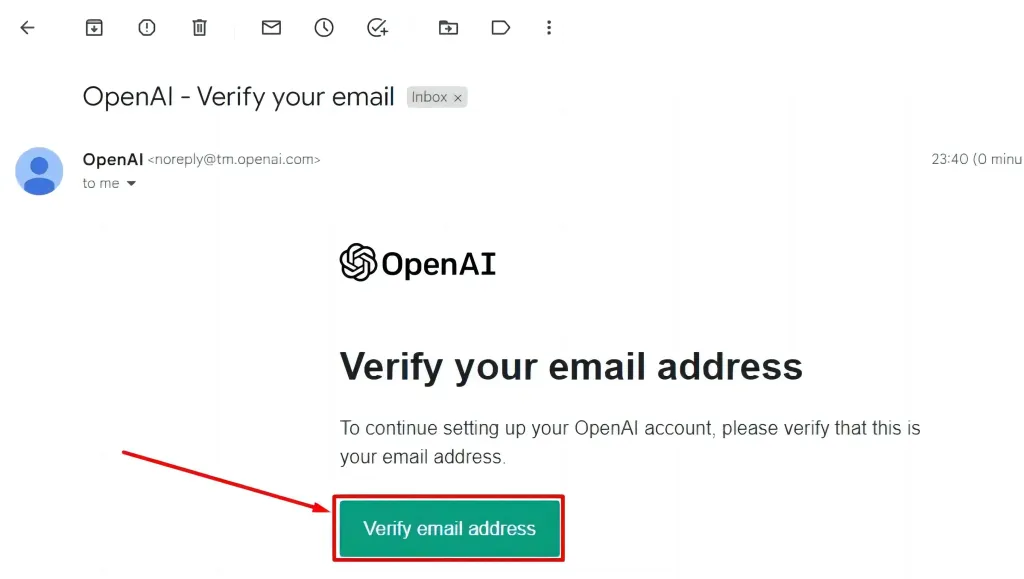
To Validate your account and activate your Chat GPT membership, follow the below steps:
- Open your Email account and hit the “Verify Email Address” button in order to verify your email.
- In the new provided form, enter your full name and phone number and then select “send code”. Chat GPT will send you a 4-digit OTP on the provided phone number. Make sure to provide the number of a ChatGPT-supported country.
- Verify OTP by typing the 4-digit code in provided space and clicking “Continue”. Congratulations, you’ve successfully created ChatGPT free account. Now your chat GPT account is ready to use.
How to login to ChatGPT?
Chat GPT Login with Email address
After signing up for Chat GPT, it's time to utilize Chat GPT to harness the AI power to boost productivity. Follow the below steps to log in to the Chat GPT account without any hassle:
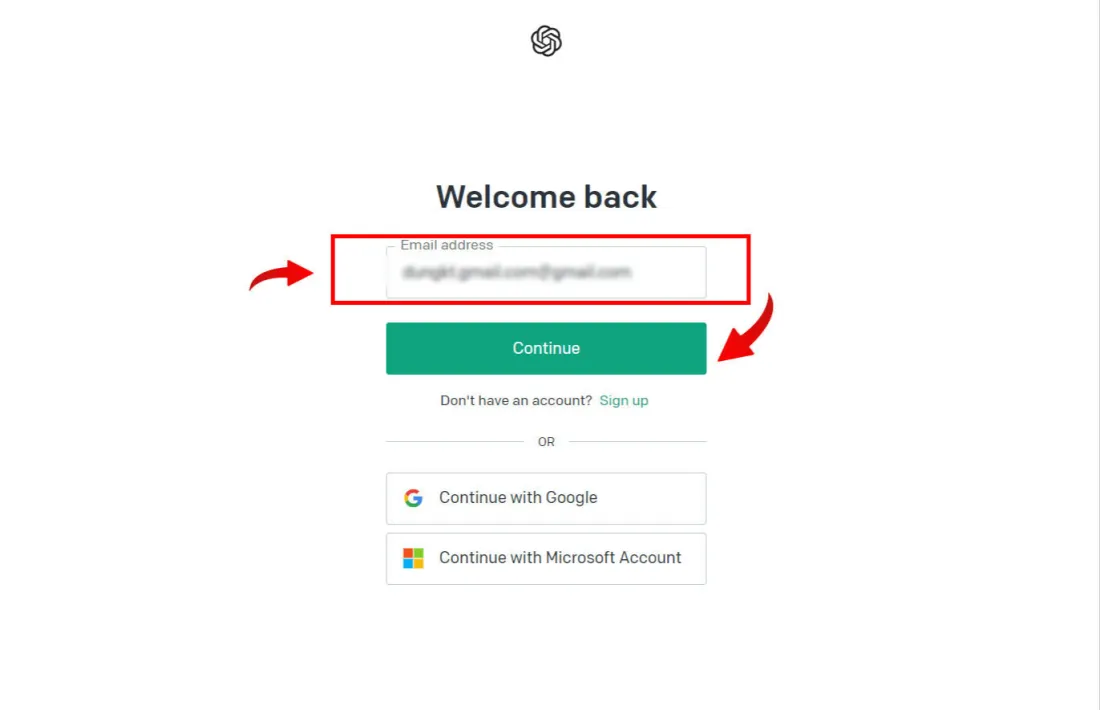
- Go to https://chat.openai.com/auth/login page on your web browser.
- Click the “Login” button.
- When the login screen displays, fill in your login credentials in the provided fields.
- Click “Continue” to access the chat GPT dashboard.
Chat GPT Login with Google
While Signing Up for ChatGPT, you’ll be given a choice of “Continue with Google.” To use your Google account for logging into chatGPT, follow the steps below:
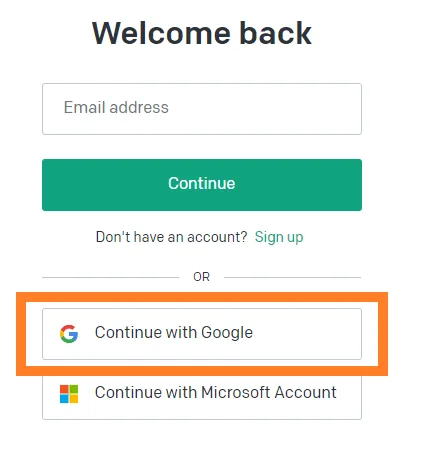
- Search for Open AI’s official website, and on the homepage, navigate for “ChatGPT”.
- Hit this text, and click “Test ChatGPT” to open the chat GPT log-in/ sign Up page.
- Click the “Sign In” button and then choose the “Continue with Google” option.
- You’ll be redirected to sign in for the Google Account page. Please enter your email address.
- Enter a password for your Google Account and click “Next” to Log in to your Chat GPT account.
Chat GPT Login with Microsoft Account
In case you have a Microsoft account, you can utilize this for logging in to Chat GPT.For this purpose:

- Open the Chat GPT sign-up/Login page.
- Click “Continue with Microsoft account” and then enter your Hotmail or Outlook address, whatever you prefer to use for accessing Chat GPT.
- Now enter your Microsoft Account Password and hit “Next” to access ChatGPT main interface.
Opting for a Google or Microsoft Account eliminates the requirement to verify your email or confirm your age before gaining access to this incredible world of AI.
Once you have logged into ChatGPT, you can start a conversation with it by asking any question that you want. The bot will provide you with a response that is tailored to your needs. ChatGPT is highly intelligent and has a vast database of information, allowing it to provide accurate answers to almost any question.

Conclusion
In conclusion, the ChatGPT login process is effortless, and the bot is highly intelligent and responsive. ChatGPT is a fantastic tool that can be used for a variety of purposes, from answering questions to providing a little bit of humor. So give it a try and see what ChatGPT can do for you!
NearHub is a collaborative platform that provides a virtual whiteboard environment for teams and individuals to work together remotely. ChatGPT, combined with the NearHub Canvas, can offer a more interactive and engaging experience for users. The combination of ChatGPT and NearHub creates a highly interactive digital workspace for collaboration and learning. Users can communicate with ChatGPT, interact with each other through the NearHub Board, host virtual meetings, and share important information that can enhance their productivity and workflow.
FAQ: Understanding ChatGPT and Its Integration with NearHub
1. What is ChatGPT?
ChatGPT is an AI-powered conversational agent developed by OpenAI. It is built on a large language model trained on massive datasets, allowing it to understand natural language and generate human-like responses across a wide range of topics.
2. What are the key features of ChatGPT?
- Natural Language Processing (NLP): Understands complex sentences and context.
- Multilingual Support: Accessible to a global audience in various languages.
- Personalization: Keeps track of past interactions and user preferences to make conversations more engaging.
- Learning Capabilities: Adapts and improves response accuracy by analyzing interaction patterns.
- Witty Personality: Capable of providing humorous and entertaining responses.
3. How do I create a ChatGPT account?
- Visit the ChatGPT Login Page.
- Click "Sign Up" and enter your email address and a strong password.
- Verify your email: Click the link sent to your inbox by OpenAI.
- Phone Verification: Enter your name and a valid phone number from a supported country to receive and verify a 4-digit OTP code.
4. Can I log in without creating a new password?
Yes. You can use the "Continue with Google" or "Continue with Microsoft Account" options. This allows you to bypass traditional email verification and quickly access the dashboard using your existing credentials.
5. How does ChatGPT enhance the NearHub experience?
NearHub provides a virtual whiteboard for remote collaboration. When combined with ChatGPT:
- Interactive Workspace: Users can use ChatGPT within the NearHub Canvas to brainstorm ideas or get instant information during meetings.
- Streamlined Workflow: It helps automate administrative tasks and organize information shared on the NearHub Board.
- Enhanced Collaboration: The integration creates a dynamic environment for teams to communicate, visualize data, and boost overall productivity.





 sales@nearhub.us
