
































































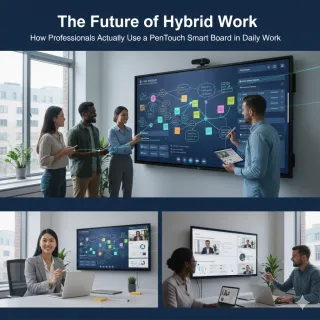
As the global workforce shifts toward permanent hybrid models, traditional collaboration tools are proving insufficient for high-stakes professional environments. This article examines the practical application of the PenTouch Smart Board, highlighting its role as a central hub for data-driven decision-making and project management. It details the technical advantages of zero-lag 4K touch technology, the efficiency of native Microsoft 365 integration—such as instant PDF archiving and PowerPoint ink—and the importance of enterprise-grade security features like password protection and calendar synchronization. Ultimately, the post provides a roadmap for teams looking to refine their hybrid work strategy through superior visual collaboration.
Key Takeaways
- The Command Center Mindset: Move beyond simple writing by using the board as a centralized hub for monitoring live data feeds and analytics dashboards.
- Visual Workflow Efficiency: Streamline Kanban boards and sprint planning with tactile digital interactions that enhance team alignment.
- Precision Hardware: Benefit from 4K clarity and zero-lag PenTouch technology, essential for detail-heavy professional work like architecture and design.
- Effortless Documentation: Eliminate manual clean-up time by utilizing instant PDF exports and email sharing directly from the device.
- Hybrid Equity: Bridge the "presence disparity" gap by allowing remote and in-office participants to contribute to a unified digital canvas in real-time.
- Enterprise Security: Protect sensitive data with PIN/password protection and maintain office efficiency through integrated room calendar syncing.
Picture this: You are ten minutes into the most important project kickoff of the quarter. Your team is buzzing with ideas, but you’re stuck fumbling with a dried-out dry-erase marker and a cramped whiteboard that’s already covered in "DO NOT ERASE" scribbles from last week. We’ve all been there. This friction is exactly why the modern workspace is undergoing a massive digital transformation. Professionals today are moving away from static tools and embracing smart board interactive whiteboards, NearHub board, smart whiteboard for business, whiteboard for planning to bridge the gap between physical brainstorming and digital execution.
The problem isn't just about having a screen on the wall; it’s about solving the "disconnect" that happens after a meeting ends. For any modern organization, a successful hybrid work strategy depends on how effectively team members can collaborate regardless of their physical location. This article dives deep into how high-performing teams actually utilize the NearHub board to turn messy ideas into actionable data. Whether you are an architect, a software lead, or a corporate educator, understanding how to use a smart board effectively can be the difference between a productive hour and a wasted afternoon.
Moving Beyond Basic Writing: Using the Smart Board as a Command Center
For many, the first instinct is to treat a smart whiteboard for business like a giant iPad. While that’s partially true, professionals view it as a "Command Center." It is the central nervous system of the office where data from various streams converges, serving as a pillar for an integrated hybrid work strategy.
The Centralized Dashboard Experience
Top-tier professionals don't just write; they monitor. By utilizing a smart white board, managers can pull up real-time analytics dashboards side-by-side with their notes. Imagine a marketing team reviewing their Google Ads performance on the left side of the screen while sketching out a new campaign funnel on the right. This multitasking capability is what defines the NearHub board experience—it removes the need to switch between devices, keeping the team’s focus on a single, high-resolution focal point.
Integrating Live Data Feeds
In industries like logistics or finance, a whiteboard for planning must be dynamic. Professionals use the browser-integration features to keep live "Command Centers" active. Instead of static images, they embed live maps, stock tickers, or Trello boards. Because a smart board interactive whiteboards, NearHub board, smart whiteboard for business, whiteboard for planning setup is essentially a high-performance PC with a touch interface, it acts as the bridge between the digital cloud and the physical meeting room.
How Project Managers Streamline Kanban and Workflow Visuals
Project management is where the whiteboard for planning truly shines. According to a report by Harvard Business Review, teams that utilize visual collaboration tools see a significant increase in alignment and a reduction in "re-work" caused by communication gaps. This visual alignment is a core component of a modern hybrid work strategy.

Digital Kanban Boards at Scale
Gone are the days of sticky notes falling off the wall. Professionals use the NearHub board to host "Stand-up Meetings." By opening Jira, Monday.com, or Asana directly on the board, the project manager can physically drag a task from "In Progress" to "Done." This tactile movement creates a psychological sense of progress that clicking a mouse simply cannot replicate.
High-Stakes Sprint Planning
During a sprint planning session, the ability to annotate over a roadmap is crucial. A smart whiteboard for business allows the team to overlay floating notes on any document to spark instant discussion. If you need those notes to be permanent, simply use the native capturing tools to ensure that the "Why" behind a decision is never lost in translation.
| Feature | Traditional Whiteboard | Smart Board (NearHub/PenTouch) | Hybrid Strategy Benefit |
|---|---|---|---|
| Persistence | Must be erased manually | Export to PDF / Email | Instant archive for remote staff |
| Collaboration | Local only | Local + Remote participants | Real-time equity for all users |
| Media | Markers only | Video, Images, 3D, Web | Rich context for complex projects |
| Organization | Limited space | Infinite Canvas / Pages | Scalable planning for long sprints |
The "No-Lag" Experience: Why Hardware Specs Matter for Professional Drawing
One of the biggest complaints with early-generation smart board interactive whiteboards was the "parallax" effect—the gap between where you touch and where the ink appears. For professionals like industrial designers or surgeons, this lag is unacceptable.

Pressure Sensitivity and Latency
The PenTouch technology in the NearHub board is designed for a "Pen-to-Paper" feel. This isn't just marketing fluff; it’s a technical necessity. When an architect is sketching a structural change, they need to know that the line will follow the stylus with zero millisecond delay. High-end smart white board systems use infrared or capacitive touch technology to ensure that the user’s hand can rest on the screen (palm rejection) while writing.
4K Clarity for Detailed Analysis
If you are using a smart whiteboard for business to review 4K architectural blueprints or medical X-rays, resolution matters. A professional smart board interactive whiteboards, NearHub board, smart whiteboard for business, whiteboard for planning setup provides the pixel density required to zoom into a CAD file without it becoming a blurry mess.
Seamless Integration with the Microsoft 365 Ecosystem
A tool is only as good as the software it runs. Most professionals are already deeply embedded in the Microsoft ecosystem. A smart whiteboard for business that integrates with PowerPoint or Teams is a power player in a hybrid work strategy.
Effective PowerPoint Presentations
When presenting a high-stakes pitch, professionals often use the board's floating annotation tool for quick, "on-the-fly" highlights. If you want your handwritten notes to stay as part of the document permanently, simply utilize the native ink features built directly into Microsoft PowerPoint. This flexibility allows you to choose between spontaneous "floating" notes or documented, permanent changes to your .pptx slides.
Instant Archiving via PDF and Email
Imagine finishing a 2-hour brainstorming session on your whiteboard for planning. Instead of taking a blurry photo with your phone, the NearHub board allows you to instantly generate a high-quality PDF of the entire session. With one click, you can email the notes directly to all attendees or save them to your shared server. This ensures that the professional workflow remains seamless and that everyone leaves the meeting with the exact same documentation. Learning how to use a smart board for quick exports eliminates nearly 30 minutes of administrative "clean-up" time per meeting.
Maintaining Engagement in Remote and Hybrid Environments
The "Hybrid Office" is the new standard. Statista reports that over 70% of US companies have adopted a permanent hybrid model. To succeed, companies need a robust hybrid work strategy that addresses the "engagement gap."
The Hybrid Brainstorming Solution
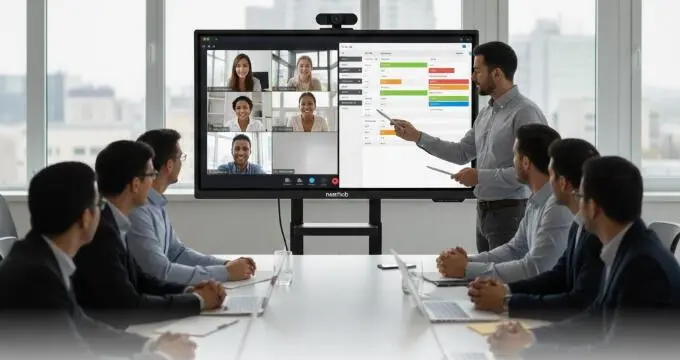
The NearHub board acts as a shared digital space. When a remote employee writes on their tablet at home, their writing appears on the smart board interactive whiteboards in the office in real-time. This level of hybrid collaboration ensures that ideas aren't ignored just because the person suggesting them isn't in the physical room.
Visual Storytelling via Video Conferencing
Professionals don't just "show" their screen; they "interact" with it. During a video call, the smart board interactive whiteboards, NearHub board, smart whiteboard for business, whiteboard for planning allows the presenter to stand up and draw. This movement keeps the audience’s attention far better than a static screenshare.
Security and Privacy: How Professionals Manage Sensitive Data on Smart Boards
In industries like healthcare, law, or high-tech R\&D, what happens on the board must stay secure. A robust hybrid work strategy must prioritize data protection and efficient room management.
Password Protection and Meeting Privacy
Unlike basic monitors, a professional smart whiteboard for business comes equipped with built-in password protection. This ensures that only authorized team members can access the board's interface and sensitive files stored locally. By setting a unique PIN or password, IT managers can ensure that a "whiteboard for planning" used by the finance department remains inaccessible to unauthorized visitors later in the day.
Integrated Calendar and Meeting Room Sync
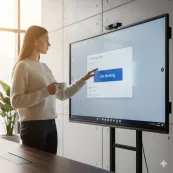
One of the most valuable features for a busy office is the ability to sync with enterprise meeting room calendars (such as Outlook or Google Calendar). The NearHub board can display the daily schedule directly on its home screen. This allows professionals to walk into a room, see exactly how much time is left in the current booking, and instantly launch their scheduled meeting—keeping the entire hybrid work strategy running like clockwork.
Conclusion & CTA
The transition to the future of work doesn't happen by accident. It happens by choosing tools that work as hard as you do. Professionals across the globe are proving every day that smart board interactive whiteboards, NearHub board, smart whiteboard for business, whiteboard for planning are no longer "luxury" items—they are essential infrastructure for any effective hybrid work strategy. By consolidating your brainstorming, project management, and video conferencing into a single NearHub board, you reclaim your time and your team's focus.
In summary, whether you are using a whiteboard for planning to map out a complex software architecture or utilizing a smart whiteboard for business to close a million-dollar deal, the key is integration. Don't just use it as a screen; use it as a command center that talks to your calendar, secures your data with password protection, and empowers your hybrid team.
Looking for a reliable smart board interactive whiteboards, NearHub board, smart whiteboard for business, whiteboard for planning? Check out our here: https://www.NearHub.us/product/interactive-smart-whiteboard-s-pro.
FAQ Section
How does a smart board support a company's hybrid work strategy?
It creates a "unified canvas" where remote and in-office workers can contribute simultaneously, ensuring all voices are heard in real-time.
Can I use the NearHub board with my own laptop?
Absolutely. Most professionals connect their laptops via USB-C or HDMI to use the smart board interactive whiteboards as a touch-enabled second monitor. This allows you to run your local software while utilizing the massive screen real estate for whiteboard for planning.
Does it have built-in security?
Yes. The smart white board features password/PIN protection to secure your device and prevents unauthorized access to your professional data.
How do I share my notes after the meeting?
You can instantly export your session as a PDF and send it via email directly from the board, or save it to a connected USB drive.
Can it sync with my office calendar?
Yes, it supports synchronization with enterprise meeting room calendars to show schedules and booking status in real-time.



 sales@nearhub.us
