

































































In the professional landscape of 2026, the success of a hybrid organization is no longer defined by attendance counts, but by "Intentional Presence." This guide addresses the systemic "Office/Remote Disconnect" and the "Ghost Town" office phenomenon by identifying the seven essential hybrid work tools required for peak performance. It explores the biological and strategic necessity of "Presence Equity" and "Technological Symmetry," highlighting how hardware like the Windows-powered NearHub S Pro eliminates the "Setup Tax" and "Documentation Black Holes." By shifting from a desk-centric to an activity-based model, leaders can utilize these tools to foster asynchronous excellence and synchronous fluidity. Ultimately, the article provides a blueprint for Chief Operations and People Officers to maximize real estate ROI and talent retention through a synchronized ecosystem of interactive hardware and intelligent software.
Key Takeaways
- Shift from Presence to Performance: Success in 2026 depends on measuring impact and deliverables rather than "hours in chair," treating the office as a specialized tool for high-bandwidth sprints.
- Eliminate the "Setup Tax": Prioritize professional-grade, Windows-based smart boards that run apps natively to reduce technical friction and start meetings in under 60 seconds.
- Prioritize Presence Equity: Use high-fidelity AI cameras and interactive canvases to ensure remote workers have an equal visual and vocal voice, effectively dissolving the digital-physical divide.
- Implement Activity-Based Presence: Align work locations with task requirements—prioritize deep focus at home and reserve the office for high-intensity, synchronous collaboration.
- Foster Asynchronous Excellence: Utilize cloud-synced digital canvases to maintain a "single source of truth," ensuring that decisions and sketches are never lost in information silos.
- The Office as a "Magnet": To drive return-to-office success, the workspace must offer a "collaborative surplus"—providing tools and environments that are significantly superior to home setups.
- Optimize ROI Through Rightsizing: Reduce total square footage while increasing the quality of the remaining space, reinvesting savings into premium "Phygital" infrastructure.
We have all experienced it: the forty-five-minute commute through heavy traffic, the desperate search for a parking spot, and the lukewarm office coffee—all to arrive at a desk, put on noise-canceling headphones, and spend eight hours on the exact same video calls you could have taken from your kitchen table. It feels inefficient, outdated, and frankly, a waste of human energy. This "ghost town" office phenomenon is the primary reason why so many organizations are struggling to maintain morale in 2026. If your team feels like the office is a chore rather than a tool, your selection of hybrid work tools is likely failing to bridge the gap between presence and productivity.
Welcome to this comprehensive Listicle and the definitive guide to modern workforce empowerment. This isn't just a list of apps; it is a strategic blueprint for high-performance teams. In this guide, we will explore why the right hybrid work tools are the "connective tissue" that transforms a disjointed workforce into a synchronized powerhouse. Whether you are a startup scaling globally or a legacy firm rightsizing your real estate, this article provides the roadmap to high-performance success. We will dive deep into the hardware and software required to eliminate technical friction and ensure every employee, regardless of location, can contribute at their highest level.
Defining the Modern Ecosystem: What are Hybrid Work Tools in 2026?
Before we dive into the specific recommendations, we must define what we mean by hybrid work tools in the current market. A decade ago, "hybrid" was a loose term for working from home occasionally. Today, it is an architectural strategy that treats the physical office as a specialized piece of equipment—much like a laboratory or a recording studio—rather than a default storage facility for people.
The Core Pillars of a High-Performance Toolkit
To move beyond a stagnant "badge-swipe" culture, your selection of tools must address three core dimensions:
- Presence Equity: Ensuring that remote participants have the same visual and vocal influence as those in the room. This is the foundation of any high-functioning distributed team.
- Cognitive Load Management: Reducing the "Setup Tax" and technical friction that causes micro-frustrations and mental fatigue during the transition between home and office.
- Technological Symmetry: Providing tools in the office that are significantly superior to what an employee has at home. If the office technology is worse than a home setup, the policy will inevitably fail.
According to a recent report by McKinsey & Company, organizations that focus on "intentional collaboration" rather than mandatory attendance see a 15% increase in employee engagement and a 20% boost in innovation speed. This data proves that the success of your strategy depends on the quality of the interaction, which is directly dictated by your choice of hybrid work tools.
Top 7 Essential Hybrid Work Tools for 2026
To achieve hybrid work productive: strategies for peak performance, you cannot rely on legacy hardware and consumer-grade software. You need an integrated stack that supports the "flow state" of a distributed team. Here are the top seven tools every 2026 organization needs to remain competitive.
1. Interactive Hubs: The NearHub S Pro Smart Whiteboard
The center of any modern collaboration theater is the interactive display. The NearHub S Pro Smart Whiteboard serves as the central nervous system of the hybrid office. By allowing for "Persistent Canvases," it ensures that a brainstorm started on Monday in New York is still there on Wednesday for a team in London.
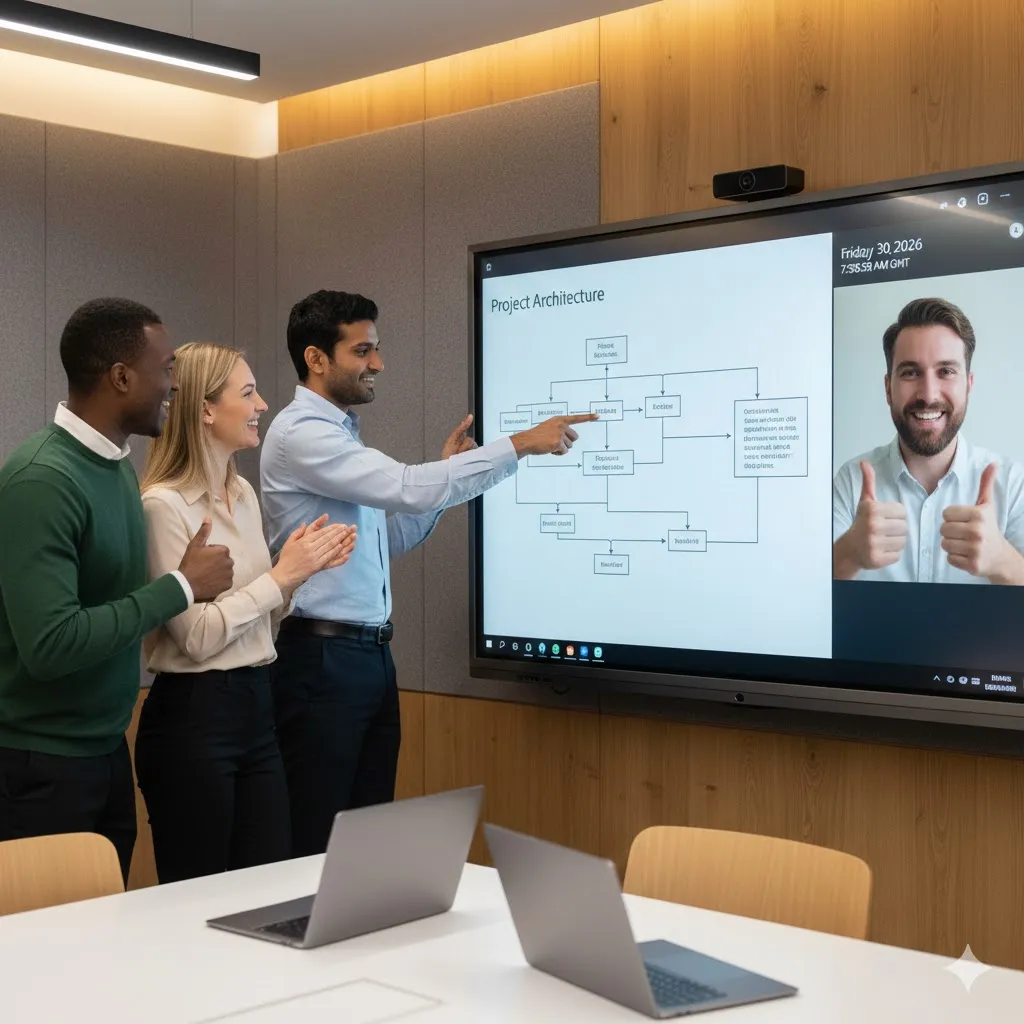
- Key Advantage: Native Windows integration allows it to run full desktop versions of Zoom, Teams, and Google Meet with zero feature loss.
- Wellness Benefit: It encourages active collaboration, allowing team members to stand and move while they work, reducing the physical toll of sedentary desk time.
2. Asynchronous Video Messaging Platforms
In 2026, we have learned that not every conversation needs to be a meeting. Asynchronous tools allow for deep focus while maintaining the nuance of face-to-face communication.
- The Strategy: Use video messages for status updates and reserve "live" time for complex conflict resolution or creative sprints.
3. AI Meeting Assistants and Summarizers
The days of manual note-taking are over. AI assistants record, transcribe, and summarize meetings, ensuring that no decision is lost in a documentation black hole.
- Integration Tip: Connect your AI assistant to your project management board to automatically turn meeting action items into tasks.
4. High-Fidelity Presence Equity Hardware
Standard wide-angle webcams are insufficient for modern needs. Modern hybrid work tools must include AI-powered cameras that feature speaker tracking and auto-framing.
- Why it matters: Remote workers need to see facial expressions and non-verbal cues to feel like active participants rather than spectators.
5. Secure Distributed Access and Zero Trust Networks
With the rise of distributed work comes the rise of cyber threats. Modern toolkits must prioritize security without creating friction for the end-user.
- The Trend: Organizations are moving away from bulky legacy VPNs toward Zero Trust Network Access (ZTNA) solutions.
6. Digital Ergonomics: Smart Workspace Furniture
Wellness is a tool for productivity. Height-adjustable desks and high-fidelity headsets are essential for maintaining the physical stamina required for a full day of hybrid interaction.
7. Workflow Automation and Integration Engines
Connecting your disparate apps into a single, automated workflow is the only way to scale a hybrid team without hiring an army of administrators.
The Hybrid Remote Work Meaning Shift: Why Hardware is the New Office
To understand how to lead a 2026 team, we must look at the hybrid remote work meaning evolution. It is no longer about "where" you sit; it is about the "fidelity" of the connection. If you have a clear policy but your employees are still unhappy, the problem likely isn't the policy—it's the friction.
Eliminating the Setup Tax
One of the most ignored friction points is the time wasted connecting devices. If a meeting takes ten minutes to start because of a faulty HDMI cable or a camera that won't sync, you've just wasted a significant percentage of your collaborative ROI.
- Audit your rooms: Replace legacy projectors with a smart white board.
- Master your tools: Provide training on how to use a smart board so that every team member can start a session in under sixty seconds.
Visual Symmetry as a Strategic Advantage
When you provide a nearhub enabled workspace, you are providing a single "source of truth." This visual symmetry ensures that the person in the room and the person in the home office are looking at the exact same 4K reality. This eliminates the "second-class citizen" feeling that plagues many distributed teams.
Specialized Industries: How Hybrid Work Tools Support Social Impact
While most people think of hybrid work as a corporate tech phenomenon, it has fundamentally changed specialized fields. For example, the rise of hybrid social work jobs has created a demand for secure, mobile, yet high-fidelity interaction tools that allow professionals to provide care from any location without compromising client privacy.
Use Case: Education and Public Service
In public service and education, the toolkit must support:
- High-Fidelity Interaction: For sensitive case reviews or complex pedagogical explanations where visual nuance is critical.
- Mobile Persistence: The ability to move from a field visit to a central hub without losing documentation or flow.
- Privacy Compliance: Utilizing hardware like the NearHub S Pro that integrates with enterprise security protocols to protect sensitive data.
Comparison Table: Software vs. Hardware ROI
| Tool Category | Primary ROI Metric | Burnout Prevention | Security Level |
|---|---|---|---|
| Software Apps | Task Velocity | Low (Can increase fatigue) | Variable |
| Interactive Hardware | Decision Velocity | High (Reduces strain) | Enterprise-Grade |
| AI Assistants | Documentation Speed | Medium (Reduces labor) | High |
| Secure Access | Risk Mitigation | Low (Functional necessity) | Critical |
Strategies for Peak Performance: Integrating Your Hybrid Work Tools
Choosing the tools is only half the battle. You must also master hybrid work productive: strategies for peak performance. Integration is where the magic happens. A tool in isolation is a silo; a tool in an ecosystem is a multiplier.
The Single Canvas Protocol
In 2026, the most successful teams have a rule: if it isn't on the digital canvas, it didn't happen.
- The Workflow: Every brainstorm happens on a smart white board.
- The Sync: The board instantly exports the session to a shared cloud folder (Slack, Teams, or OneDrive).
- The Review: Remote workers can add "Asynchronous Annotations" later that evening, keeping the momentum alive across time zones.
Rightsizing Real Estate Through Technology
A high-performance toolkit allows you to reduce your total square footage while actually improving the quality of the remaining space.
- The Strategy: Move from "rows of desks" to "theaters of collaboration."
- The Math: Saving rent on 5,000 square feet can fund the technological upgrade of ten high-end collaboration hubs, providing a much higher return on human capital.
The Future of Interaction: AI and Sensory Feedback in 2026
As we look toward the second half of the decade, the next wave of hybrid work tools will focus on sensory feedback. We are moving beyond the "tiny screen" toward immersive environments that simulate physical presence through high-fidelity audiovisual integration.
Spatial Audio and Presence Precision
To combat meeting fatigue, tools are now incorporating spatial audio—meaning if a colleague on the left side of the screen speaks, their voice comes from the left side of the room. This mimics the biological reality of human hearing and reduces the cognitive load of a distributed meeting.
The Role of the NearHub S Pro in the Immersive Office
The NearHub S Pro Smart Whiteboard is designed to be the anchor for these immersive experiences. Its high-fidelity microphone array and 4K display ensure that even the most subtle non-verbal cues are captured, making the "distance" between New York and London feel like a few feet rather than a few thousand miles.

Security and Governance: Protecting Your Hybrid Toolkit
A toolkit is a liability if it isn't secure. As teams become more distributed, the "attack surface" of the organization increases. Professional hybrid work tools must prioritize security without creating friction for the end-user.
Standardized IT Integration
The best tools are those that your IT department already knows how to manage.
- The Windows Advantage: Since the NearHub S Pro runs on a Windows-based system, it integrates seamlessly with your existing Active Directory and security protocols.
- Data Persistence: Ensure your tools have auto-wipe features for local cache data while maintaining encrypted cloud backups for all collaborative sessions.
FAQ Section: Optimizing Your Hybrid Work Tools
How do I use a smart board to bridge the remote gap?
A smart white board allows remote workers to see annotations in real-time and even draw on the board from their own laptops. This creates a "single source of truth" for the meeting, ensuring no one is left out of the creative process.
What are the best hybrid work tools for small businesses on a budget?
Start with the "Big Three": A high-quality interactive hub like nearhub for the office, an asynchronous video messaging tool for updates, and a cloud-based project management platform. Investing in one high-quality piece of hardware is often more productive than ten minor software subscriptions.
Can hybrid work tools improve employee wellness?
Yes. By using interactive displays that encourage standing and movement, you reduce the physical toll of sedentary work. Furthermore, by reducing technical friction (the Setup Tax), you decrease the daily stress levels of your team.
What is the "hybrid remote work meaning" in 2026?
It means that work is no longer a place you go, but a series of high-fidelity interactions you participate in. The "office" is now defined by the quality of the tools you use to connect with your team, rather than the address on your business card.
How do I lead a hybrid team effectively?
Focus on "Activity-Based Presence." Don't mandate days in the office; mandate activities that require high-bandwidth interaction (like strategy or conflict resolution) and provide the professional tools required to make those activities successful.
Conclusion & CTA
The transition to a hybrid-first world is the most significant shift in corporate culture in over a century. Successfully navigating this change requires more than just a memo; it requires a radical commitment to providing the right hybrid work tools for your team. By defining the office as a specialized destination for collaboration and equipping it with high-performance hardware, you turn your strategy into a competitive advantage.
A high-performance toolkit is built on a foundation of trust, equity, and the right infrastructure. When you eliminate the "tiny screen" struggle and replace it with professional-grade tools like the NearHub S Pro Smart Whiteboard, you aren't just buying hardware; you are investing in the long-term innovation and health of your team. The goal is simple: to make the work as rewarding as the result.
Looking for a reliable hybrid work tools? Check out our smart white board here: Best Interactive Smart Whiteboard for Teaching & Business | NearHub Board S Pro | NearHub Official.




 sales@nearhub.us
