




















































Let’s paint a familiar scene: you’re the remote participant in a large hybrid meeting, dialing in from home. On the main screen, a long conference room of fifteen people laughs at a joke — you see their mouths move, but hear only a metallic echo.
You wave, try to speak — “Sorry, I missed that” — yet your voice fades into a faint whisper. You’re both present and invisible. Or worse, as the presenter, you’re met with the dreaded: “Sorry, we can’t hear you.” These aren’t small glitches — they’re a direct hit to productivity.
This is a meeting equity problem — the idea that every participant, no matter their location, deserves an equal voice. When audio fails, remote colleagues are left unheard and mentally exhausted, trapped in effortful listening that fuels meeting fatigue and drains engagement — a hidden Audio Tax on every team.
The culprit? A dual-audio disconnect — remote participants can’t hear the room, and the room can’t hear them. This guide is your roadmap to fix it: uncover the causes, explore the technology that restores clarity, and learn how solutions like the Nearity ecosystem build a reliable foundation where everyone can finally be heard.
🎧 “Can You Hear Me Now?” – The 4 Audio Gremlins Wrecking Your Hybrid Conference
Before you can fix the problem, you have to know your enemy. These audio gremlins aren’t random — they’re recurring villains. Let’s call them out.
Gremlin 1: The Echo Chamber
The Pain: The dreaded echo — you speak, and your own voice bounces back seconds later, or worse, a piercing screech fills the room.
The Cause: It’s a classic feedback loop. The microphone picks up sound from the speaker and sends it back to the remote side. This happens easily when multiple in-room devices stay unmuted.
Gremlin 2: The Sound Imbalance
The Pain: “Jenny,” sitting close to the mic, sounds deafening. “Paul,” at the far end of the table, sounds like he’s whispering underwater.
The Cause: It’s just physics. A single mic captures nearby voices louder and distant ones softer. When you rely on one mic for a long table, balance is impossible.
Gremlin 3: The Chaos Engine
The Pain: It’s not just barking dogs or vacuum cleaners. It’s the thousand tiny distractions — creaking chairs, paper shuffling, keyboard typing — that destroy focus.
The Cause: Traditional microphones capture everything within range. Remote listeners hear every background noise amplified, overwhelming the speaker’s voice.
Gremlin 4: The One-Way Street
The Pain: Conversations feel robotic. As soon as two people speak at once, one is cut off, killing the natural rhythm of collaboration.
The Cause: This is “half-duplex” audio — systems that can either talk or listen, but never both simultaneously. To prevent echo, they mute one side at a time, breaking the human flow of conversation.

💡 Expert Interlude: The Critical Difference: Acoustic Echo vs. Room Reverb
Not all “echo” is created equal — and knowing the difference is critical.
Acoustic Echo is the classic feedback loop (Gremlin 1). The mic picks up the speaker’s output and sends the remote caller’s voice back to them. Thankfully, this can be solved with modern Acoustic Echo Cancellation (AEC) technology.
Room Reverb, on the other hand, is a physical problem. It’s that “boomy” or “hollow” sound caused by hard surfaces — glass, concrete, or bare walls — bouncing sound waves around before they reach the mic.
Here’s the catch: even the best AEC system can’t fix bad acoustics. AEC removes digital feedback, not physics. To eliminate reverb, you must treat your space — add carpets, curtains, or acoustic panels.
Next, let’s explore the technologies that fight back against these “audio gremlins.”

🦸 The Audio Avengers: A Guide to the Tech That Fights Back
To defeat poor audio, you need a team of heroes — modern technologies working together to deliver clear, natural sound.
The Foundation: Acoustic Echo Cancellation (AEC)
AEC removes Gremlin 1 — echo. It’s a smart, high-speed algorithm that recognizes the audio sent to the speakers, subtracts it from what the mic hears, and sends only your real-time voice back to remote participants.
The Director: Beamforming (The Audio Spotlight)
Beamforming defeats Gremlin 2 — muffled voices. Using multiple microphones, it focuses on the person speaking, no matter where they sit. It’s like a spotlight for sound, capturing distant voices clearly while ignoring background noise.
The Evolution: Audio Fencing (The Virtual Cubicle)
Audio Fencing takes beamforming further. It creates an invisible audio boundary — capturing only sound within your meeting zone and blocking everything else, ideal for open offices.
The Cleaner: AI-Powered Noise Suppression
This AI hero tackles Gremlin 3 — unwanted noise. Trained on millions of audio samples, it recognizes and removes non-speech sounds like typing, wrappers, or barking dogs — keeping only clear human voices.
The Goal: Full-Duplex Audio (The Natural Conversation)
The final hero conquers Gremlin 4 — half-duplex lag. Full-duplex audio lets everyone talk and listen simultaneously, restoring the natural flow and spontaneity of real conversation.

✨ The Unified Solution: A Spotlight on the Nearity 360 Alien
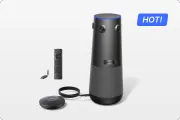
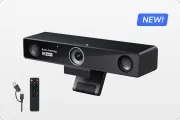
Understanding this complex, interdependent "Audio Tech Stack" makes one thing clear: you can't just "buy a mic." You need a unified solution. This is where Nearity 360 Alien steps in as the definitive all-in-one device.
Its audio system is built to deliver on the promise of "real, clear" sound, specifically by mastering the four biggest challenges in hybrid audio:
- Crystal-Clear & Real Voice Pickup: The 360 Alien uses a 6-element omnidirectional microphone array combined with advanced beamforming. This technology dynamically locks onto the active speaker, solving the "Muffled Paul" problem (Gremlin 2) and ensuring voices are captured with precision from up to 5.5 meters away.
- Advanced AI Noise Suppression: Powered by Nearity's ProperClean 2.0 audio technology, the 360 Alien uses deep-learning algorithms to identify and insulate against 99.99% of noises, including over 300 common conference room sounds. This means keyboard typing, paper shuffling, and AC hum (Gremlin 3) are filtered out, preserving only the clear human voice.
- True Full-Duplex Audio: This is what enables natural, human conversation. The 360 Alien's system allows people to "talk AND listen simultaneously" without the audio cutting out. This eliminates the awkward "walkie-talkie" lag (Gremlin 4) and allows for the free flow of ideas, just like a face-to-face discussion.
- Unmatched Scalability (Extension Mics): This is the Alien's "killer feature." While the base unit is perfect for most rooms, it features External Mic Support. You can daisy-chain up to two additional microphones to extend the audio pickup range to an impressive 16 meters. This allows a single, elegant device to scale from a huddle room to a massive executive boardroom, something other 360° cameras simply cannot do.
This isn't just a collection of features; it's the definitive solution to the human problem of "Meeting Inequity". It's a system designed to remove the "Audio Tax," boost remote engagement, and finally deliver on the promise of a truly collaborative hybrid workplace.
🔌 Don't Blame the Mic: One Thing You're Forgetting (Your Network)
You just invested $5,000 in a top-tier conference room system. The 4K video looks stunning — yet the audio is still choppy, delayed, or distorted.
Why? Because your high-performance AV system is running on a weak network — like a racecar stuck on a dirt road.
Everyone knows “lag,” but jitter is the true enemy.
- Latency is delay — it causes those awkward “no, you go ahead” pauses.
- Jitter is inconsistency — when audio packets arrive out of sync, you get broken, distorted sound.
Speed isn’t the issue — stability is. Wi-Fi, no matter how fast, is prone to congestion and interference, leading to high, unpredictable jitter. For real-time voice, that’s fatal. Experts agree: to maintain clarity, jitter must stay under 30 milliseconds — something Wi-Fi simply can’t promise.
The One-Cable Magic: Power over Ethernet (PoE)
Modern cabling supports PoE, delivering both data and power through a single cable. One line can run your camera, speaker, and ceiling mic — no extra outlets, no messy cords.
It’s cleaner, cheaper, and more reliable, turning your conference setup into a truly scalable, professional system.

🚀 Beyond the Tech: 5 Practical Video Conference Tips for Audio Clarity
Even the best tech can’t fix a bad room or bad habits. To achieve true audio clarity, you need smart practices to complement your setup. Here are five expert-approved tips.
1️⃣ Tame Your Room (The Physics Fix)
Your audio suffers because of room reverb—sound bouncing off hard surfaces like glass, marble, or concrete. Add soft materials to absorb it:
- Acoustic panels (they can double as wall art)
- Carpets or rugs to reduce reflections
- Heavy curtains over glass or walls
2️⃣ Match the Tool to the Room
There’s no one-size-fits-all camera or mic.
- Small/Huddle Rooms (2–4 people): Use a 120° wide-angle all-in-one video bar.
- Medium Rooms (5–10 people): Use a camera with optical zoom (≈10×) and a strong mic array.
- Large Rooms (10+ people): Combine optical zoom (≈20×) with tabletop or ceiling mics for full coverage.
| Mic Type | Pros | Cons | Best For |
|---|---|---|---|
| All-in-One Video Bar | Simple setup, no clutter | Limited range | Small–medium rooms |
| Tabletop Mics | Great sound, flexible | Cable clutter, table noise | Medium–large rooms |
| Ceiling Mics | Clean look, premium audio | Costly, needs pro install | Boardrooms |
3️⃣ Fix the “Dual Audio” Problem
When remote participants can’t hear in-room speakers (or vice versa), use the One-Unmute Rule:
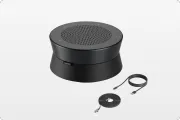
Only the main system (e.g., a Nearity speakerphone) should have its mic and speaker on. Everyone else joins with audio off to prevent feedback. In larger rooms, route the remote feed into the PA system.
4️⃣ Master Hybrid Etiquette
- Remote attendees: Use a proper headset, mute when silent, and raise your hand to speak.
- In-room attendees: Speak toward the mic, not sideways. Never pass mics around—assign a “remote champion” to monitor chat and remote inputs.
5️⃣ Rethink the “Golden Rule”
The old rule says everyone should join on their own laptop if someone’s remote. In reality, that causes chaos—15 open mics mean guaranteed echo.
A smart 360° camera or an integrated system like Nearity delivers equal visibility and clear audio for all, without the technical mess.

✅ Your Hybrid Conference Doesn't Have to Be a Disaster
We've come full circle. Bad conference audio is no longer an excusable "glitch." In the hybrid world, it is a choice.
It's a choice to levy an "Audio Tax" on your remote team, forcing them into a state of "effortful listening" that drains their energy and productivity. It's a choice to accept "Meeting Inequity" and leave remote colleagues struggling to be heard. This is why Nearity Smart Audio-Video Ecosystem is the definitive answer for businesses ready to get serious about hybrid work.
Stop letting bad audio derail your most important conversations. Stop forcing your team to pay the "audio tax." It's time to fix your hybrid conference audio for good.
Explore all-in-one tools and schedule your demo today to finally be heard.
❓ Frequently Asked Questions (FAQ)
Q1: What is the most important factor for good hybrid conference audio?
A: Clarity. This is achieved in two ways: 1) Ensuring the speaker's voice is loud and clear, which depends on using a microphone that is close (or simulates closeness with beamforming). 2) Aggressively eliminating all other distracting sounds, including background noise (like typing) and technical echo.
Q2: Why can remote participants hear me, but I can't hear them in the conference room?
A: This is a common "dual audio" problem. It's highly likely the remote participants' audio is only playing from your laptop's small, weak speakers. A professional setup routes the incoming audio into the room's main speakers or a powerful, dedicated conference speakerphone so all in-room attendees can hear clearly.
Q3: How do I fix an echo in my conference room?
A: First, identify the type of echo. If it's acoustic echo (a technical feedback loop, where remote people hear their own voice back), you need a device with high-quality Acoustic Echo Cancellation (AEC). If it's room reverb (a "bouncy," "hollow" sound from hard surfaces), you must treat the room physically with soft furniture, carpets, or acoustic panels.
Q4: Is Wi-Fi really that bad for conference cameras and audio?
A: Yes. It's not about speed (bandwidth), but consistency. Wi-Fi is vulnerable to high jitter (inconsistent packet delay), which is the #1 killer of real-time audio. Jitter is what causes that "choppy," "distorted," and "gaps in conversation" sound. For professional and reliable conference audio, you must use a wired network cabling installation.
Q5: What's the difference between a ceiling mic and an all-in-one camera's microphone?
A: All-in-one video bars have excellent, integrated mics that are perfect for small-to-medium rooms where participants are close. Ceiling microphones are a premium solution for large rooms. They provide a completely clean, clutter-free table aesthetic and use advanced beamforming to cover the entire space, but they are more complex and costly to install.
Q6: How can I stop my mic from picking up keyboard typing?
A: Traditional noise suppression can't filter these "non-stationary" sounds. You need a modern device with AI-Powered Noise Suppression. This new technology has been trained to tell the difference between a human voice and a "keyboard click," "barking dog," or "food wrapper," and it filters them out in real-time. Systems from Nearity are specifically designed with this cutting-edge AI.
Works Cited
- https://chroma.fm/news/meeting-equity-in-hybrid-meetings
- https://resources.owllabs.com/blog/hybrid-meeting-etiquette
- httpsS://www.ntia.gov/blog/2024/we-can-t-hear-you-how-improve-audio-experiences-during-virtual-meetings-and-conferences
- (https://www.shure.com/en-US/insights/how-does-echo-cancellation-work-during-a-video-conference)
- https://developer.nvidia.com/blog/nvidia-real-time-noise-suppression-deep-learning/
- https://www.jabra.com/supportpages/jabra-speak-750/7700-409/faq/what-is-full-duplex-audio
- https://obkio.com/blog/latency-vs-jitter/
- https://teksetra.com/resources/the-importance-of-structured-cabling-in-modern-av-systems/
- https://windycitywire.com/blogs/cat-6a-vs-cat-7-making-the-right-choice-for-high-speed-networks
- https://www.primacoustic.com/resources/4-ways-to-improve-conference-room-acoustics/
- https://learn.microsoft.com/en-us/previous-versions/skypeforbusiness/optimizing-your-network/media-quality-and-network-connectivity-performance
- https://boseprofessional.com/resources/insights/meeting-room-acoustics-a-combination-of-physics-and-technology






 sales@nearhub.us
